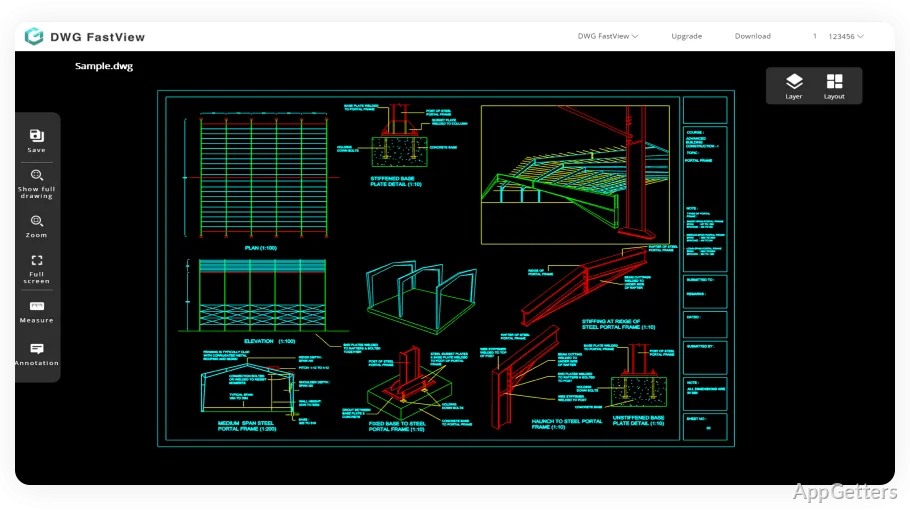
Working with CAD drawings for Windows users is, in most cases, so much more about reading that one can hardly talk about creating. Student users mainly focus on understanding the content of the assignments. Contractors verify the dimensions of the on-site locations. The office staff is usually more concerned with finding a reliable way to open or mark up the DWG files without having to install a complete engineering software package. That is, indeed, the exact point where DWG FastView steps in. The application is marketed as an extremely lightweight CAD viewer and editor. It mainly concentrates on being accessible and fast rather than supporting full-featured industrial drafting workflows.
Generally, DWG FastView appears to target users who mainly want trustworthy file compatibility and fast access to technical drawings. It is neither positioned to be a replacement for the high-end CAD environments on Windows, nor to replace them. However, it certainly supplies a viable compromise to a lot of people who frequently handle DWG files but don’t want to carry the bulk of professional engineering software.
A Lightweight Alternative for Everyday CAD Access
DWG FastView’s remarkable feature is its speed in loading standard drawing files. At the same time, on a mid-range PC, the moments of waiting for launch are not very long. Changing layouts or zooming in to see really detailed parts of the plans can still be done very quickly in most cases. This is exactly the area of interest for most users. They would be using the program with construction drawings, school assignments, or archived blueprints. Here, the speed factor is often more important than the presence of supplementary functions for advanced designing.
The UI has been designed in such a way that it does not challenge the users with changes in interface conventions by implementing the common features of CAD programs. This way, the learning curve becomes less steep for people who are coming from bigger software platforms. To a large extent, the tools are arranged in an intuitive manner. Therefore, it is quite hard even for a beginner not to discover the controls for common views. Of course, experienced CAD people might complain that the interface is too simplified. However, it is most likely that the other groups of users, like casual or occasional ones, will thank the reduction of complexity.
If one has simple requests concerning marking up, measuring, or looking at layers, the program is able to support the regular needs. Actually, it can be considered a viewer with some editing functions, rather than a match for fully equipped design software.
File Compatibility and Cross-Device Workflow
One of the biggest draw cards for the users of software like DWG FastView is compatibility. It is well known that DWG files generated in a variety of CAD programs can be a bit of a nightmare when it comes to being properly displayed in lightweight viewers. But overall, DWG FastView is a pretty smashing tool for the latest file versions. We tried out the software with some typical architectural and mechanical drawings. The layout remained unchanged, including the positioning of the texts and the organization of the layers.
Apart from that, the Windows version also takes advantage of cloud-based storage and synchronization with mobile devices. This feature turns out to be greatly appreciated by the users who are accustomed to using both a desktop and a tablet for their work. This especially occurs in construction, education, or inspections in the field. A person on the site going through the plans can, as a matter of fact, get the same project back on the Windows PC without the need for a major file conversion.
Still, the most advanced 3D models and large technical assemblies remain the area that really shows the underside of DWG FastView. The software takes time to load such files as compared to the professional CAD suites. The professionals working on enterprise-scale drafting projects may recognize the system’s restrictions in terms of performance during long working sessions.
Practical Tools Without Enterprise Complexity
Really, DWG FastView works best in the role of a helper tool that enables one to perform simple tasks with the CAD data, rather than in the role of a full-fledged CAD replacement. The main function, the annotation tools, come in handy during the joint reviewing scenario. The export selections are quite adequate for sharing the plans in the different common formats. Keeping students and hobby users in mind, the software is also a handy CAD learning tool. It provides a grasp of the CAD drawing elements by means of having simple menus without complicated licensing requirements.
An additional major advantage is the ease of installation. The Windows app does not gobble up system resources and can therefore be comfortably run on laptops and office computers that are not necessarily going to be used as CAD workstations. In the real world, these aspects are usually of higher importance than feature depth.
That said, using the software for one’s professional career might be quite a different experience. Over time, people find that they need more automation, they want to do rendering, and they want parametric models. With this software, you cannot break free from still very limited editing, very functional, but restricted compared to full engineering suites.
Where DWG FastView Fits Best on Windows
The ideal users of DWG FastView are those who regularly handle CAD drawings but do not necessarily create highly technical projects from scratch. Besides students who study the coursework, there are also project managers who need to check the layouts. Small contractors are always referring to the plans, and office teams are always handling the architectural files. All are potential beneficiaries of such a program.
It is a matter of convenient accessibility and ease of use rather than wishing to have raw power in features. That is the very point of the product. It opens files at the speed of light, maintains a low footprint in terms of system resources, and covers the main practical viewing and markup tasks that most people need these days. On one hand, it is quite obvious and easy to understand that this software will not satisfy the needs of highly demanding users. However, it is still a good enough CAD platform. If someone is only looking for DWG editing or viewing and is okay with moderate editing, DWG FastView seems a really suitable and sensible third-party solution for the Windows platform.