EXE
Home » Software » Windows » CAD » LibreCAD for Windows
LibreCAD for Windows

LibreCAD for Windows

  • By LibreCAD
  • Free
  • Version: 2.2.1.5
  • 51.83 MB
  • Security Report:

The Windows platform is usually the best place to find most types of software. Finding a dependable free 2D CAD drafting tool can, however, be quite a challenge. Typically, tools that support drafting for free either feel old or don’t allow the user to export their work in a wide variety of formats. Also, the free tools often go completely towards the engineering end, thus scaring the beginners away. This is where LibreCAD comes in. It is quite a different approach from the customary way. Apart from the lightweight quality of 2D drafting, which is the main feature that it offers, it is an open-source program. It works smoothly even on very modest systems. It is also not relying on the subscription model, which has become common in the CAD software world.

In a real-life situation, the feeling that LibreCAD gives is that it is a well-thought-out solution for people who want to create accurate drawings. It is not mainly intended for large-scale design projects. This difference in focus not only determines the advantages of the tool, but at the same time the downside of it. So, it is mainly a drafting tool, not a complete engineering platform.

Basic Drafting Workspace That Is Familiar

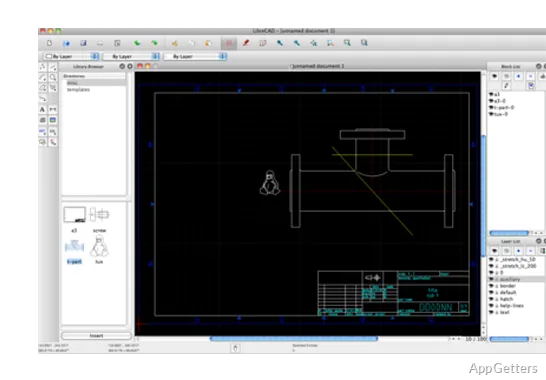
LibreCAD’s Windows version has one of the friendliest interfaces. It is “CAD-standard,” meaning that the layout/design of the program reminds users of their old draft CAD programs. Users mainly need mouse skills, knowledge of icons, and a few keyboard shortcuts, instead of merely depending on toolbars. As this is a once very large, monotonous window, users will recognize the environment immediately. Even a beginner will understand the principle after the very first try, especially when the tasks are very simple, such as floor plans, technical sketches, woodworking layouts, mechanical diagrams, etc.

Another thing that differentiates LibreCAD from other software programs is that it seems to have quite a big heart when it comes to performance. In spite of the fact that some users may hand-pick other software packages on a product(CD), the impression here is very different. It launches fast and stays responsive even on really old laptops. It is of great importance for those students, hobbyists, and home users who most probably do not have access to the high-end workstations. The tools, such as snapping, layer management, and dimension controls, come with the drafting setup itself. They make even the most tedious of drawing tasks not so tedious.

But, on the other hand, the interface may appear quite old-fashioned when compared with the new, fresh design application ones, as explained. Some menus need more than one click to reach them, and the ability to customize the interface is not on par with the commercial ones.

Where Is LibreCAD in the Workflow

For people who are mainly into clean 2D documentation, LibreCAD is the tool that will assist them best. You will find that it handles the essential things without needless enlargement of the software. This is especially true if you are making workshop drawings, classroom assignments, laser-cutting layouts, or renovation plans. In the eyes of other CAD software, LibreCAD is good since it supports the exchange of drawings to and from other CAD software environments by means of DXF files.

In a practical situation, this featherweight design is no doubt one of its important pros. The program hardly ever feels overburdened. The projects also remain quite easy as the working environment is kept almost entirely within the toolset. For the occasional drafting, that’s totally enough. The users won’t have to waste time learning about simulated tools, rendering, or 3D modeling that they will never get to use. They also will not be bothered with additional parts while working in the simplest fashion of the 2D design.

On the other hand, LibreCAD is not the software of choice if you are a team looking for a product that will support integrated collaboration, cloud syncing, advanced parametric design, and so on. Besides this, the speed of LibreCAD development is such that some related workflows might seem a bit rough when compared with the most recent commercial CAD products. If you are a user who is dependent on highly refined automation and a huge collection of plug-ins, then, most certainly, you are going to find these missing sooner than later.

The Feasible Restrictions

Although LibreCAD is up to the mark for many drafting tasks, you will also need some degree of understanding and stubbornness at the same time. This is necessary in order to use the software proficiently and comfortably within the confines of day-to-day work. Resources such as documentation and tutorials exist, but the entire learning experience may still seem scattered rather than focused when compared to the established software with well-organized training departments. New users will, from time to time, run into some strange terms or get somewhat confused with interface behaviors, as they are mostly designed for people who are already familiar with CAD.

One more real-world limitation is the lack of native support for 3D. LibreCAD very much limits itself to the 2D drafting category, and while this works for a lot of technical tasks, the ability to visualize your product or create architectural models is completely off the table.

Having said that, it is an excellent, stable solution for all Windows users, especially in typical usage situations where the risk of crashes is negligible. One of the biggest advantages is again the relatively low system requirements. Therefore, the platform is suitable for use in classrooms, workshops, and offices with older equipment where heavier CAD suites might not be able to work efficiently.

Only For Intentional 2D Design Work

LibreCAD is a tool that will give the best results to users who mainly value simplicity, minimal usage of system resources, and accurate 2D drafting more than showy presentation features. The students who are studying the basics of drafting, hobbyists who create technical layouts, and small workshops that produce fabrication drawings will indeed find a practical aspect of the software.

It is not the most suitable software package for professional workplaces that use collaborative engineering pipelines or advanced 3D workflows. But for such straightforward drafting tasks, LibreCAD still ranks as the most usable of free CAD tools on the Windows platform.

Its attraction lies, to a great extent, in its reliability, as it accomplishes fundamental drafting tasks without requiring users to subscribe. It also avoids throwing them into a situation of heavy hardware requirements and complexity that is completely unnecessary.

Software Details of LibreCAD 2.2.1.5

License
Free
Version
2.2.1.5
File Size
51.83 MB
Downloads
6
Language
English
Category
CAD
Op. System
Windows
Developer
Last Updated
May 7, 2026

Version History

6 versions
2.2.1.5
Latest
51.83 MB
May 7, 2026
v2.2.1.3-12-gd1ca469c9
47.5 MB
March 10, 2026
2.2.1.3
47.45 MB
January 12, 2026
2.2.1.2
24.47 MB
July 14, 2025
2.2.1.1
25.51 MB
February 20, 2025
2.2.1
24.43 MB
January 7, 2025

Leave a Comment

Your email address will not be published. Required fields are marked *

Software Icon
Security Report

Loading scan data...

Scroll to Top