EXE
Home » Software » Windows » CAD » DreamPlan Home Design for Windows
DreamPlan Home Design for Windows

DreamPlan Home Design for Windows

  • By NCHSoftware
  • Free
  • Version: 9.13
  • 5.61 MB
  • Security Report:

Renovating the house or simply playing around with different room arrangements can be the source of more challenges than expected. Most people start the project by writing down ideas in the form of rough sketches or using mobile apps. These look very attractive at first. Soon, the limitations of these solutions show up when you bring in measurements, furniture, or landscaping details. DreamPlan Home Design for Windows is precisely the right product for this kind of need. It’s a light home planning software for users who want to see their plans clearly. It also helps them avoid spending a lot of time learning complicated professional CAD software.

Daily use of the program suggests that it is tailor-made for those who need to get a clear picture of things. These users are usually less focused on technical accuracy. Students crafting interior concepts, homeowners working on remodel projects, and casual DIY workers are probably among the most important target groups. Instead of supplying a profusion of technical engineering controls, DreamPlan simply aims at making your ideas begin to take shape as soon as possible. It does this in a user-friendly environment, even if you are a first-time user.

A simpler alternative to complex design suites

One of the features that is known for DreamPlan Home Design is that the software does not waste time asking users to get a layout started. Right from the very first interaction with the interface, you will get the feeling that drag-and-drop is used for elements like walls, doors, furniture, and outdoor items. The whole process of creating a project is not as scary as old-fashioned architectural software. This level of accessibility is a significant change for users who have never worked with house planning apps before.

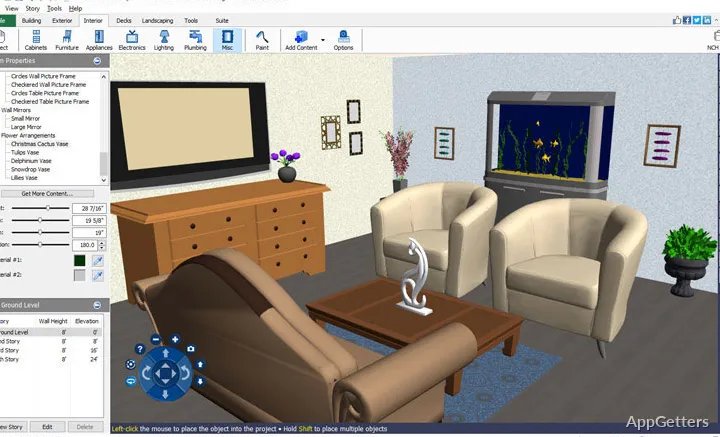
Users’ ability to move back and forth easily between 2D plans and 3D visualization is a very convenient feature at the early stages of planning. Unlike in the case of just looking at some lines and numbers on a flat blueprint, users can have a walk-through of their future home. They are able to assess how the room may feel if that is something that they want to consider. This also helps to tackle issues that are practical, such as very narrow paths or non-harmonious furniture placement.

Even with that, simple sometimes means a lack of options. Users waiting for features like precise drafting or thorough technical modifications will most probably feel limited by this software. This becomes more noticeable when compared to high-end architectural solutions.

Practical for Everyday Home Planning

There is no doubt that DreamPlan Home Design is very good for handling common residential planning scenarios. The software performs well at merely “rearranging a living room”, “planning a garden path”, or “testing kitchen layouts”. Such simple tasks are a breeze for a user on a standard Windows PC.

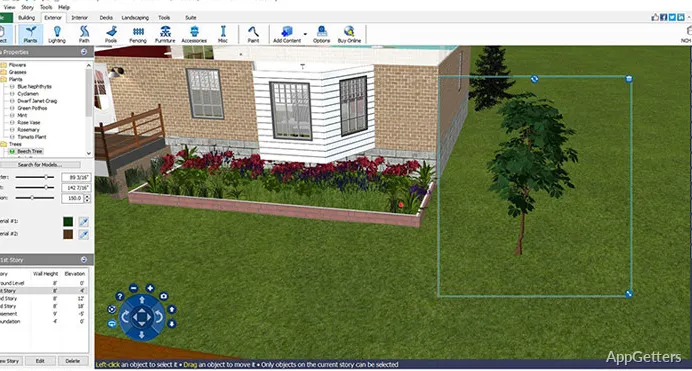
At the same time, this is still just the beginning of what can be done with the landscaping module. Obviously, if one simply places trees, pathways, fences, pools, and outdoor lights, one can create a simple but highly effective visualization of a house and its property. Homeowners going through exterior renovations can benefit greatly from planning their project with this software.

Performance improvements are more noticeable with great hardware. However, a mid-range PC can still deliver DreamPlan’s basic features adequately during a longer work session. The software is quick to start, and it is not at all demanding on the computer’s resources, unlike professional modeling applications. For instance, it is a perfect solution for a student or a regular home user. This is especially true for someone who has a laptop that is not capable of handling larger CAD programs.

However, there is only so much that a computer can deliver these days. In any case, one should be aware that DreamPlan quality is not entirely up-to-the-minute. The two main areas that are likely to be noticed are the textures and the level of detail of the objects. This becomes especially noticeable when one has seen high-end contemporary visualization software.

More valuable for visualization than for technical drafting

Arguably, the greatest asset that DreamPlan Home Design offers is its ability to assist users in making up their minds in the first stages of planning. Without it, most people are quite lost at that stage. It is also the point in the process of making physical changes when one can still pull back in case a different idea comes up.

The measurement tools and room dimension controls can produce somewhat reliable results to back up the initial plan. However, if you are a professional and your workflow revolves around the production of strict construction documents, then you are probably looking at additional, more specialized software later in the workflow. DreamPlan is neither made to take the place of full-fledged architectural drafting environments, nor is it generally intended to become one.

It actually works better when imagination and visualization work hand in hand. Letting users loose to quickly try out different scenarios, make layout comparisons, and present ideas to family members, or clients is perhaps the number one reason why this software has so many fans. This can be done without the need for formal design training.

Where DreamPlan fits best on Windows

This home design software is at its peak for casual and intermediate users. They want the planning environment to feel manageable and simple, in contrast to a technical production suite. Homeowners who want to prepare their remodeling works, students working on spatial arrangement skills, and DIY users testing creative decorating ideas will find this software suitable. The balance between simplicity and visual feedback is one of its strongest points.

For Windows users in particular, the software achieves its goal through minimizing obstacles. There is no need for an extensive onboarding process, fancy hardware, or professional drafting skills for the software to be useful. Although professional-level designers might eventually find that their needs go beyond its capabilities, many will love how fast it lets you turn rough ideas into clear visual representations. There are and will be times when architectural accuracy takes a backseat. People’s need to understand their situation better then comes to the forefront. DreamPlan’s contribution is mainly to the latter.

Software Details of DreamPlan Home Design 9.13

License
Free
Version
9.13
File Size
5.61 MB
Downloads
2
Language
English
Category
CAD
Op. System
Windows
Developer
Last Updated
March 29, 2024

Version History

2 versions
9.13
Latest
5.61 MB
March 29, 2024
8.36
5.32 MB
August 10, 2023

Leave a Comment

Your email address will not be published. Required fields are marked *

Software Icon
Security Report

Loading scan data...

Scroll to Top