EXE
Home » Software » Windows » CAD » Room Arranger for Windows
Room Arranger for Windows

Room Arranger for Windows

  • By Jadamec
  • Trial
  • Version: 9.7.3
  • 19.24 MB
  • Security Report:

We start by making a floor plan or drawing a furniture layout on paper because the idea seems simple and easy. However, when we start moving pieces around, making the right distances, and maintaining door clearance, we often find mistakes. This also happens when adjusting the scale. Because of this, we have to make the changes over and over again. With apartments, home offices, dorm rooms, or even renovation projects, the problem is even more evident. Space is a big constraint, and every inch really counts. Room Arranger provides a simple desktop design program. It helps with practical room visualization more than large-scale architectural drafting.

For those who use Windows and want to make layouts without the need to learn professional CAD tools, this software represents a great opportunity to get started simply. Its overall concept is more directed toward regular people who want to plan their everyday problems. It is not mainly directed toward professionals who have to produce construction documents.

A Simpler Alternative to Complex Design Software

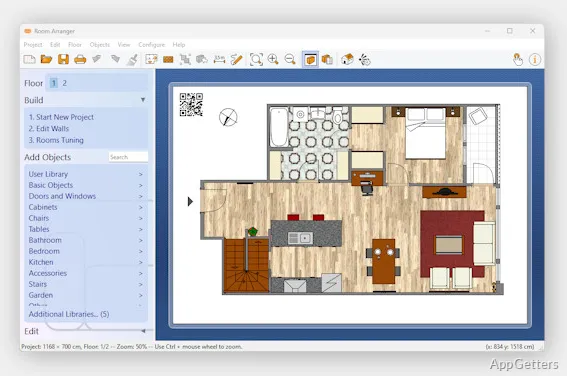
The thing that probably strikes users the most about Room Arranger is the rapid rate at which they can come up with a layout that is functional. To make an interface intuitive and easy to use, it relies heavily on a drag-and-drop approach. The addition of walls, doors, windows, and furniture can be done via simple menus. Such a feature considerably lowers the learning curve. This is especially true compared to technical modeling platforms that often prove to be too much for casual users.

On a day-to-day basis, this software can be used to visually figure out room layouts before actually making changes to the physical setup. People who are planning a bedroom redo, students with a couple of small apartments to organize, or families testing furniture placement will more often than not come up with functional plans. These plans can often be created quite quickly, even during the first session. The measuring and scaling tools additionally ensure that layout measurements are kept accurate. This is of great significance in the case of dealing with compact or bizarrely shaped rooms.

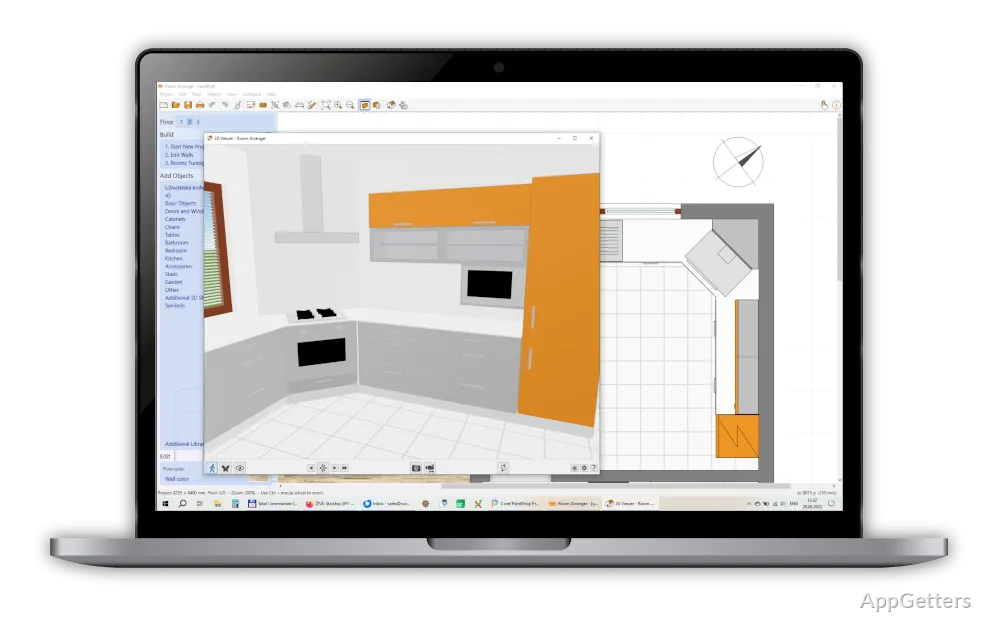
In a way, the experience is still very much on the practical side rather than being very visually attractive. Even though the graphics are adequate, the main focus, of course, is on the correctness of the plan. It is also focused on testing the arrangement as opposed to the production of photorealistic images.

Useful for Everyday Interior Planning

Room Arranger tends to be the perfect fit for simple household planning. It is designed to keep the work very limited in scope and easily manageable. Users will be able to keep on moving a piece of furniture from one place to another without getting exhausted. They can also go on testing the paths that they would be taking when walking around, and even compare completely different layout versions. All of that can be done without even lifting a single piece of furniture. For a lot of people, such comfort might be the main selling point of the software.

The software’s internal libraries provide users with a decent inventory of the most common household furniture and decorative elements. This helps accelerate the whole planning process. Even though the catalog cannot be compared to the ones offered by the most expensive architectural suites, at least it is suitable for the average rooms one may have: living room, kitchen, bedroom, and office. The dimensions of the objects can be modified. This can be done if a user intends to be as close as possible to the actual sizes of the furniture items.

Performance-wise, the program is a good-looking candidate. Even if you have an old PC, you are not going to experience much difficulty in running this program on your Windows system, probably. Being light-weight is part of its charm. This makes it more focused on utility than being a big design platform in terms of the consumption of resources.

Practical Limits Users Should Expect

Room Arranger has its share of pros and cons. One has to be aware of the fact that advanced users will definitely notice a considerable number of features absent from the program. Those who have in mind getting hold of a professional-grade visualizer, a detailed hard-material simulator, or a program capable of planning large architectural projects are highly likely to regard the program as being at the modest end of the spectrum. Such users may find the program somewhat modest. With its visual output, the software gives priority to the straightforwardness of the image. It focuses less on beauty or presentation quality.

And since we’re on the subject of the interface, it cannot be said that it is really bad or something. Yet, considering other newer design programs, it quite possibly will give off a slightly old-fashioned vibe. It would probably take a bit longer than expected for an average person who is used to modern cloud-based tools to get the hang of the program. Some of its menus and controls still bear the signs of older desktop software styles. Besides, after a short period of time, most users will be able to perform the main operations without much difficulty.

As far as collaboration features are concerned, the software has a rather short list of them. The fact is that it is primarily focused on individual planning rather than teamwork, which also involves contractors, architects, or the sharing of projects remotely. However, for simple room planning by a single user, these missing things are of little importance.

Where Room Arranger Fits Best

Room Arranger works best as a very simple home layout tool for those who like their planning neat and simple. Room Arranger is not mainly intended for people who put a premium on complicated design. It is a perfect fit for those who want to solve real spatial problems like the arrangement of furniture in a tiny flat, the preparation for a move, or the reorganization of a workplace. It also suits people with renovation ideas in their heads before committing to the investment of time and money.

Its strength resides in not going off in all directions. Not trying to take on professional architectural software, it is really a companion for lightweight planning. It is mainly suited for everyday interior organization. Users who prefer plain desktop tools with simple and predictable workflows will probably find it more natural to incorporate them into their regular planning activities. This is especially true when compared to many bigger design suites. When it comes to interior planning for fun and room experimentation, this software is easy to get to know, stable, and practical all at the same time. There is no need for complex technical skills.

Software Details of Room Arranger 9.7.3

License
Trial
Version
9.7.3
File Size
19.24 MB
Downloads
1
Languages
English English, Czech, French, Spanish
Category
CAD
Op. System
Windows
Developer
Last Updated
June 6, 2023

Version History

1 version
9.7.3
Latest
19.24 MB
June 6, 2023

Leave a Comment

Your email address will not be published. Required fields are marked *

Software Icon
Security Report

Loading scan data...

Scroll to Top