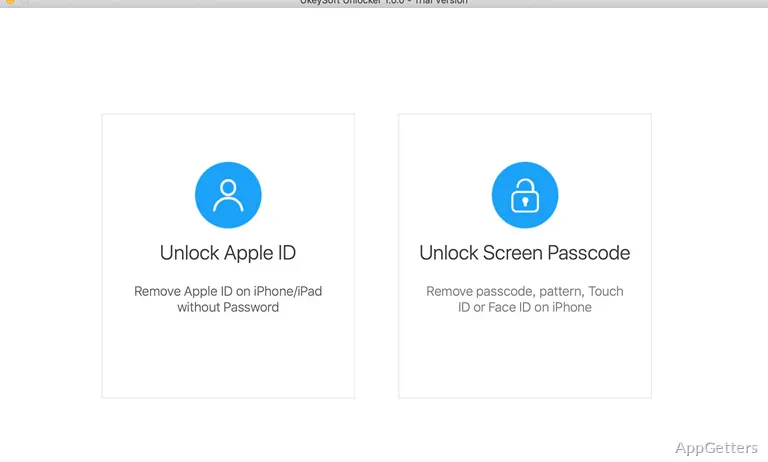
People locked out after forgetting an iPhone passcode can use UkeySoft iPhone Unlocker from a Windows computer. It removes screen locks through a connected-device and firmware workflow, with separate options for certain other iOS passcodes and Apple ID issues.
Connect, download firmware, remove the lock
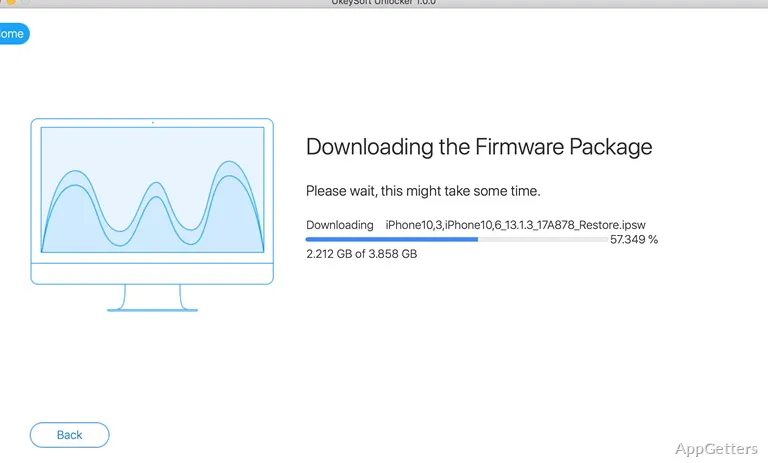
The screen-passcode workflow starts by connecting the iPhone to the computer. After choosing the screen-lock option, the program downloads a firmware package for the device and uses it to remove the passcode. The interface guides the user through these stages, including putting the iPhone into recovery mode when needed.
A forgotten numeric code, a disabled iPhone, or a lock involving Touch ID or Face ID are among the screen-access situations the program addresses. Screen Time and restrictions passcodes have separate removal options. Removing a screen lock resets the device: its data and settings are erased, so content must come from a backup if one is available.
Other iOS unlock options
UkeySoft also has an Apple ID removal workflow for eligible, activated iPhones and other iOS devices. Requirements depend on the device’s Find My setting and iOS version; some situations require access to the device’s settings. This option is distinct from removing a screen passcode, and its eligibility conditions matter.
The software’s Apple ID functions should not be treated as a way to bypass every activation lock. In particular, the developer’s instructions limit Apple ID removal when Find My is enabled on newer iOS versions.
What happens to data during screen-lock removal?
The screen-passcode process erases the iPhone’s data and settings. Restore from an existing backup after the reset to recover backed-up content.
- Connect the device, select the screen-lock removal option, download its firmware package, and start the removal process.
Pros
- Removes numeric screen passcodes, Touch ID, and Face ID locks
- Includes options for Screen Time and restrictions passcodes
- Downloads firmware for the connected device during screen-lock removal
- Provides a separate Apple ID removal workflow
Cons
- Removing a screen passcode erases the device’s data and settings
- Apple ID removal depends on Find My status and iOS version
System requirements: Windows 7, Windows 8, Windows 8.1, Windows 10 · 32-bit and 64-bit · 1 GHz processor or above · 1024×768 monitor resolution or higher · 512 MB RAM or higher
Does UkeySoft iPhone Unlocker keep data when removing a screen passcode?
No. Screen-passcode removal erases the device’s data and settings.
What does the firmware download do?
The program downloads a firmware package for the connected iPhone as part of its screen-passcode removal workflow.
Can it remove an Apple ID from any iPhone?
No. Eligibility depends on Find My status and the iOS version; some cases also require access to device settings.