EXE
Home » Software » Windows » Phone Tools » Droid Transfer for Windows
Droid Transfer for Windows

Droid Transfer for Windows

Keeping track of data between an Android phone and a Windows PC may get rather complicated as time goes on. Photos get scattered across several folders. Text messages stay only on a device, and music and other files are divided between different cloud services and local storage. At some point, a lot of users try to find a direct way to move, back up, and arrange the phone content without becoming solely dependent on cloud synchronization. As a Windows software, Droid Transfer aims to solve the problem by allowing desktop-based access to Android data. This is done through a PC interface that users are already familiar with.

Android File Management the Direct Way

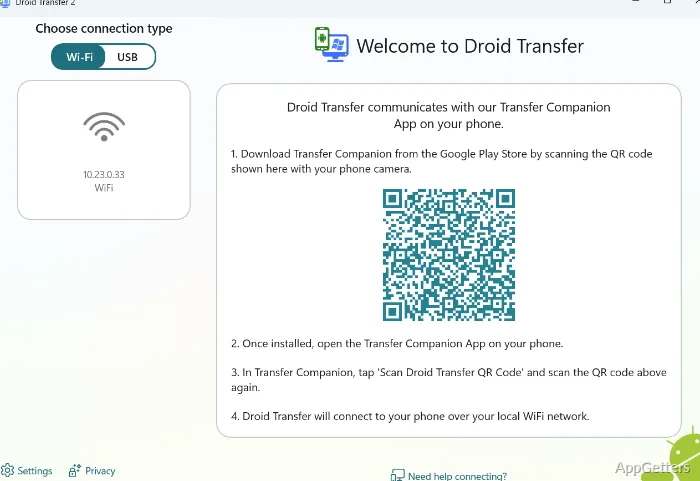
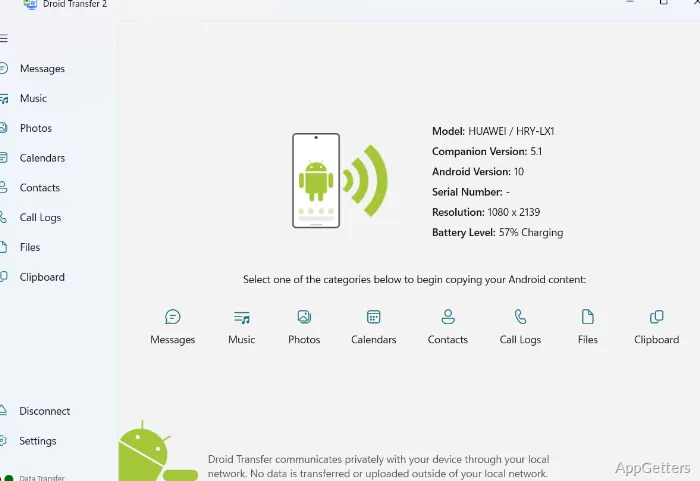
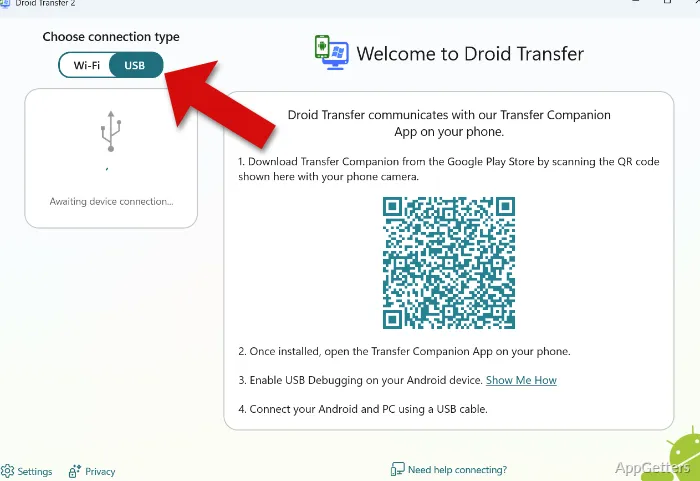
Basically, the software allows users to make their Android devices and Windows computers work together. The content of the device will be shown by the program in a way that is understandable for non-technical users. This happens after the phone is connected via USB or Wi-Fi. Inside the program, users can choose the content they want to access, such as photos, contacts, messages, music, or other data. So, without the need to manually figure out the Android’s folder structure, these options are right at your fingertips.

This may make your life easier if you are somebody who usually keeps phone content on a computer. Owing to this software, everyday file management can become simpler. Home users can move family photos, while students can store their school documents. So, in the case of changing the device, people will also find a centralized desktop workspace extremely handy. The program makes it so that you don’t have to go back and forth between cloud accounts, phone, and Windows File Explorer endlessly.

Regular Backup and Archiving Processes

Lots of people aren’t aware of how hard it actually is to get your text messages, call logs, or media files out of your phone in the event that it’s lost or damaged. This is a good example where Droid Transfer shines, because it enables you to make local copies of these items. This provides an extra layer of security in addition to cloud backups. But you can also try this new method by creating local files similar to cloud backups in case you would like to have your own archives.

An additional level of local data storage is possible with the help of Droid Transfer. This can be useful in situations when people have less cloud space or when access to the internet is not always available.

A Couple of Practical Strengths and Drawbacks

In the eyes of a normal person, the software is not only easy to use but quite safe as well. Moreover, the main features have been wrapped inside categories. Users can easily understand them without a deep knowledge of the Android directory system. In fact, the majority of the operations come down to choosing some data. You then decide where you want to save the files. This is a very simple task, even for first-time users who are not very familiar with the software.

Overall, the program is pretty reliable when you perform a typical transfer operation, especially if you possess a stable USB connection. But for the software to operate, you also need to have the device companion software running. This is an inconvenience to some users who might be a bit reluctant to set it up at first.

Also, users who want to set automatic, always-on synchronization will probably find it more manual than cloud-centric. Droid Transfer works best when users deliberately decide to connect a device and carry out transfers. They should not expect to have background syncing between multiple devices.

Local Backup and Device Migration Are the Key Areas

Droid Transfer is a good selection for users who highly value local control and device management. Such users mostly use it to back up phones to a Windows PC, migrate data between Android devices, or keep personal archives.

Its main role is to serve as a no-cloud complement to the cloud ecosystem rather than a full replacement for it. So, regular users who appreciate having offline copies of their precious memories, experts who need to access message histories easily, and users who are going to change a phone that is getting old will grow to appreciate this desktop-based approach. They are likely to benefit from it the most. Those who love hands-on management and consider it important to keep their data stored locally will have a practical advantage.

Software Details of Droid Transfer 26.2.4.0

License
Free
Version
26.2.4.0
File Size
98.34 MB
Downloads
6
Languages
English English, Afrikaans, Amharic, Arabic, Armenian, Belarusian, Bulgarian, Catalan, Chinese, Croatian, Czech, Danish, Dutch, Estonian, Farsi, Finnish, French, German, Greek, Hebrew, Hindi, Hungarian, Icelandic, Indonesian, Italian, Japanese, Kazakh, Korean, Latvian, Lithuanian, Malay, Norwegian, Polish, Portuguese, Romanian, Russian, Serbian, Slovak, Slovenian, Spanish, Swahili, Swedish, Tagalog, Thai, Turkish, Ukrainian, Vietnamese, Zulu
Category
Op. System
Windows
Last Updated
March 6, 2026

Version History

6 versions
26.2.4.0
Latest
98.34 MB
March 6, 2026
25.11.24
85.23 MB
February 5, 2026
25.9.4.0
77.41 MB
September 5, 2025
25.6.18.0
72.41 MB
June 20, 2025
25.5.15.0
72.4 MB
May 21, 2025
25.2.25.0
72.44 MB
April 18, 2025

Leave a Comment

Your email address will not be published. Required fields are marked *

Software Icon
Security Report

Loading scan data...

Scroll to Top