EXE
Home » Software » Windows » Photo Tools » 3uTools for Windows
3uTools for Windows

3uTools for Windows

  • By 3uTools
  • Free
  • Version: 9.06.006
  • 185.41 MB
  • Security Report:

Managing an iPhone or iPad from a Windows PC can be a challenge sometimes. The official Apple tools are limited to basic uses. So, a lot of users eventually get into looking for a more flexible way to handle their backups and file transfers. They also look for better ways to manage device info and maintenance. 3uTools has caught the attention of Windows users in this respect. It is an iOS management tool that, in one package, offers what you need: monitoring devices, managing files, and fixing problems.

A Central Premium Tool for iOS Device Management

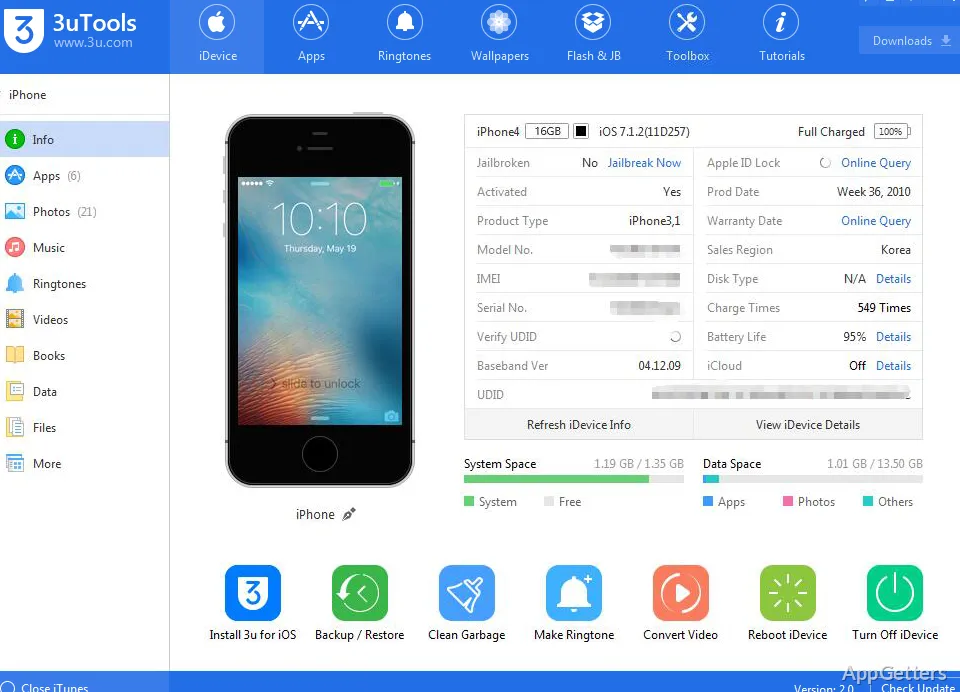
On a day-to-day basis, 3uTools serves as your main point of contact with connected iPhones, iPads, and iPods. After an iPhone or iPad is recognized, users get to see hardware specs, storage, and battery through this software. They also get to see system status.

Besides that, 3uTools reduces the number of steps for doing simple tasks. These include backing up the device, transferring pictures, handling media files, and app management. If you are a student, a home user, or just an average device owner, it makes sense to cut down time spent running different apps. This is done by handling all of these things in one app. As for the interface, it still remains quite simple, but the number of tools can be a little bit scary to newbies.

Benefits of Using 3uTools Daily

Among the factors that lead more than a few users to opt for 3uTools is convenience. Simple maintenance operations can actually be done from a single dashboard. In general, they could require the user to perform several load steps. So, a person can review storage usage or export photos that are on the phone to the PC. A person can also back up the device. This can be done even before they update iOS. All of this can be done very quickly.

In fact, this kind of pragmatism can turn out to be very good. It is especially useful for people who regularly have to take care of a number of Apple devices. Families, little repair shops, and tech fans are quite happy to come across a single source of device info and management options. The wide range of features this program has can, in particular, lessen the pain that one experiences during everyday workflows. Quite often, backups are done, or transferring large amounts of data between a Windows computer and an iOS device is required.

Dependability, Speed, and Weak Points

3uTools is working quite steadily in the majority of cases. This applies to primary management tasks such as recognizing a device, its backup, and the exchange of files. The program has made the largest part of its user base come to realize that it is an all-inclusive set of tools. One can use it even if one is not a computer genius. However, a big part of the reliability of the software is going to be dependent on various things. These include the quality of the USB connection, the compatibility of the device, and how often Apple changes iOS.

From a more down-to-earth perspective, there are also some slight drawbacks to keep in mind here. Since it is software that plugs into the Apple ecosystem’s restrictions, there will be times when some features will behave one way on one kind of model. This can vary from one model to another. This can happen, for example, when the OS changes. One may want a really simple experience, but what he or she will get is a great number of options. The interface may feel a little bit crammed since a lot of advanced options are shown together with basic tools. One should still understand that not all features will always be needed for a particular task if one wants to avoid confusion.

Where the Offer of 3uTools Lies

3uTools is, for the most part, a Windows tool for those users who wish to have far more exposure and power over their iOS devices. This is as compared to what regular sync tools deliver. The people it reaches are quite large. This ranges from pupils who want to back up their own personal devices to home users who are into organizing media libraries. It also reaches enthusiasts interested in device health monitoring.

The main selling point of the software is that it is possible to bring together several different functions of the device. This can be done in one place and on one screen. It is not geared to a particular operation. Rather, it is a kind of support through device management, maintenance, organization, and fixing. This includes the work. It may be more than what some users require. For those who are accustomed to hooking up Apple devices to a Windows PC, it will definitely be handy to have many frequently used tools in one single app.

Software Details of 3uTools 9.06.006

License
Free
Version
9.06.006
File Size
185.41 MB
Downloads
7
Languages
English English, Afrikaans, Amharic, Arabic, Armenian, Belarusian, Bulgarian, Catalan, Chinese, Croatian, Czech, Danish, Dutch, Estonian, Farsi, Finnish, French, German, Greek, Hebrew, Hindi, Hungarian, Icelandic, Indonesian, Italian, Japanese, Kazakh, Korean, Latvian, Lithuanian, Malay, Norwegian, Polish, Portuguese, Romanian, Russian, Serbian, Slovak, Slovenian, Spanish, Swahili, Swedish, Tagalog, Thai, Turkish, Ukrainian, Vietnamese, Zulu
Category
Op. System
Windows
Developer
Last Updated
April 10, 2026

Version History

6 versions
9.06.006
Latest
185.41 MB
April 10, 2026
9.05.011
185.63 MB
March 30, 2026
9.03.031
185.49 MB
March 13, 2026
9.02.020
182.96 MB
January 29, 2026
9.01.012
183.94 MB
January 9, 2026
9.0.088
206.07 MB
December 5, 2025

Leave a Comment

Your email address will not be published. Required fields are marked *

Software Icon
Security Report

Loading scan data...

Scroll to Top