EXE
Home » Software » Windows » Editors » Pixia for Windows
Pixia for Windows

Pixia for Windows

  • By Pixia
  • Free
  • Version: 6.61.160
  • 40.51 MB
  • Security Report:

Drawing programs abound, but those that allow one to get a serious job done for free on Windows are far and few between. It may happen that a software would be totally stripped down. It would discourage you from your path of serious digital art. At the other extreme, a complex set of operations and functions to learn would not just be a barrier to work. It would also be a barrier to even using the software. It would itself become the long-term project of your life. Well, you see, Pixia is somewhere on the median line. Users who just want digital tools to create their art can find that appealing. They do not have to be thrown at the deep end of a professionally fully-featured environment.

Even if one still remembers that Pixia was initially drawn and painted in, the software still, in a way, focuses on the production of images. Casual photo editing takes a secondary role. One generally would think of software that is built for the people who want to draw and use layers. Such users can continue to gain digital art skills. The workflow does not feel like heavy lifting to the point of being mind-numbing. That is the way one is likely to work with Pixia on a day-to-day basis.

A Lightweight Workspace for Drawing and Painting

Running Pixia on Windows will, at any rate, allow you to use a single app and complete your work on it. This is because it is a rather light one. The installation process for first-timers is plain. After that, even a not-so-powerful PC will be able to run the program quite comfortably. To students, hobby artists, and those of you who are already limited by aging PCs, feature-riddled software will not matter most. It will not be what you prioritize.

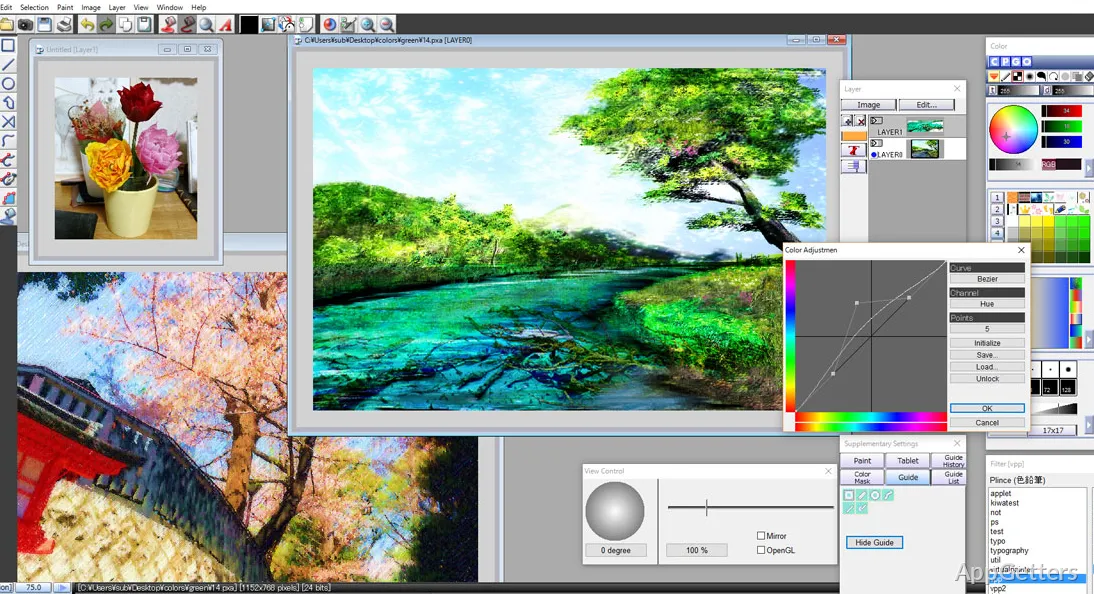
Although the interface seems to be dated circa Windows XP or so, which can be interpreted as both the positives and the negatives of the software, its controls are simple and practical. They do not go hand in hand with visual intuitiveness. However, after the users become adept at using the Pixia toolbar, the artistic workflow using the software is not going to be tedious. This is especially true for the creation of sketches, paintings, and layered work. Users who are transitioning from just simple MS Paint programs might find it to be a nice enough step up after a little teaser.

Practical Tools Without an Overbuilt Workflow

On the whole, a digital painter would want a variety of brushes with good sensitivity to pressure, layering capabilities, mask support, selection modes, color options, etc. Pixia offers these essentials. The question then is not what and how many, but how well the features improve the potential of creative work.

Pixia is an apt tool paired with an artist’s mind. It is capable of producing illustrations, designing anime-style art, fan art, simple graphic design tasks, and users’ experimentation with digital painting techniques. Brush dynamics provide sufficient complexity and allow for user adjustment of parameters such as pressure, texture, and stroke. These are fundamental to the creation of a work of art. However, the ‘rubber meets the road’ is that experienced users of established contemporary creative suites will identify missing polish. They may also notice fewer workflow conveniences and a more limited system of customization.

So, are you a serious artist who has all but abandoned paint? Well, the software can be quite useful for intentional creative projects. But it may leave you wanting in terms of the flawless efficiency that is possible to find in the latest commercial drawing applications.

Reliability, Learning Curve, and Everyday Use

One of the goodies that Pixia comes with for one’s regular personal use is its reliability. It is able to deliver stability in the majority of instances of drawing sessions. Its small computer footprint is vital to making the application available to a wide variety of Windows users. This kind of availability could be a key factor for a learner who just wants software that is quick to start. It can also be relied upon to provide a constant practice time.

It represents an intermediate point between beginner paint tools and advanced illustration applications. The very green ones might still need a little time before understanding layers, brush settings, and workspace navigation. Luckily, the software does not have the kind of complexity layers that can drive users away from digital art for good. Hence, Pixia is often thought of as a learning and experimentation environment. That balance makes it less associated with heavy production work.

Where Pixia Fits in a Windows Creative Workflow

Pixia lends itself really well to hobbyists, students, anime, and manga lovers. It also suits anyone who wants an illustrative program that is free on Windows. Instead of striving to provide you with a creative ecosystem that can rival expert settings, its goal is simply to be a place for developing the drawing habit. One can also discover digital art methods there.

Those who are looking forward to having an interface that is beautifully modern will definitely notice the limitations here. The same applies to those expecting a professional level of automation. However, for a user who simply values speedy performance, usable tools, and a route to skill development, Pixia has enough appeal. This can make it a distinctive choice among the many Windows-based drawing programs.

Software Details of Pixia 6.61.160

License
Free
Version
6.61.160
File Size
40.51 MB
Downloads
3
Languages
English English, Spanish
Category
Op. System
Windows
Developer
Last Updated
July 23, 2024

Version History

3 versions
6.61.160
Latest
40.51 MB
July 23, 2024
6.61k
40.72 MB
September 11, 2023
6.61de
40.47 MB
March 20, 2023

Leave a Comment

Your email address will not be published. Required fields are marked *

Software Icon
Security Report

Loading scan data...

Scroll to Top