EXE
Home » Software » Windows » Editors » PhotoPad Image Editor for Windows
PhotoPad Image Editor for Windows

PhotoPad Image Editor for Windows

For most Windows users, image editing is more about performing regular tasks easily rather than creating complex designs. Editing images just for resizing, enhancing brightness, removing tiny imperfections, or making images ready for personal, school, or web use, to a large extent, does not require professional software. The difficulty is to find software that is simple yet not too limited. PhotoPad Image Editor is right there on the line. It is a perfect combination of delivering practical editing features and an easy-to-use interface. It does this without the complexity usually associated with creative high-end software.

Daily Editing with PhotoPad

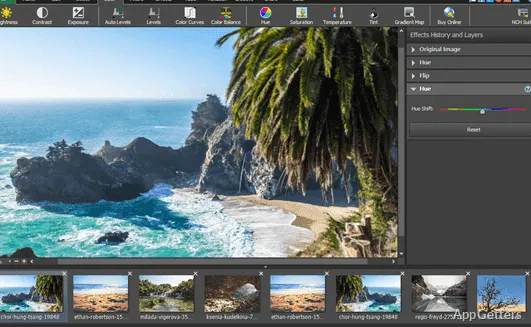
The PhotoPad Image Editor interface is one of the easiest things to use. It almost has the same look and feel as other photo-editing software. It keeps the main tools always accessible instead of burying them in various menus. Briefly, for Windows users doing sporadic image editing, this will definitely enable them to save some time spent on navigation of where the functions are.

When using the program, normally you will be able to perform simple actions like cropping, rotating, resizing, or doing a basic correction with hardly any preparation. This, in turn, makes the app suitable for students, home users, or even online sellers who want to quickly edit images for their projects, family photos, or product pictures, respectively. Instead of providing an involved, creative environment, the focus here is on delivering quick results.

Good Tools That Don’t Require Powerful Computers

At the heart of PhotoPad are some very common but very useful editing features and functionalities. It is possible to perform basic color corrections, apply some filters, and use the brush and heal tools with ease. Besides, one can add words to the image. Thankfully, all these features come as part of one package without having to install or set up additional modules. People using a combination of regular photo images and basic graphics will most probably find the interface and the toolset enough for their purposes.

On the other hand, the program is unlikely to bog down on a normal Windows system. This can be a deal-breaker for those who still work on old laptops or computers with scarce computing power. Of course, you should always keep in mind the limits of the resources you are dealing with. The program is indeed not intended to be used for complicated projects with layers, masks, compositing, etc. Rather, it is much more about quick and comfortable use than in-depth creative work.

Getting the Job Done Reliably

Very often, stability is the deciding factor, even if the software has fewer features. It is definitely more important practically to get the program launched fast. The software should stay responsive during edit sessions. It must perform the usual work, such as saving and opening files, with consistent results. The program should also simply be able to replicate edits without generating confusion, rather than having all the features in the world.

On the whole, PhotoPad is a good fit for this type of user. People processing personal picture collections, classroom resources, etc., are involved in the program’s target use. Plus, the program’s simple operation and low learning intensity contribute to the user feeling less burdened. This applies to tutorial guidance as well as the process of trial and error, repetition, and re-learning.

Still, some compromises have to be taken into account. This is where the focus of the UI leans towards wide accessibility and user-friendliness rather than being open to broad customization. Naturally, there will be differences in workflow refinements between PhotoPad and those professional applications used by advanced users. They, in this case, may very well find PhotoPad less satisfactory. However, such a difference will hardly be significant enough, if not visible at all, for a user who only occasionally needs to edit graphics.

Position of PhotoPad Image Editor in a Windows Environment

Those who can benefit the most from PhotoPad Image Editor are likely to be the ones who require photo editing that is reliable but simple enough. You do not have to spend hours learning the software. Thus, one can easily see how students in the process of completing their homework, families looking after their digital photos, especially kids’ photos, and even small online sellers preparing images for their product listings will find PhotoPad very handy.

PhotoPad is always considered as one of the feasible alternatives to a professional creative suite. Its main purpose is to provide a simple editing tool for routine visual tasks. With reference to the Windows system, the main advantage of this program is that it manages to combine ease of use, essential editing features, and a user-friendly workflow. Photo editing becomes about clean and usable results without assembling a complex visual project. It is this use of PhotoPad that can be justified as existing rationally within a software toolbox.

Software Details of PhotoPad Image Editor 15.04

License
Free
Version
15.04
File Size
3 MB
Downloads
8
Languages
English English, German
Category
Op. System
Windows
Developer
Last Updated
April 29, 2026

Version History

6 versions
15.04
Latest
3 MB
April 29, 2026
14.48
3 MB
October 17, 2025
14.44
3 MB
September 26, 2025
14.41
2.98 MB
September 10, 2025
14.39
2.98 MB
August 22, 2025
14.33
2.97 MB
July 4, 2025

Leave a Comment

Your email address will not be published. Required fields are marked *

Software Icon
Security Report

Loading scan data...

Scroll to Top