Making vinyl decals, stickers or rhinestone templates on a cutting plotter? Easy Cut Studio combines vector-design tools with controls for preparing jobs for compatible vinyl cutters, so a project can move from artwork to cutter output within the same workspace.
How do you turn an image into a cuttable design?
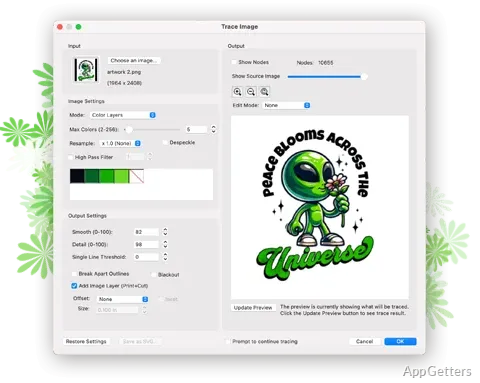
Import artwork and use the tracing tool to create vector outlines from bitmap images. The resulting paths can be adjusted before cutting, which is handy for turning a logo or scanned drawing into a vinyl design. Supported import formats include JPG, PNG, GIF, PSD, PDF, TIFF, BMP, and TGA.
For vector artwork, Easy Cut Studio accepts formats such as SVG, AI, and PDF. Node editing lets you alter individual points and curves in an outline; the simplify feature can reduce excess nodes. Text can be customized with fonts installed on the computer, converted to paths, or arranged along an arc or path.
What can you adjust before sending a design to the cutter?
Layers organize objects and can be assigned separate output tasks, including print-only, cut-only, draw, or print-and-cut. Welding joins overlapping shapes or letters into a single shape, while grouping keeps related objects together. Auto Nesting lays out objects within a specified cut area to make better use of the material.
- Set cutting speed, pressure, blade offset, overcut, and multi-cut options.
- Mirror artwork or choose to cut only selected objects.
- Add contour paths and registration marks for print-and-cut jobs.
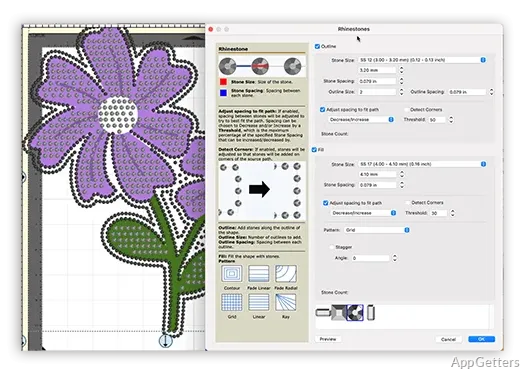
- Create rhinestone templates from designs using the rhinestone tools.
How does print-and-cut work?
Add a contour path around printed artwork and place registration marks before printing. After the print is ready, the cutter follows the contour to trim around the design, a workflow suited to stickers and decals. Registration mark size, thickness, and offset are adjustable.
Can Easy Cut Studio work with different cutters?
The software sends cutting jobs to supported vinyl cutters and plotters, with connection options that include USB, serial, parallel, Bluetooth, and Wi-Fi. Support varies by device; Cricut cutting machines are not supported.
Pros
- Traces bitmap images into editable vector paths
- Supports SVG, AI, and PDF artwork imports
- Includes contour cutting with registration marks
- Nesting arranges objects to use cutting material efficiently
Cons
- Does not work with Cricut cutting machines
System requirements: Windows 7, Windows 8, Windows 10, Windows 11
Can Easy Cut Studio convert a JPG or PNG into cut paths?
Yes. Its tracing tool creates editable vector outlines from bitmap images, including JPG and PNG files.
Can it cut around a printed sticker design?
Yes. Add a contour path and registration marks, print the design, then use a compatible cutter to trim along the contour.
Does Easy Cut Studio support Cricut cutters?
No. Cricut cutting machines are not supported.