EXE
Home » Software » Windows » Editors » DrawPad for Windows
DrawPad for Windows

DrawPad for Windows

  • By NCH Software
  • Trial
  • Version: 12.00
  • 6.58 MB
  • Security Report:

Sometimes, Windows users may want to create a quick drawing, modify a diagram, scribble an idea, or make simple graphic materials without digging into complicated design software. Professional graphic programs, on the one hand, have numerous features. On the other hand, they can also come with a steep learning curve for some users. These users only occasionally need the most basic drawing and image production functionalities. DrawPad has been created as a solution for this issue. It supplies a small graphics editor available to a wide range of users and focuses mainly on simplicity and user-friendliness.

Besides, it may be used at home by members of the family and by students. It may also be used by people who run very small businesses, simply to put together some visual content without a broad knowledge of design. DrawPad concentrates on helping ordinary users quickly and effectively do their daily drawing and editing work. It does so rather than burdening them with complicated processes.

Work Area Focused on Simplicity

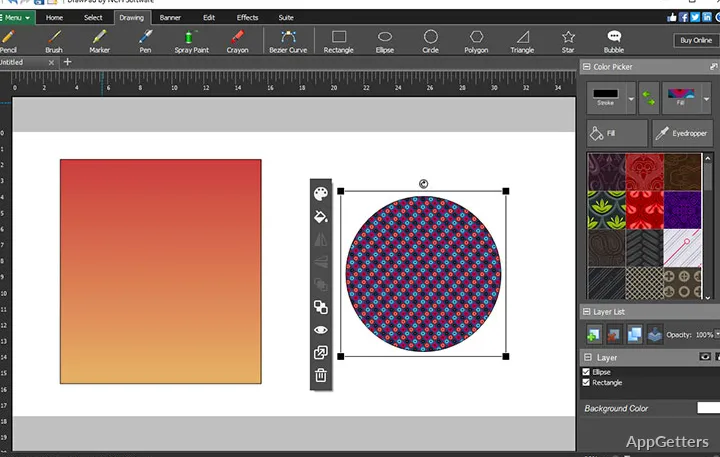
DrawPad’s most prominent feature is probably its very simple implementation. The components of the software are arranged in a manner that allows even those users who have never before drawn or edited with a computer to do so. They can get started right after installing the program. The elementary instruments are in plain sight, and the usual features are also easily accessible, without being nested within layers of menus.

Such a design, when put to use, will probably lessen the amount of time spent on acquiring familiarity with the software. Users preparing diagrams for their school work, making simple logos, or doing illustrations for the purpose of a presentation will most likely be able to start their creation without delay. DrawPad is an excellent fit, especially for those who are very basic paint program users. They now want to have more options available. Yet they are unwilling to explore professional-grade design software.

On the other hand, professional graphic artists may, in some ways, find the DrawPad working space lacking when compared to very powerful design and illustration software used for complex commercial projects.

Great for Daily Graphic Tasks

If you make DrawPad your choice, you will pretty much be doing what it was designed for. That means making your everyday creative activities a breeze. It goes without saying that tasks like icon creation, image editing, and figure drawing fit comfortably within its routine. The same applies to writing captions and getting simple, visually-based materials prepared. The program accomplishes these activities competently. For the most part, it steers clear of the details of large and complex creative environment tools.

Firstly, in the case of learners, the feature of producing charts, visual aids, and graphics for projects just from one application might be especially handy. Secondly, the average user at home can have a go at family photo retouching, card printing for merry occasions, or making graphics for individual projects. Thirdly, small companies and independent users have their share of fun and advantages.

It places more emphasis on the aspect of easy and simple functioning. It does not focus as much on the side of innovative experimentation. This enables the users to maintain a reasonably predictable and manageable workflow.

Performance and Dependability for Everyday Use

Among the issues normally brought up by potential customers when choosing creative software, the first one is responsiveness. Another is whether the software can always be fast enough during normal everyday usage. In this department, DrawPad mostly does quite well on PCs equipped with the Windows OS. This is especially true if it is a matter of handling smaller projects and standard image editing tasks. Opening the application and getting it ready for action is, as a rule, a rapid process. The program also has very moderate demands on the system resources.

This less demanding nature in the use of resources can be quite handy. It is especially useful for those users running on old, veteran computers. It is also useful for users running on systems that are not intended for heavy graphics work. Besides, it is the case that such simple and basic projects can be accomplished with no or very scarce occurrence of delays. Thus, the user will be able to get on with the job. There is less need to wait for the application to recover from the last command given.

Those users, however, who happen to be working on highly detailed artistic visuals, big commercial design projects, or top-level illustration workflows will, sooner or later, discover limitations. These are a consequence of the software’s predisposition toward simplicity and user-friendliness.

DrawPad’s Best Fit

DrawPad is a handy graphics tool for routine creative needs. This is far from a substitute for professional, specialized design software. Its greatest features are the ease of use, the friendly design, and the capacity to carry out just about any basic drawing and image editing task without making it complicated.

Most probably, students, home users, hobbyists, and small businesses will be the main beneficiaries of the experience offered by this product. This is more true for them than for anyone else. On the contrary, those calling for advanced publishing facilities, high-end illustration tools, or extensive professional design capabilities would find it rather lacking in these areas. However, for Windows users looking for a reliable yet simple graphics editor, DrawPad strikes an excellent balance. It highlights usability, efficiency, and day-to-day performance.

Software Details of DrawPad 12.00

License
Trial
Version
12.00
File Size
6.58 MB
Downloads
6
Language
English
Category
Op. System
Windows
Developer
Last Updated
May 19, 2026

Version History

6 versions
12.00
Latest
6.58 MB
May 19, 2026
11.06
6.54 MB
February 5, 2024
10.59 Beta
6.42 MB
October 13, 2023
10.50
6.41 MB
August 28, 2023
10.21
6.37 MB
April 11, 2023
10.11
6.32 MB
March 6, 2023

Leave a Comment

Your email address will not be published. Required fields are marked *

Software Icon
Security Report

Loading scan data...

Scroll to Top