EXE
Home » Software » Windows » Editors » Pinta for Windows
Pinta for Windows

Pinta for Windows

People who work on Windows often look for a simple image editor without the hassle of learning complex design software. For instance, cropping screenshots, inserting text into images, color adjustment, and then creating simple graphics mostly do not require a professional-grade application. Either way, one could hardly get through the gap between advanced creative suites and minimalistic editors that are very basic. Some programs have too many features, while others are too limited for daily work. Pinta, an image editing app, has been made to strike a balance between the two extremes.

It offers a reasonable set of editing tools in a very limited environment. This is why it is an appropriate choice for those who need more than what simple image viewers can give, but do not want to deal with the complexity of professional graphic software. On Windows, it acts as a simple solution for daily image editing tasks.

A Familiar and Accessible Editing Experience

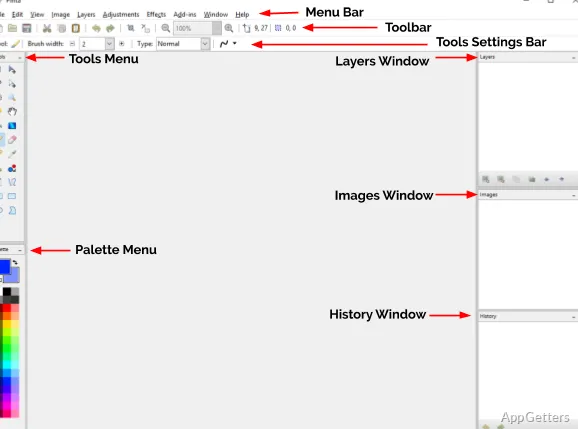
Lots of users open Pinta for the first time and are pleasantly surprised by the simplicity of the interface. The layout design strictly adheres to the standards that different programs in the field of image editing must adhere to in order to be considered by users. Thereby, it is very easy for a new user to comprehend all the aspects of the software. The four main groups of features are well separated and neatly arranged in the user interface. These include tools, layers, color controls, and editing options. They are arranged in such a way that they do not give the feeling of excessive use of the screen space.

Such an arrangement makes a real difference when it comes to day-to-day use. In fact, it is capable of considerably smoothing the progress of familiarization with software. Presentation students, individuals working at home with family photos, and office personnel creating simple graphics can all be expected to be fully up to speed with the use of the application. They can achieve this in a very short time. The main point here is that this interface does not strive for anything complex. Rather, it does a very good job of helping users perform with ease. They can concentrate on the actual work that they came for and disregard the steps of getting to work via the software.

Practical Tools for Everyday Projects

The general-purpose image editor suite that Pinta sports is one of the features that is bound to please users the most. Users can also make the most of layers for an organized workflow. Along with that, tasks such as image size modification, photo cropping, shape drawing, text addition, and visual adjustment can be carried out with ease. This layer feature alone is already a major step up from very basic offline editors in terms of project complexity. It is enough to work alongside the various toolsets we have.

The abovementioned features are surely capable of providing a lot of utility to Pinta’s users. Examples of the work that can be comfortably done with the software are social media graphics creation and screenshot editing. Image preparation for school assignments and simple promotional materials can also be done comfortably with the software. The tool is quite up to the task. The performance remains quite adequate, giving users very little to complain about. For those whose needs fall within the scope of regular image editing, the toolset on offer is often more than enough.

Where Its Simplicity Becomes a Limitation

Even though Pinta can be used for many tasks in the image editing field without major problems, using it in that manner will reveal its constraints in more demanding situations. Also, there are limits to what the software can do. In the case of a person who would like to manipulate images in highly professional manners or create top-notch graphic works for exposure, the capabilities of the software would be limited for the user. The same applies to those working on large-scale commercial projects. Besides, some of the tools and features in the target workflows are exclusively found in industry-standard or professional software. They are either absent or weakly developed in the software.

To a large extent, this is a trade-off decided by the developers. By foregoing so many complexities, Pinta manages to keep its door open for new users and to remain a lightweight app. It also assures that it is accessible, if not very feature-rich, at the same time. That said, users who are looking for software that does a lot automatically and has advanced retouching tools will have to rely on specialized software. The same applies to people seeking production tools specific to the industry. Awareness of this helps one to manage expectations suitably. It also helps one make a decision on whether or not the software fits the intended workload.

A Sensible Choice for Everyday Windows Image Editing

Most of the time, the feature set of Pinta is well-suited to situations in which the aspects of simplicity, reliability, and ease of use are deemed more important. The availability of advanced creativity features is less important in such situations. Students, daily limited users, hobbyists, and pros can greatly benefit from the even-handed approach that Pinta offers. This is especially true for those who, by chance, have to do some image editing. Enough functionality and hardly anything complex: this is how Pinta tries to help the users. It helps in the accomplishment of the majority of the common tasks.

For users who are on Windows and looking for an in-between and reasonable option, Pinta can be that. It would fit their routine projects. Being lightweight, delivering an accessible workflow, and concentrating on essential editing functions make the software a go-to for everyday productivity. At the same time, it poses no difficulty to the users regardless of their level of experience.

Software Details of Pinta 3.1.2

License
Free
Version
3.1.2
File Size
57.91 MB
Downloads
6
Language
English
Category
Op. System
Windows
Developer
Last Updated
April 3, 2026

Version History

6 versions
3.1.2
Latest
57.91 MB
April 3, 2026
3.1.1
57.3 MB
January 12, 2026
3.0.5
53.67 MB
November 25, 2025
3.0.4
53.58 MB
October 7, 2025
3.0.3
52.54 MB
August 1, 2025
3.0.1
52.31 MB
June 9, 2025

Leave a Comment

Your email address will not be published. Required fields are marked *

Software Icon
Security Report

Loading scan data...

Scroll to Top