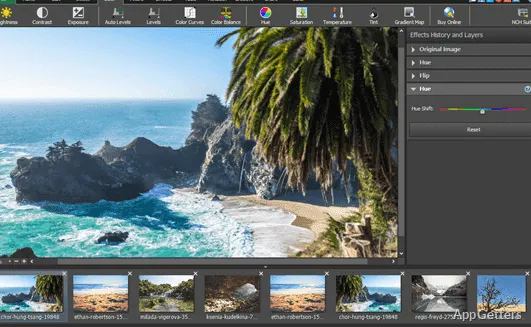
Users sometimes want to perform image editing tasks productively and effortlessly. They do not want to become proficient in a complex design application. Simple editing actions like cutting images, erasing a few blemishes, adjusting the size of photos for social media, or getting pictures ready for documents generally do not call for very complicated software. PhotoPad Professional tries, among other things, to fill the gap for a lightweight image editor on Windows. It will attract people not interested in a steep learning curve. In a nutshell, the app goes to great lengths to keep common editing actions always available. This is especially true for users who work with personal photos, school projects, or basic content creation.
Editing Made Simple for Your Daily Needs
PhotoPad Professional focuses more on everyday image editing than on the production of advanced graphics. The user interface is very intuitive for new users. The most common tools, like cropping, rotating, color adjustment, filters, and even some basic retouching, are always at hand. From a layman’s point of view, less time would be wasted looking through multiple stacked menus. Less time would also be spent trying to understand unfamiliar terminology.
On top of that, the program serves very well as a utility tool for performing common photofixes. Pretending to be the perfect instrument for casual users, it simply does not offer in-depth workflows and the level of customization found in professional editing software. The product is designed more for fast operation and general accessibility rather than for detailed controls and exact modifications.
Convenient for Home, School, and Small Business
PhotoPad Professional will probably be a good companion to you if your main purpose of using a photo editor is to make functional enhancements rather than highly specialized ones. It is very likely that the toolset will be sufficient for day-to-day work. This applies to students preparing presentations, home users organizing family photos, or small business owners creating simple marketing visuals.
Format support and batch processing options can also work out very well in practical situations, particularly when multiple images are involved. The user would not have to work on each photo one by one, but could apply the same modifications to the whole batch instead. This may be a decent time saver for a series of monotonous tasks. On the other hand, bigger or more complex editing projects will probably reveal the performance and feature gaps of photo editors such as this one.
Generally speaking, in fact, in this segment of software usage, the creative freedom offered is usually left aside in favor of the overall dependability. For people with fairly predictable editing patterns, items like consistency and ease of use tend to be more important. They tend to matter more than having access to leading-edge design features.
PhotoPad Professional, Strengths and Weaknesses
Surprisingly, one of the features putting PhotoPad Professional ahead of many other software is that it has quite a good balance: it stays user-friendly without sacrificing the necessary functionalities. At the same time, it manages to nudge users towards exploring some of the less obvious features it has to offer. This happens in several aspects, such as editing. It provides enough of it to cover many typical operations. Installation on the Windows platform is not expected to be a problem. Discovering the application will not be that difficult for users.
However, at the same time, it is essential to keep a level head and comprehend the realistic capabilities of the product. For instance, seeing this editor as giving you comparable control over layers to what you get in so-called professional-grade high-end compositing tools would be a stretch. Some creativity-minded professionals and accomplished photographers will probably regard it as little more than a utility piece.
In fact, PhotoPad Professional can be summed up as a program that offers good service in terms of image adjustment in a fast, uncomplicated, and reliable manner. It is a pretty close representation of the state of a very simple tool. Whether such a hallmark is a big plus or a big minus depends on one’s experience.
Great for Simple Photo Editing
PhotoPad Professional is a handy Windows photo editor for those who simply want to get effective results without getting a degree in technology. Those people who either rarely edit photos or frequently do so should find it suitable. This is especially true for users who don’t need high-end art creation tools.
Since it is capable of supporting various visual tasks without much preparation and reasonable complexity, the program is a good solution for home users, students, educators, and small offices. Advanced users, on the other hand, will sooner or later find the product lacking. This will happen when confronted with projects that call for higher degrees of control and professional levels of production. That said, in the case of simple image editing workflows, PhotoPad Professional seems to be the right compromise. It sits between very rudimentary editors on the one hand and full-fledged professional software on the other.