EXE
Home » Software » Windows » Editors » PhotoPad - Photo Editing Software for Windows
PhotoPad – Photo Editing Software for Windows

PhotoPad – Photo Editing Software for Windows

  • By NCH Software
  • Free
  • Version: 15.13
  • 3.02 MB
  • Security Report:

Not every time a Windows user desires to tweak a photo do they require a full professional editing suite. In the majority of cases, they just need something utilitarian: a simple tool for cropping photos of their vacation, correcting a bit of the light, adding basic effects, or preparing images for school, work, or the web. The dilemma is finding software that is very easy to use and, at the same time, not lacking in functionality. PhotoPad situates itself in that space. It provides, through its photo editing workflow, something that is usable for nonprofessional users. It is also able to feature a wide range of the most common editing needs at the same time.

An Editing Workflow You Probably Know With Little Setup

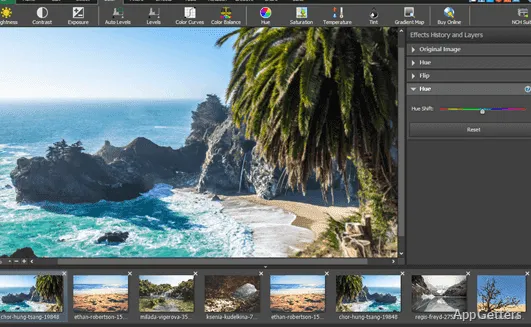
Among the notable features of PhotoPad – Photo Editing Software is the ability it offers for users to work with images almost instantly. The interface layout follows a model that any user of very simple Windows utilities or basic creative software will instantly recognize. Generally, users require little learning for operations such as opening images, making edits, and saving changes.

The design of the software is to make editing as simple as possible. That includes resizing, cropping, rotation, color adjustment, and visual effect application in implementation. For beginners, it makes the level of vacillation very low. Instead of going through various menus or spaces, the main tools mostly remain visible and easy to get to. However, on the other hand, those who are used to sophisticated editing surroundings can find the workflow significantly simplified. This is in comparison with professional-grade products.

Ideal for Daily Photo Improvements and Minor Assignments

PhotoPad – Photo Editing Software generally serves real-world editing scenarios that do not require just image viewing only or graphic designing of the highest level. Editing family pictures, students making presentations, and small business owners doing simple graphic works are the main target audience of the product. In principle, they should be able to do the common tasks without resorting to other software.

The software provides a variety of the already mentioned tools and others as well, such as retouch, filter, adding text, etc. Besides, it has the functions enabling making adjustments in batch style. That can accelerate the performance of the same tasks. As a result, when dealing with a large number of photos for activities such as selling, social media, or personal archives, these descriptions apply. Without a doubt, a vast feature catalog is less important than the reliability of the software when it is to be used for routine tasks. Basically, PhotoPad contributes most of the time to the users finishing their ordinary editing jobs in a timely manner, rather than offering highly specialized creative controls.

Functional Limits Shadow Some of the Advantages

The very factors of PhotoPad – Photo Editing Software that make it easy also matter a lot. That is, the software will not be able to meet the expectations of the very demanding ones. The capability of handling unlimited layers, not to mention precise masks and the editing pipeline that is completely customizable, are the features that those needing them will have to look beyond PhotoPad for eventually. In its present form, the software handles ordinary everyday situations very well. However, it is not intended to be a substitute for complex professional editing tools.

Users who are interested in using more elaborate control and detailed compositing tasks will certainly be disappointed with the least flexibility of the available controls. That is, the experience, by and large, emphasizes speed and simplicity, not in-depth technical customization. Power-users, on the other hand, will be in for a shock. That is because the software does not quite rise to their expectations of flexibility and control. The operating level on Windows is quite minimal, so that it can still work bearably on some old and mid-range machines. This can be a plus for those who want to go for really fast editing. Their systems, however, are not precisely top of the range. Nevertheless, these professionals will be most disappointed in the limited repertoire of software options when it comes to highly complex procedures.

Where PhotoPad Belongs in a Windows Editing Setup

PhotoPad’s greatest appeal is to the Windows users who desire an editing environment that is easy to handle. There is no need to learn it extensively. Besides casual photographers, students, and home users, it will also work quite well for small-scale content creators. These users perform routine image adjustments.

The notion of the program competing with professional creative suites is really a non-issue. On the contrary, it is that everyday, ordinary level of editing that it serves: quick corrections, simple enhancements, practical image preparation, and so forth. Those who are all focused on convenience, clear navigation, and low barriers to entry will happily adopt the software in their workflow. The more advanced users, however, will consider it a nice little extra gadget rather than their main production environment.

Software Details of PhotoPad – Photo Editing Software 15.13

License
Free
Version
15.13
File Size
3.02 MB
Downloads
2
Languages
English English, German
Category
Op. System
Windows
Developer
Last Updated
May 29, 2026

Version History

2 versions
15.13
Latest
3.02 MB
May 29, 2026
15.04
3 MB
April 29, 2026

Leave a Comment

Your email address will not be published. Required fields are marked *

Software Icon
Security Report

Loading scan data...

Scroll to Top