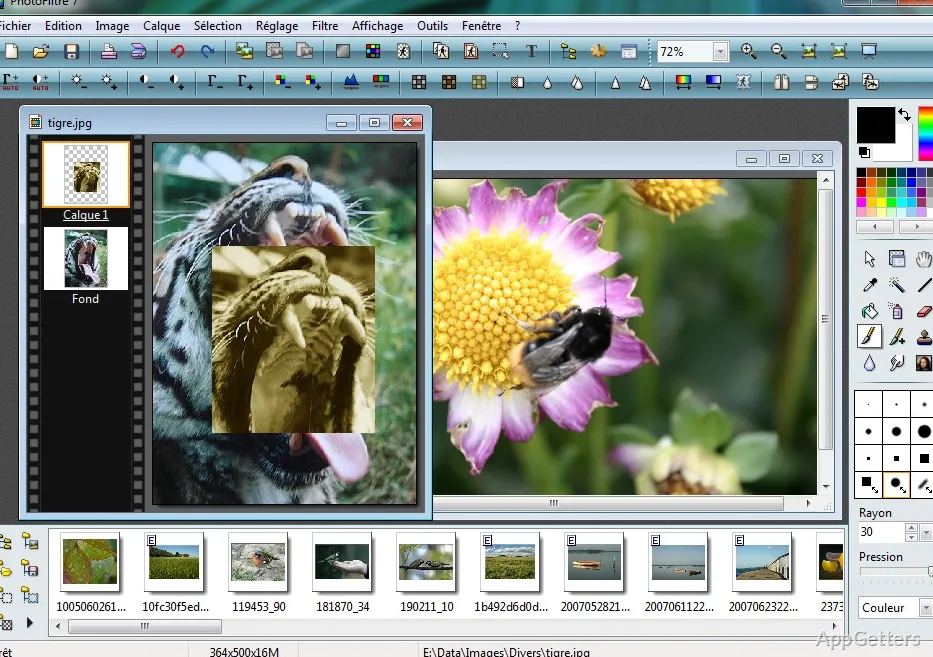
Outgrown the free PhotoFiltre but don't want Photoshop's weight? PhotoFiltre Studio, by Antonio Da Cruz, adds layers, masks, Photoshop-compatible 8BF plugins and a batch module to the same light, simple editor.
Apply filters and adjust photos
Use the filter controls to add effects or change an image’s appearance. PhotoFiltre Studio also includes everyday editing operations such as cropping, resizing, and color adjustment, so a photo can be framed and corrected in the same workspace.
Retouching tools include a magic wand, clone stamp, blur and smudge, red-eye correction, nozzles and an artistic brush with oil paint, watercolor, palette knife and pointillize effects.
Build an image with layers
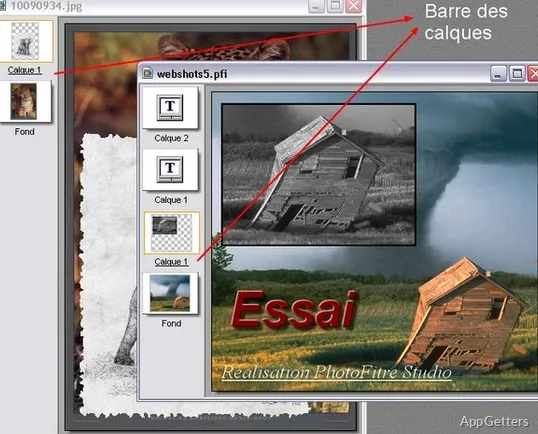
Four layer types are available: standard, text, adjustment and color layers. Masks control which parts of a layer show, and the PhotoMasque module creates contour and transparency effects from grayscale masks.
- Use selection tools to mark the area an edit should affect.
- Apply filters and adjustments to the selected area or image.
- Keep separate elements on layers while refining a composition.
Import images and handle repeated edits
Scan straight into the editor through TWAIN. The batch module applies filters, resizing, adjustments and transformations to a whole folder of images at once, and Photoshop 8BF filters can be loaded from any folder.
Pros
- TWAIN support for acquiring images from connected devices
- Layer-based editing for combining image elements
- Selection tools for isolating parts of a picture
- A range of filters for applying image effects
Cons
- Interface looks dated next to modern editors
- No RAW photo development
- Windows only
System requirements: Windows 7, Windows 8, Windows 10 · 32-bit only
What is the difference between PhotoFiltre and PhotoFiltre Studio?
Studio is the paid edition. It adds adjustment and text layers, masks, the PhotoMasque module and batch processing to the basic editor.
Can I use Photoshop plugins?
Yes. Filters in Photoshop's 8BF format can be installed and used.
Can it edit many photos at once?
Yes. The batch module resizes, filters, adjusts and transforms whole sets of images in one run.
Can PhotoFiltre Studio import an image from a scanner?
Yes. Images can be acquired from TWAIN-compatible scanners and cameras.