How difficult is it to learn 2D animation on Windows? In fact, a lot of animation programs will seem very complicated for beginners moving into Windows-based animation work. Professional tools sometimes require going in with experience of timelines, layers, rigging systems, or advanced rendering workflows. That can be a barrier to learners, hobbyists, and casual artists who just want to do frame-by-frame animations and don’t want to learn the interface for days first. Pencil2D tries to fix things in a completely different way. The emphasis is on classic hand-drawn animation with a simple workspace that’s usable even on old Windows machines.
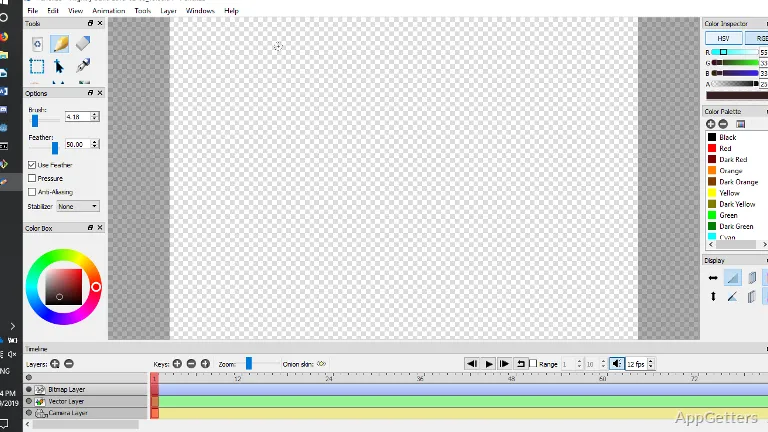
Most of the time, it seems like the software is deliberately simple, not that it has been taken apart and made without the good parts left. The UI is non-cluttered, and almost all tools are ready at hand with a small amount of menu nesting. Those users who’ve drawn on paper before and now come to digital animation will most probably like the app because of that simplicity. They keep the app even after they’ve tried others that are larger and more powerful.
An Environment Focused On Classic Animation
The most innovative thing about Pencil2D, perhaps, is that the conceptual design of traditional hand-drawing frame-by-frame closely corresponds to the mentality of the software. This means the users can directly paint on the screen and jump between the frames in no time at all. They can even get a visual of the movement without following a long and complicated production pipeline. Onion skin for the most basic animations works very well. It makes drawing easier as it allows understanding the motion and timing.
On Windows, the software is quite efficient even on low-end computers. This is critical for educational computers, fairly inexpensive laptops, or aged personal computers at home, on which heavier creative software is quite a challenge to run. Loading time is quick, and the projects are still quite small unless the users start importing big files.
Generally, brushes and other drawing instruments were not given great attention in terms of quality, looks, and feel. The brush strokes, however, are quite good for fairly casual animation at the time. Even the artists working with professional graphical displays will hardly be able to find in those little brushes the functionality that they have in other, more advanced, software for illustration. Still, for rough animation tests, educational projects, and simple short clips, the workflow is efficient.
What Pencil2D Is Good For
The best work of Pencil2D comes from users who intend to learn the basics of animation. It does not come from those who produce studio commercials. Short and simple loops and exercises involving squash and stretch animation are possible to understand in the timeline very quickly. This happens without any technical distractions at all. Teachers also always like software that will not involve a lot of installation, setting up, or account creation before use.
House users have the advantage of lower system requirements and a simple export process. The making of short animations such as GIFs, storyboards, or simple skeletal studies of characters is all very doable, even for beginners. This is also characteristic of artists who prefer drawing to rigging-based systems.
However, when working on large projects, one gets to see the limitations. Compared to the state-of-the-art production animation tools, the set of features is still quite narrow. The possibilities for advanced compositing, effects management, and sophisticated asset organization are quite limited. Also, the interface was designed around simplicity, and this is why the long projects with many layers may become very unwieldy.
Stability, Speed, and Everyday Routine
When used on a daily basis, Pencil2D only rarely poses major problems, and it is quite a workable tool for at most casual and educational scenarios. However, it may fail at the level of polish that used to be the typical hallmark of commercial creative applications. Particularly when working with more detailed projects, slowdowns and small interruptions will happen from time to time. Overall, the software is quite reliable for short-form animation tasks.
Being open-source also affects the way this software is experienced by users. Generally, update changes concentrate on upgrading usability further and patching bugs. Only occasionally are new features added aggressively. Hence, we can say that this software is more like a handy thing kept up by a community, and less like a quickly developing, subscription-based creative platform.
One more thing that beginners will like is that it is very easy to export animations. Users can turn their work into video files or image sequences without delving too deeply into excessively technical rendering settings. For people learning animation basics, a more seamless workflow often matters more than having advanced production controls.
Learning Animation and Simple Projects
Pencil2D is for those who want to have a simple starting point in the world of digital animation on Windows. That includes students, hobbyists, teachers, and casual artists who are using frame-by-frame techniques for the first time. As a whole, the software puts greater stress on accessibility as well as clarity than on production tools at a professional level, and this tradeoff is reflected in the whole experience.
People who want studio-level animation features may find themselves in need of a different application quite soon. Nevertheless, for sketch animation, practice exercises, short personal projects, or learning settings, the lightweight workflow is actually quite an advantage. Rather than bombarding new users with complex technical systems, Pencil2D keeps them focused on timing, drawing, and movement, the fundamental aspects that are most important when learning animation.