Students, office staff, and small teams who work across documents, spreadsheets, and presentations can handle those tasks in Microsoft Office 2016. The suite brings Word, Excel, PowerPoint, Outlook, Access, Publisher, and OneNote into desktop workflows, including work that needs to continue offline.
Documents, data, and presentations
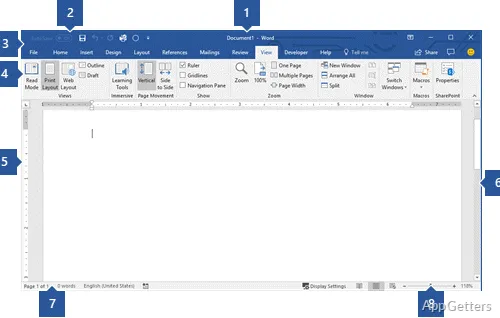
Word 2016 provides revision tracking and shared editing for documents that need feedback from more than one person. Smart Lookup uses Bing to bring related web information into the document, while support for online images, video, and handwritten equations gives authors additional ways to build out a page.
Excel combines spreadsheet calculations with analysis tools such as Power Query and a Function Wizard. Its chart choices include histograms, waterfall, Pareto, and sunburst charts, for visualizing distributions, cumulative values, and hierarchies. Shared editing and version history support workbooks that pass among collaborators.
PowerPoint offers transitions, animation effects, embedded video, and narration for presentations. Comments and simultaneous editing support review with a team; presentations can also include online content and handwritten equations.
How does Office 2016 handle shared work?
Files saved to OneDrive can be synchronized and shared, with collaborators editing documents together and adding comments or suggestions. Shared notebooks in OneNote gather notes, images, links, and recordings in one place, and multiple people can contribute to them. These cloud-based workflows depend on an internet connection; the desktop apps can also be used for offline work.
Mail, databases, and publications
Outlook brings multiple email accounts into a unified inbox and searches across messages and files. When composing mail, users can attach recent documents or OneDrive files and set sharing permissions. Access is for managing databases and exporting data to Excel, while Publisher lays out printed or digital materials such as catalogs, newsletters, and brochures.
- OneNote keeps project notes and mixed media together in shared notebooks.
- Office 2016 supports compatibility with earlier Office file formats.
Pros
- Word tracks revisions and supports shared editing
- Excel includes Power Query and specialized chart types
- Outlook manages multiple accounts in a unified inbox
- Publisher creates brochures, newsletters, and other publications
Cons
- OneDrive synchronization and live co-authoring require internet access
System requirements: Windows 10, Windows 11 · 1 GHz or faster x86/x64 processor with SSE2 · 2 GB RAM · 3 GB available disk space · .NET 3.5 required
Can Office 2016 work without an internet connection?
The desktop apps support offline work. OneDrive synchronization and live collaboration use cloud connectivity.
Can several people edit the same Office file?
Word, Excel, and PowerPoint support simultaneous collaborative editing; OneNote notebooks can also be shared and edited by multiple people.
Which app should I use to make a brochure?
Publisher is designed for creating publications such as brochures, catalogs, and newsletters.