EXE
Home » Software » Windows » Editors » DrawPad Professional for Windows
DrawPad Professional for Windows

DrawPad Professional for Windows

  • By NCHSoftware
  • Trial
  • Version: 12.00
  • 6.58 MB
  • Security Report:

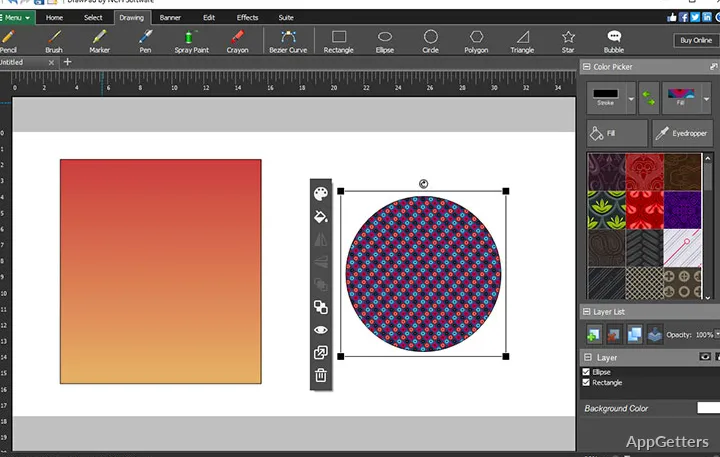
The majority of Windows users desire a simple graphics editor that will fulfill their design needs without the complex learning curves or high hardware requirements of the major creative suites. DrawPad Professional is the program that satisfies those requirements. It supplies a fairly user-friendly environment for image editing, drawing, and simple graphic creation. One gets the feeling that the tool isn’t really designed for the production houses at the professional level, but rather for the users who want to effectively create visual content.

For home users, students, or small offices, this program can assist in accomplishing the following tasks: drawing a logo, creating social media graphics, or making a diagram. It can also assist in using images for touch-ups at a basic level. Its interface is so logical that even beginners will figure out what to do. But if you are an advanced editing platform user, you may be slightly puzzled by the simpler workflow and smaller toolset.

Effective Editing Without Straining the System

One big advantage of using DrawPad Professional for Windows is that it is not so heavy. It is quickly installed and started with no long waiting times. In general, it works well on computers that have problems with bigger graphics applications. That dependability is really significant for those who focus on the production of things rather than on customizing a complex workspace.

Generally speaking, the editing that has to be done on a daily basis is pretty simple. Image cropping, text addition, layer management, and the design of sober vector or raster elements are all that can be done. As seen with the naked eye, this program does not offer users endless menus or complicated production jargon. This leads to them being lost and confused. However, this feature does sometimes backfire as a disadvantage when projects needing top-notch color management or advanced compositing come up. This also applies to accurate design workflows that are the norm in specialized creative environments.

How DrawPad Professional Contributes to Real Project Execution

Practically, the program will complement you in completing only a very few tasks in the full creative ecosystem. That is the professional studio environment. Students who need help preparing visual assignments, home users who want to edit personal graphics, or small businesses that create promotional materials in a simple way may benefit most from using the software. It quite efficiently supports their procedures for regular tasks.

Particularly, it is significant because it alleviates awkwardness. The users open the project, perform the edits, export the image, and with that, their work is done. They do this without spending time configuring the workspaces or learning multi-layered production pipelines. On the other hand, there will still be professionals working in collaborative design teams or those who handle print-grade production. They will find that, at some point, their procedures will be limited quite quickly. Moreover, the software is stronger in terms of supporting smaller, independent tasks, at which productivity is more relaxed than in huge, technically demanding projects.

Fairly Good Option for Casual Creators as Well as Small-Scale Visual Work

DrawPad Professional is probably not a good match for those who regularly belong to the category of heavy users. That is, it is handy for artists in large studios with the latest hardware. They also have access to exclusive tools and resources. But for home users or small businesses that do only a modest amount of visual work, it is a reasonable choice. The program allows people to create at whatever speed and level they are comfortable with. This is because it is a lightweight modeling tool.

The software allows achieving the goal of delivering a project in less time than a big studio would take. This is attained through a streamlined work-through. It includes allowing a person to work, perform the edits, and finally, save or export the image file. Professionals working in collaborative design teams may find that these processes will limit the productivity of the teams that they belong to.

DrawPad Professional is definitely approachable for casual users as well as those on a limited budget. It features enough of the capabilities you would expect in a modestly priced graphics editor. It keeps most users quite happy.

Software Details of DrawPad Professional 12.00

License
Trial
Version
12.00
File Size
6.58 MB
Downloads
2
Language
English
Category
Op. System
Windows
Developer
Last Updated
September 3, 2025

Version History

2 versions
12.00
Latest
6.58 MB
September 3, 2025
10.11
6.32 MB
March 6, 2023

Leave a Comment

Your email address will not be published. Required fields are marked *

Software Icon
Security Report

Loading scan data...

Scroll to Top