Backlit portrait with a dark face, or a hazy landscape? AKVIS Enhancer brings out detail in dark or unevenly lit areas, sharpens photos and adjusts tones. Its three correction modes address different image problems, while presets and batch processing support repeatable edits.
Choose a correction mode for the image
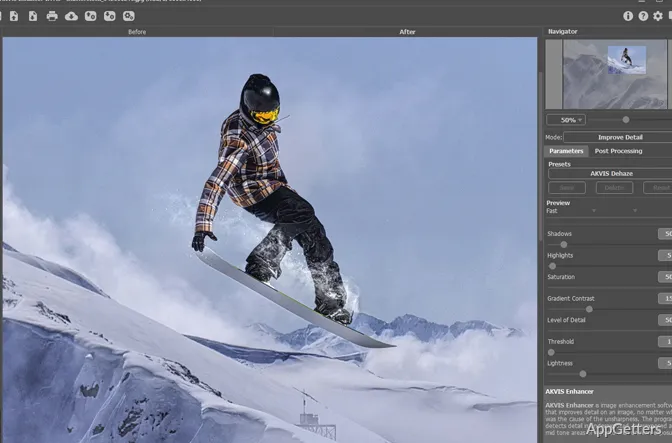
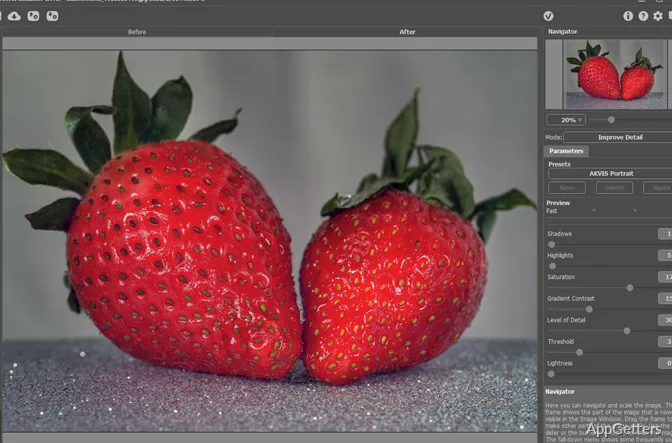
There are three correction modes: Improve Detail, Prepress and Tone Correction. They approach enhancement differently, so a photo’s lighting and intended use can guide the choice.
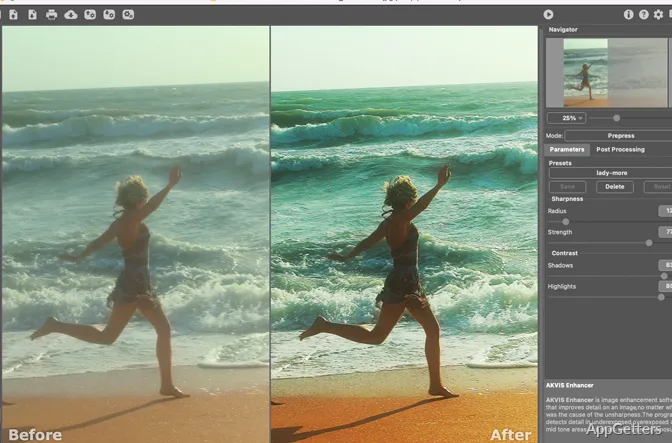
Improve Detail increases the difference between nearby color values to make fine image features more visible. It can bring out information in both shadowed and bright regions, and address uneven exposure, poor lighting, or haze. Prepress targets images being prepared for print or online publishing, with controls for sharper borders and stronger contrast. Tone Correction adjusts brightness in light and dark parts of the picture; corrections can cover the whole image or selected colors.
Save settings and process image batches
When an adjustment works well, save its settings as a preset and reuse them on later images. Batch Processing applies the same settings to a series of pictures, reducing repeated manual adjustments.
- Use Improve Detail for detail recovery in unevenly lit scenes.
- Choose Prepress to refine edges and contrast before publication.
- Apply Tone Correction to adjust brightness across the image or selected colors.
Edit in the standalone app or a plug-in
Enhancer runs as a standalone program or as a plug-in for photo editors, including AliveColors, Adobe Photoshop, and Corel PaintShop Pro. Both forms provide the three enhancement modes. The standalone app also has Post Processing controls for brightness, contrast, gamma, and saturation, which can be applied after the main correction.
Pros
- Improve Detail reveals information in shadows and highlights
- Prepress mode increases edge sharpness and image contrast
- Presets save settings for reuse; Batch Processing applies them to image series
- Standalone and plug-in versions offer different editing workflows
Cons
- Post Processing settings are included only in the standalone version
System requirements: Windows 7, Windows 8, Windows 8.1, Windows 10, Windows 11 · 32-bit and 64-bit · Minimum: Pentium IV, 4 GB RAM · Recommended: Intel Core i5, 8 GB RAM
What kinds of photo problems can AKVIS Enhancer address?
Hidden detail in shadows or glare, haze, poor lighting, weak contrast and uneven brightness.
What is the difference between Improve Detail and Prepress?
Improve Detail brings out features in shadows and highlights. Prepress focuses on edge sharpness and contrast for images being prepared for print or online use.
Can Enhancer apply the same correction to several photos?
Yes. Batch Processing applies chosen settings to a series of images, and saved presets can be reused.