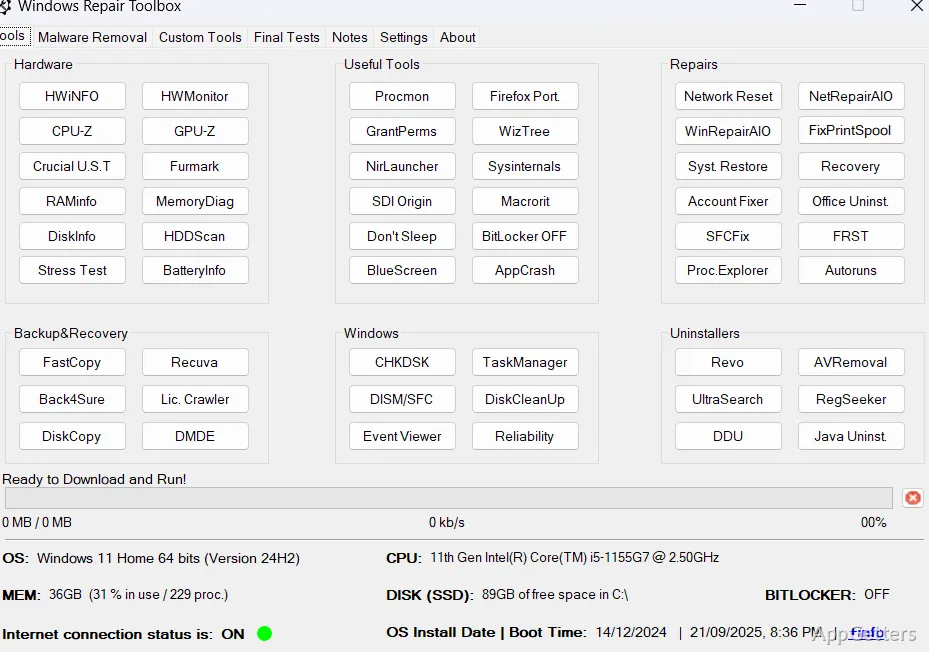
Repair work can start from a single place that launches diagnostic and repair utilities, runs selected tasks, and keeps notes and logs together. Windows Repair Toolbox organizes third-party tools by function and can download them as needed or in advance for offline use.
How does the toolbox find repair utilities?
Tools are grouped by function, covering tasks such as malware removal, system cleaning, and repair. Windows Repair Toolbox downloads selected programs on demand and can choose a version suited to the Windows edition being serviced. It also provides an option to download the full tool collection in one operation, then keep those tools updated for work on computers without an internet connection.
Most included programs are portable, so they can run without a separate installation. Three exceptions require installation. Users can also add favorite tools to the toolbox, which is handy for technicians who rely on a particular utility alongside the built-in selections.
Can it run a repair workflow unattended?
Several tools can be selected to run one after another in unattended mode for malware removal, cleaning, and repair. When the sequence finishes, the toolbox can email a completion notice with its logs. This supports repair sessions where tasks take time and their results need to be recorded or shared.
What Windows repair functions are built in?
Alongside its downloadable utilities, the program provides quick access to commonly used CHKDSK, SFC, and DISM commands. RAMinfo displays detailed memory specifications, while a graphical interface provides access to the Sysinternals Suite. The toolbox also includes shortcuts to Windows tools and functions, quality-assurance tests for after a repair, and a place to save notes about the work.
Computer information is displayed in the toolbox for reference during troubleshooting. Antivirus Removal Tool can help identify current and leftover antivirus installations.
Pros
- Downloads tools individually or all at once for offline work
- Runs selected tools successively in unattended mode
- Provides shortcuts for CHKDSK, SFC, and DISM commands
- Stores repair notes and can email completion logs
Cons
- Three included tools are not portable
- Some tools may trigger antivirus false-positive alerts
System requirements: Windows 7, Windows 8, Windows 8.1, Windows 10, Windows 11
Can Windows Repair Toolbox be used without an internet connection?
Yes. Download all the tools in advance, then use the toolbox on an offline computer.
Does it include CHKDSK, SFC, and DISM?
It provides functionality for running commonly used commands for all three.
Can it save the results of an unattended repair?
It can email a completion notice with the logs after selected tools finish running.