Several Windows PCs on one desk and tired of switching keyboards? Input Director lets one keyboard and mouse control them all: it connects the computers over a network, letting the pointer move between screens and the clipboard carry copied content between systems.
Screen transitions and layouts
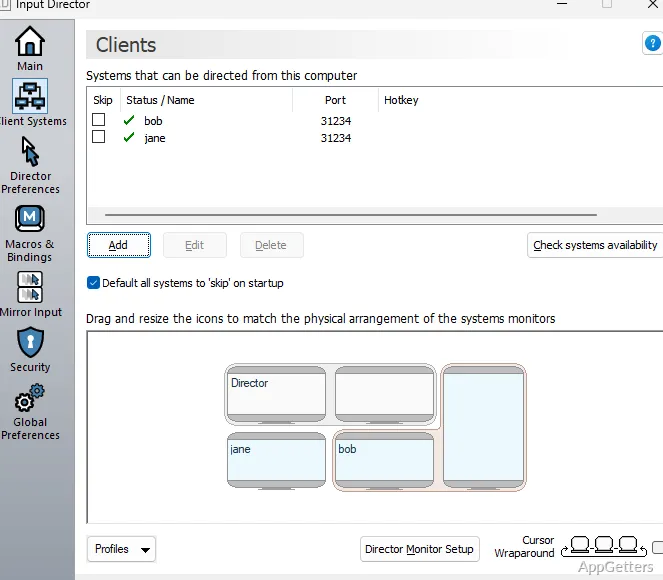
Arrange each computer's monitors in Input Director to match their physical positions. When the pointer reaches an enabled screen edge, it can appear on the neighboring computer. Transitions can happen as soon as the pointer reaches the edge, after a pause, or after a double tap. A key can also be required to allow a transition, and corner limits can reduce accidental switches.
Hotkeys offer another way to change control: assign one to select a particular computer or move between computers and monitors. Brief ripples around the pointer after a transition make it easier to spot where it landed.
Shared clipboard and input
Copy content on one computer, move control to another, and paste there using the shared clipboard. Clipboard sharing includes files. Input Director can also mirror keyboard input or mouse gestures to multiple computers at once.
- Record keyboard macros and run them with a hotkey on the selected computer or across systems.
- Remap a key so it acts as a different key on a chosen computer.
- Keep the keyboard indicators in step with the computer currently being controlled.
Profiles and system controls
Profiles store different computer groups and monitor arrangements, while configuration import and export make it possible to reuse a setup. A computer can be temporarily skipped during navigation. The on-screen information window can identify which system currently has control.
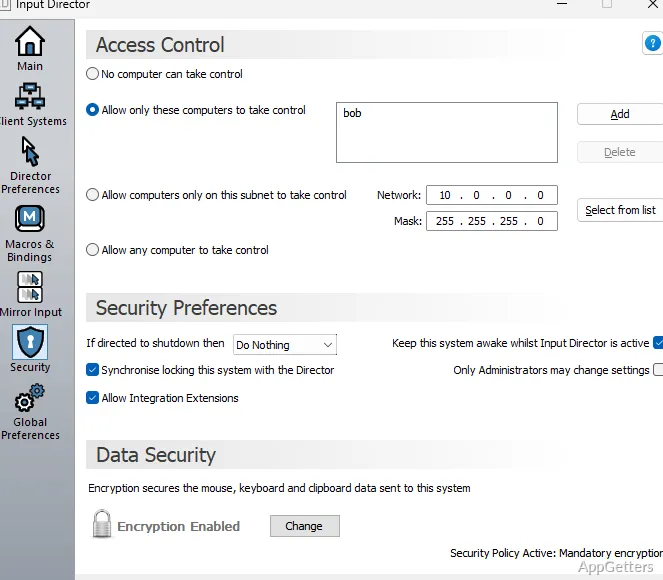
Input Director also includes shared controls for managing connected systems. It can lock all computers, synchronize screensavers, and coordinate shutdowns; shutdown behavior can be set per computer, including standby or hibernation. Network wake and encrypted data transfer are available as well.
Pros
- Switch computers by moving the cursor to a screen edge
- Share clipboard content, including files, between systems
- Create profiles for different computer groups and monitor layouts
- Use hotkeys, macros, or mirrored input across computers
System requirements: Windows 7, Windows 8, Windows 8.1, Windows 10, Windows 11 · Network connection between the computers
How do you switch control to another computer?
Move the pointer to an enabled screen edge, use a configured hotkey, or use a transition rule such as pausing or double tapping at the edge.
Can Input Director copy files between computers?
Yes. Its shared clipboard supports copying and pasting files between connected computers.
Can keyboard input go to more than one computer at once?
Yes. Mirror input broadcasts keyboard input, mouse gestures, or both to multiple computers.