EXE
Home » Software » Windows » general » LetsView for Windows
LetsView for Windows

LetsView for Windows

  • By LetsView
  • Free
  • Version: 1.3.1.1
  • 2.39 MB
  • Security Report:

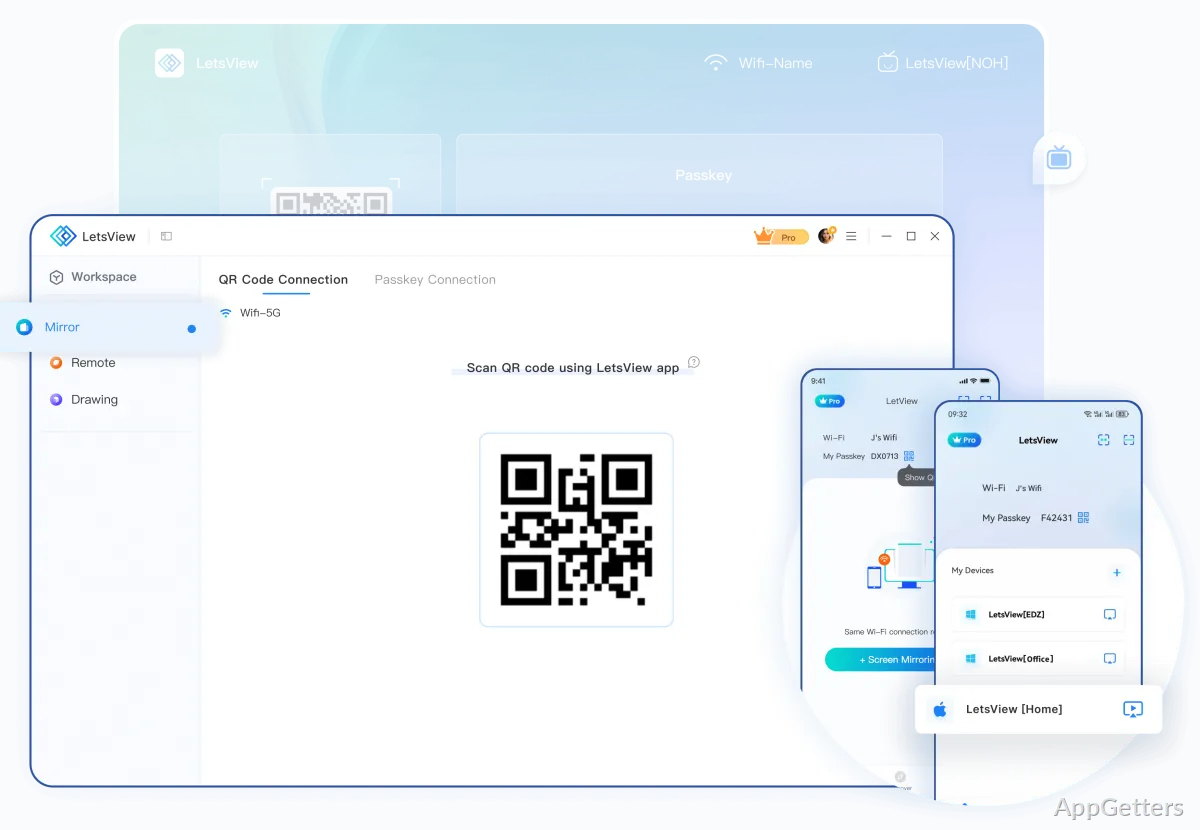
Screen sharing on Windows, at least theoretically, should be easy, but in reality, it turns out to be a nightmare. There are numerous stories of people struggling with compatibility difficulties. They have delays in connection and get tangled up in complicated tools, etc. Presenting, sharing mobile screens, or remote teamwork usually require one key thing. Users depend on screen sharing to work without fail, with no extra features. Tools like LetsView are literally giving these users a great reason to ditch desktop connections. They can mirror their devices wirelessly.

Wireless Screen Mirroring Made Easy

LetsView is not about blowing your mind with all the different great features it has. You have no idea how to use many of them. It’s mainly about getting you from point A to point B without any hassle. Installing it on Windows takes no time, and the interface is also very minimalistic. In practice, when you have to connect your mobile or another computer, only a couple of steps are needed. This applies if both devices are connected to the same network. Thanks to this feature, even beginners will easily get the hang of the casting technology.

The thing that really amazed me is that this software does not introduce the user to all those technical things and configuration layers. These only add to bewilderment and time loss. On the negative side, it is quite obvious that the tool will not meet the desires of those users who want access to all the tiniest details and settings. Such possibilities are very limited here. It could be said that this is the very tool designed expressly for those who do not want to spend their time on detailed settings and modifications. They want to be able to duplicate their screens quickly and effectively.

Usage Scenarios and Constant Performance

LetsView in typical home or classroom settings has the potential to be a pretty solid and dependable performer. This is true as long as the connection stays stable. It is unlikely to experience screen mirroring interruptions when giving a presentation, browsing the Internet, or running a program for regular use. For example, students sharing a slide or a teacher showing a software application are typical use cases. In these instances, you might get a really smooth and effortless experience out of this tool.

But Wi-Fi quality does seem to have an impact on performance here. When on less stable networks, people may observe delays after mirroring. The quality (frame rate) is also impaired. Such issues will come to light, especially when playing a video or working on interactive content. This aspect of the software should not be completely dismissed as a major con. At least it should be taken into account that, in terms of streaming or gaming, it is not particularly meant for these purposes. So at that point, you might want to consider other solutions.

Small but Meaningful Extras to Help Get the Job Done

The development team at LetsView has decided to keep the software compact in terms of interface features. They have mostly integrated usability enhancers such as taking shots of the screen, recording the screen, and adding explanatory text. This is done without making users feel like they are working their way through some maze. These extra functionalities are particularly a boon to live educators, those who work at home offices, and to anyone else who has to combine words with visual explanations.

In reality, these functionalities are at hand and very simple to use. At the same time, they never get in the way of the main activity. Annotating a mirrored image directly can make a point more effectively than explaining it only verbally. However, the features offered here are still quite small in number. Those users who need professional broadcasting or advanced editing functionalities might consequently be missing the kind of tools they require. This happens if they stick to using LetsView only.

LetsView’s Role is Mainly for Everyday Situations

The nutshell version is that if you are the type of user who simply wants nice and easy solutions with no loss of trustworthiness and speed, this tool fits well. If you can let go of not-so-normal features, then yes, LetsView is the app for you. It will definitely be a source of quick and ready screen sharing. It works in a non-technically involved way in locations such as classrooms, small meetings, and homes.

Students, non-technical users, and employees who are working remotely will, to a great extent, be served well by it. This applies to planning their daily screen-sharing tasks. Its limitations are bound to come out more clearly in the case of higher-grade streaming or more properly designed presentations. Nevertheless, it is doing a really good thing by being a light Windows tool. It is accessible to most people. It is not trying to be the jack-of-all-trades. Whatever it is, it is getting the job done to support what users do day after day.

Software Details of LetsView 1.3.1.1

License
Free
Version
1.3.1.1
File Size
2.39 MB
Downloads
0
Languages
English English, Arabic, Chinese, Czech, Danish, Dutch, Finnish, French, German, Greek, Hungarian, Indonesian, Italian, Japanese, Korean, Malay, Norwegian, Polish, Portuguese, Russian, Spanish, Swedish, Thai, Turkish, Vietnamese
Category
Op. System
Windows
Developer
Last Updated
November 18, 2023

Version History

4 versions
1.3.1.1
Latest
2.39 MB
November 18, 2023
1.3.0.12
2.4 MB
November 13, 2023
1.1.1.5
2.64 MB
August 28, 2023
1.1.7.11
2.35 MB
August 26, 2023

Leave a Comment

Your email address will not be published. Required fields are marked *

Software Icon
Security Report

Loading scan data...

Scroll to Top