Supported Logitech devices can be tailored with custom button actions, application-specific settings, and controls for everyday tasks. Logi Options+ brings these adjustments together, with features such as Smart Actions, Flow, and gesture controls for compatible devices.
Button actions and Smart Actions
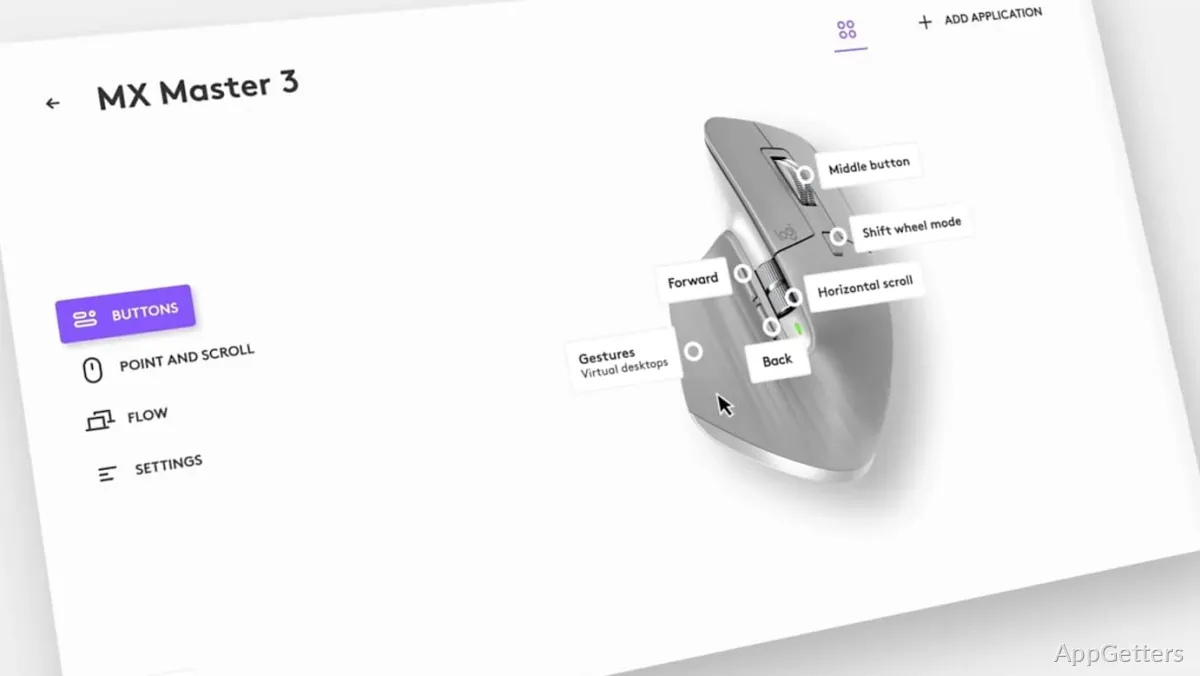
In Logi Options+, assign actions to buttons on supported mice and shortcuts to function keys on supported keyboards. Actions can be tailored to particular applications, with presets available for programs such as Chrome, Zoom, Word, Excel, Photoshop, and Microsoft Teams.
Smart Actions bundle several tasks into one mouse click or keystroke. That setup suits repeated sequences, such as opening applications and carrying out recurring steps, without assigning each step its own input.
Gestures and pointer settings
Mouse buttons can trigger directional gestures: hold a button and move the mouse up, down, left, or right to navigate windows, control music, or perform another assigned action. Gestures can also be assigned to supported touchpads.
The pointer and scrolling controls adjust pointer speed, scroll speed, and scroll direction. Device status is surfaced in the app as well, including battery level, Caps Lock notifications, and which computers are paired with supported mice and keyboards.
Flow and multi-device control
Flow lets a compatible mouse and keyboard control multiple computers. Move between those computers and transfer text, images, and files between them as part of the same workflow.
For keyboards with Easy-Switch, a key press changes between as many as three connected devices. Flow and Easy-Switch address different kinds of switching: Flow connects computer use across systems, while Easy-Switch selects a device from the keyboard.
Actions Ring and Spotlight
Actions Ring places a customizable on-screen overlay within reach of assigned tools. It is available on supported MX devices, excluding MX webcams and MX Ink. The Marketplace offers plugins, profiles, and icon packs for supported MX devices.
For supported Spotlight presentation remotes, the app configures pointer effects that emphasize, magnify, or simulate a digital laser on screen. Lighting controls for compatible Logitech LED lights include brightness, color temperature, and application-specific settings.
Pros
- Smart Actions combine multiple tasks behind one click or keystroke
- Flow transfers text, images, and files between computers
- Application-specific settings can assign different actions to different programs
- Pointer speed and scroll speed and direction are adjustable
Cons
- Actions Ring and Marketplace are limited to MX devices, with specified exclusions
- Haptic feedback is currently limited to MX Master 4
System requirements: Windows 10, Windows 11
Can Logi Options+ assign different actions to different applications?
Yes. Supported devices can use application-specific actions, either from presets or settings created for individual programs.
What does Flow do?
Flow lets compatible Logitech devices control multiple computers and transfer text, images, and files between them.
Can keyboard gestures or mouse gestures be configured?
Mouse buttons and supported touchpads can be assigned directional gestures. Supported keyboards can have shortcuts assigned to function keys.