EXE
Home » Software » Windows » general » QuickTextPaste for Windows
QuickTextPaste for Windows

QuickTextPaste for Windows

  • By Softwareok
  • Free
  • Version: 9.45.0.0
  • 433.34 KB
  • Security Report:

Many Windows users repeat the same pieces of text multiple times a day. Common things like email responses, forms, software code, and even usual phrases get typed repeatedly. Copy and paste is helpful, but it can still cause interruptions in your workflow, especially when you have to change from one application to another. Gradually, these slight disruptions pile up and make working on usual tasks slow. This is the point at which QuickTextPaste is helpful, as it is a tiny and non-intrusive software. It aims to reduce the repetition of the content and links often-used text with customizable shortcuts.

Making Repetitive Typing Easier

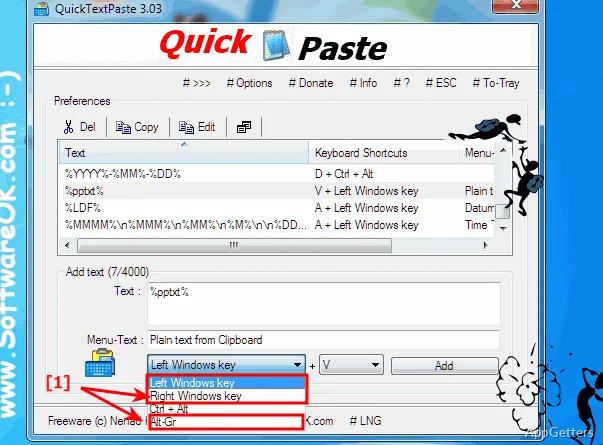
For everyday purposes, QuickTextPaste acts as a small, shortcut-triggered text-inserting tool. It is not a complete clipboard manager, as you map your most-used text onto some keys. Then these texts can be dropped right there in front of you, and this works in most of the applications. That is when the real benefit is felt while doing repetitive communications or structured inputs. Responding to common emails or filling out web forms becomes a breeze.

Setting up is not too complicated, and once done, it does not disturb you at all. There is no need for a resource-consuming user interface or any kind of interaction. When you are working, the tool ignores you completely and stays in the background, silently running. That is perfect for people who get easily distracted by anything as little as a mouse click.

Useful Features of QuickTextPaste

QuickTextPaste usually finds a natural place in your work, study, or casual workflow. A student may use it to paste their citations or phrases, while office staff might use it for their quick answers or filling in records. Even the average user may find it very useful, as this applies to putting down addresses, texts related to login, or just plain old messages.

What feels really great in actual usage is the level of smoothness, and you also get familiarity with the shortcuts. They react without any delay to the command, and it is almost like the text is appearing magically. The tool digests and outputs the content in your preferred applications. This means it is different from other similar tools, as those tools depend strongly on a particular program or environment.

What are the Pros and Cons of the Tool

QuickTextPaste is very easy to use. It only does one thing, which is to insert your texts really fast, and it always does it well. You would not even need to learn a lot or spend any time getting to understand how to use it. Just a few minutes setting it up, and you are good to go.

On the downside, its simplicity brings with it many limitations. It does not have any advanced features, including the use of variables in texts, clipboard history, or intelligent suggestions. These can be found in other, more sophisticated automation utilities. Those who are interested in automating things to a deep level may find it quite limited, and those who use the scripting mode may also find it limited. Another downside is that it can be a bit of a pain when dealing with a lot of shortcuts over a long period of time.

Who Benefits Most from QuickTextPaste

QuickTextPaste is perfect for those who want a simple way of cutting down repetitive typing. It does this without changing their working style, so it does not try to be a big productivity tool. Instead, it mainly works with what you already have. For those who favor speed and want to set up with very little effort, this tool is a great solution, as it offers almost invisible efficiency.

Constant use in the same type of environment is one of the strong points. In this environment, a high degree of reliability outweighs the need for changing and trying out new things. It might not be able to deliver on the promise of helping with advanced automations. But in everyday text handling, it is a trusty little companion. It can make your computer use incrementally better day by day.

Software Details of QuickTextPaste 9.45.0.0

License
Free
Version
9.45.0.0
File Size
433.34 KB
Downloads
0
Language
English
Category
Op. System
Windows
Developer
Last Updated
April 6, 2026

Version History

6 versions
9.45.0.0
Latest
433.34 KB
April 6, 2026
9.41.0.0
433.62 KB
February 24, 2026
9.36.0.0
433.59 KB
January 21, 2026
9.33.0.0
433.66 KB
December 18, 2025
9.31.0.0
433.63 KB
September 30, 2025
9.22
283.06 KB
June 4, 2025

Leave a Comment

Your email address will not be published. Required fields are marked *

Software Icon
Security Report

Loading scan data...

Scroll to Top