EXE
Home » Software » Windows » text-documents » Text Editor Pro for Windows
Text Editor Pro for Windows

Text Editor Pro for Windows

Typically, the problem with text editors for many Windows users is not that they lack features. It is more of a problem that the editors themselves tend to interfere with the users’ work. Users complain that a lot of modern editors come packed with a number of integration options, plugins, or background operations. These have the tendency to make even simple tasks run more slowly. This situation gets worse if someone simply wants to open a file fast, make a few changes, and move on. As a response to this, Text Editor Pro offers a lightweight but effective alternative. It is fast enough and, at the same time, just sufficiently equipped with features for daily use.

A Familiar Workspace That Focuses On Speed

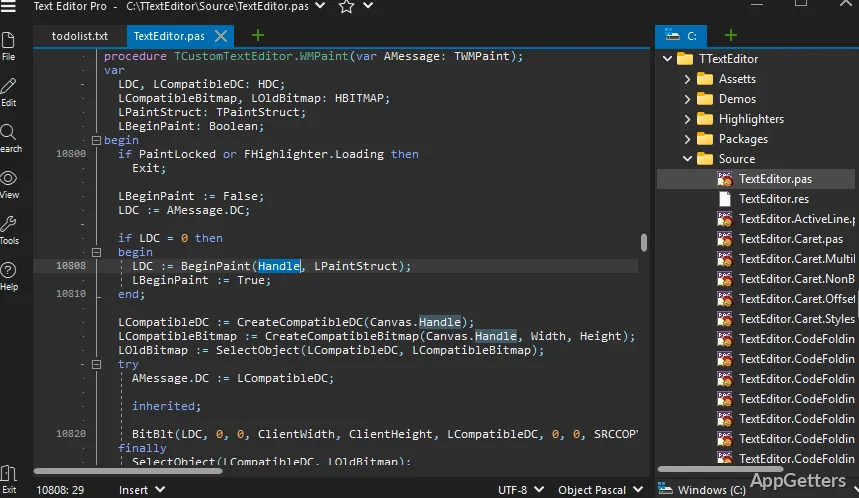
Text Editor Pro can easily be regarded as one of the fastest editors for a long time. It opens and, at the same time, edits files almost instantly. Even if you are using a pretty old computer, it will still be able to get the job done quickly. This is a very important point for those users. They may have to open several documents one after the other or switch between various tasks. Keeping with the old school Windows design, the interface is simple. It is very easy to find the right feature. You get a nice combination of menus, toolbars, and tabs.

If you are a person who utilizes simple tools like Notepad, you will have no problem adjusting to Text Editor Pro. Besides, it also carries out small changes to your everyday work experience. These include editing with tabs and the option to choose a theme that you like. Most importantly, the temptation to increase the number of options for customization is difficult to resist. At the same time, it is the right thing to do. Hence, the user will not feel lost in the everyday usage of the program.

Practical Features Without Excess Complexity

You will find in Text Editor Pro enough functionality to perform standard editing operations. The presence of the application’s functions does not become a distraction. Syntax highlighting is one of the features that has been implemented. It enables the indication of different types of code by color. With this, a user can even perform programming or scripting. Additionally, search and replace across multiple files can be done. This saves you from the hassle of repetitive manual work.

The most remarkable part is the fact that the implementation of these features is such that you do not find your work getting interrupted. You can get started just like that. You do not have to set up environments or extensions. However, those users who are in need of very advanced development features might find it lacking. This includes debugging at a very deep level or version control integrated with the software.

Suitable for Mixed Everyday Use

It is an editor that should be able to deliver the kind of performance that you expect. This applies if you are someone who values the ability to do many different things, rather than being able to do just one thing very well. Students who jot down their study notes, home users who edit their configuration files, and professionals who carry out minor code changes are examples of typical users who would enjoy working with the editor. A great number of people out there constantly switch between simple text editing and, once in a while, structured file work. This is the situation that this editor is tailor-made to handle.

Since the editor is so tiny in terms of functionality, you might find it handy as a backup editor in your toolset. This is true even if you are already the type of user who prefers heavier applications. No matter if it is log opening, script reviewing, or quick fix making, it always happens fast and smoothly. There are no delays that are usually present with big applications. Of course, that being said, for power users who deal with large-scale projects, it is only a matter of time. They will outgrow the program.

Where It Fits in a Windows Workflow

Text Editor Pro is a suitable option when used as a reliable, straightforward editor for running simple tasks. Since it doesn’t even attempt to compete with the highly sophisticated development environments, that characteristic contributes to its appeal. In fact, it is consistent with the idea of providing a bridge between bare tools and heavyweight software. It offers an adequate framework to be helpful. On top of that, it doesn’t get intrusive.

Those users who are always in search of speed, transparency, and a consistent editing experience will find a place for it in their workflow. The tool will almost certainly be able to establish a stable place. It goes without saying that those who take great pleasure in having a simple solution will find it suitable. This solution is capable of operating in both the simple text realm and, to a certain extent, of complexity. It does so without requiring continual setup and maintenance of the software.

Software Details of Text Editor Pro 36.2.0

License
Free
Version
36.2.0
File Size
10.02 MB
Downloads
6
Language
English
Category
Op. System
Windows
Last Updated
April 19, 2026

Version History

6 versions
36.2.0
Latest
10.02 MB
April 19, 2026
36.1.0
10.01 MB
April 12, 2026
36.0.0
10.01 MB
April 7, 2026
35.6.2
9.91 MB
March 18, 2026
35.6.1
9.91 MB
March 15, 2026
35.6.0
9.91 MB
March 9, 2026

Leave a Comment

Your email address will not be published. Required fields are marked *

Software Icon
Security Report

Loading scan data...

Scroll to Top