EXE
Home » Software » Windows » Photo Tools » Syncios Mobile Manager for Windows
Syncios Mobile Manager for Windows

Syncios Mobile Manager for Windows

  • By Syncios Inc.
  • Free
  • Version: 7.2.1
  • 45.25 MB
  • Security Report:

Controlling file transfer between your mobile phone and PC might be less simple than most people imagine. Of course, using cloud services for data transfer might be convenient sometimes, but what if you have a big media library? Besides, creating local backups or directly managing files cannot always be done via the cloud either. Those users who wish to have more control over their phone’s content will usually tend to download the management tools. These tools help them perform the tasks in a simple manner. They do not require the users to be very technical. Syncios Mobile Manager is exactly such a tool. With the help of this app, users can easily manage their mobile data on their devices via a Windows PC. The app provides a single and centralized interface.

A Practical Approach to Mobile Data Management

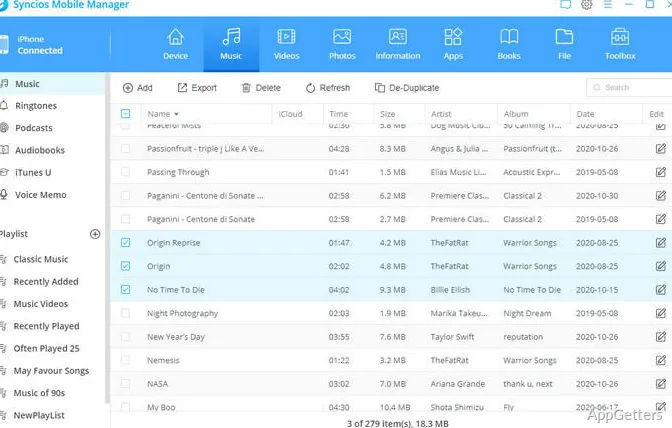
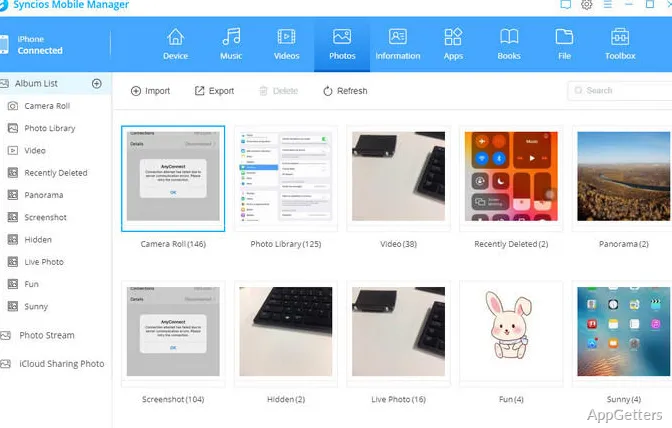
As a rule, Syncios Mobile Manager will reduce the user’s effort in the phone-management activities that are done quite often. Upon connecting your phone, you will be able to view the photos, videos, music, contacts, and messages. You will also be able to view other types of data without leaving the main window. In this case, it will be very handy when you are switching to a new device. It will also help when you are moving the data from phone to PC, or when you are making an additional backup on the PC outside the cloud system.

In fact, the program is capable of supporting both Android and iOS. This will be a really good thing if there are different platforms present within your family or workplace. And without making you go into the details of several different instruments, it puts the frequently performed functions together in one place. For a lot of users, this method of centralizing will result in less time being spent. It will reduce the time spent on looking for the files or organizing the storage manually.

Everyday Workflow Benefits

As a matter of fact, one of the advantages of this software is the way it gets along with a customer’s daily routine. For example, a student may back up his/her photos and videos via Syncios Mobile Manager prior to upgrading the phone. Besides, a regular user will simply make use of it for playing music, arranging photos, and keeping contacts that are essential when replacing the phone.

Basically, the design is simple. Even those who are not very advanced with the sync tools are able to get things done. You will hardly get any tasks that cannot be performed by using the methods that are already well-known, such as drag-and-drop or export-import. Thus, the difficulty is being lessened. The user gets to use his/her time for the actual work instead of tutorials. Besides, for those who are big fans of local copies, this tool may be a good solution. It has some restrictions in cloud-only scenarios.

Reliability, Compatibility, and Limitations

As a matter of fact, Syncios Mobile Manager is well-suited when it comes to the use in connection with regular data sharing and organization of the device. It normally will be good with media files and backups, especially. These features are of particular interest for regular phone users who connect their phones to a Windows PC.

As is the case with many other 3rd party applications of the like, device compatibility is something that will be affected. This will be due to the operating system updates as well as driver configurations. A couple of more advanced functions might turn out to require extra installation. The speed of transferring depends on the connection type and the model of the device. If you want to have a very detailed system-level customization, this software may not be the one. It is more dedicated to data management rather than device modification. These are the limitations that are typical within this category. You should be aware of them if you want to use the software for some specialized purposes.

A Useful Option for Customers Who Prefer Local Control

Users who wish to work only on their PC as the main phone manager and don’t intend to make heavy use of the cloud services will very possibly find Syncios Mobile Manager a good tool. The software helps you in doing normal things such as making backup copies, organizing photos, moving files, and switching to new devices. Students, families, and users at large will find it helpful.

While it does not really stand out with the number of features it provides, it will be effective in doing most daily routine work. People carry out this work when it comes to mobile device management. If you need an all-in-one tool where your phone data can be handled, then Syncios Mobile Manager is a very good candidate. It also offers the option to keep local copies of your key files. It falls within the overall category of mobile management software.

Software Details of Syncios Mobile Manager 7.2.1

License
Free
Version
7.2.1
File Size
45.25 MB
Downloads
1
Languages
English English, Chinese, French, German, Italian, Japanese, Portuguese, Turkish, Vietnamese
Category
Op. System
Windows
Developer
Last Updated
December 12, 2025

Version History

1 version
7.2.1
Latest
45.25 MB
December 12, 2025

Leave a Comment

Your email address will not be published. Required fields are marked *

Software Icon
Security Report

Loading scan data...

Scroll to Top