EXE
Home » Software » Windows » text-documents » PSPad editor for Windows
PSPad editor for Windows

PSPad editor for Windows

  • By Jan Fiala
  • Free
  • Version: 5.0.7 Build 775
  • 10.57 MB
  • Security Report:

Many Windows users probably would find it quite challenging to discover a text editor that perfectly serves as a nice balance between very basic tools and complex development environments overloaded with features. Simple editors generally do not offer enough structure for coding or other types of structured writing. Fully featured IDEs might be off for quick editing or light workflows due to their heaviness. PSPad editor tries to place itself somewhere between two extremes. It aims to deliver enough power for practical work without creating extra trouble.

Working environment for reasonable use

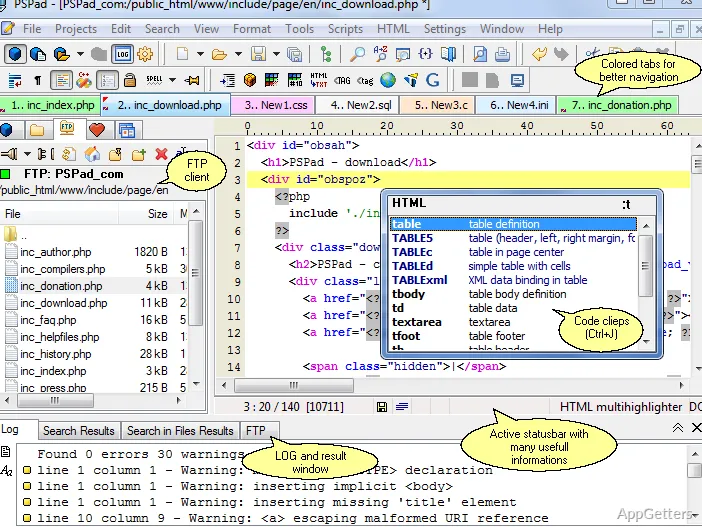
During regular use, PSPad gives the impression that it was created with the idea that its users have to be juggling several different types of text work. This includes editing configuration files, coding in HTML, or cleaning up ordinary text. The workspace always remains open and easily understandable, without becoming too simple. Multiple tabs help to keep files open concurrently. This can be a real help when looking at pieces side by side or following the documentation.

One can say that the interface style is probably not in line with modern trends, but it is perfectly working and not complicated. The labels on the first-level menus are self-explanatory. The majority of the uses that one has regularly for things during the day are approximately in the places experienced Windows users would expect them to be. This almost guarantees a smooth start. It is especially helpful for those coming from older and more straightforward editors.

Just the right amount of functionality

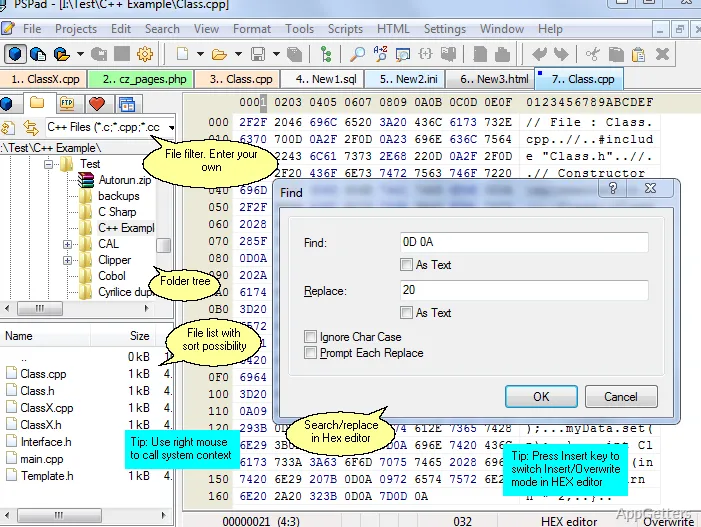
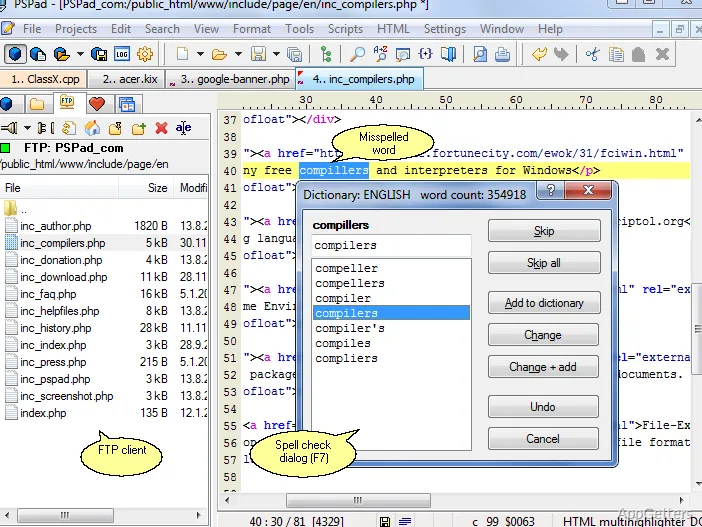
Throughout the whole operation, one thing is made very clear to the user: PSPad editor, by and large, carries along a lot of great stuff with it. It does so only to an extent beyond which it would become quite heavy or intimidating. Syntax coloring can be switched on and off for a healthy number of file formats. This allows the tool to be used for basic programming or lite development as well. Other built-in essentials include the capability to search and replace text outside the currently opened file. They also include a bit of project administration and a rather dumbfounded FTP client.

The absence of features like heavyweight dependency management or a whole-scale debugging environment serves as a very clear signal. The product is strictly code editing and reviewing-oriented, rather than being a full-blown application development environment. For this specific user segment, this limitation becomes a strength in so many ways. To be even more specific, the software is kept on the fast and responsive side even when run on relatively low-end configurations. This cannot necessarily be said about the competition. It consists of other up-to-date editors.

Trustworthiness when used in different ways

Reliability is probably one of the greatest aspects of the software. The program can work with big text files without noticeable problems. Issues such as crashing or hanging are very rarely encountered, even during long periods of use. This dependability factor puts it among the options that can be considered totally trustworthy for users dealing with logs, scripts, or even structured documents.

Besides, one can also turn to it when no Internet is available. As opposed to many of the latest software programs that are dependent on being loaded with extensions or cloud integration, PSPad editor is completely capable of working properly without being connected to the net. For students, amateurs, or researchers who have to operate in situations with very restricted access, it is quite possible that this kind of freedom might be a huge point in favor of the program.

Although users who are very familiar with personalizing every single part of their editor through extensions might get a little bit uncomfortable by the fact that there is no such ecosystem here, this is still a limitation. PSPad still stands for a fully built-in set of tools. What you get is what you see.

How it fits a contemporary Windows-based computer

PSPad editor is outstandingly good at supporting those users who are more dependent on the tools that are simple and less trendy. These users need a reliable, bare-bones editor. It should consistently provide features that are a bit more than the very basic text editing ones. However, it does not reach the level of full IDEs at all. It could be used very effectively by students who are learning markup or scripting. It also suits sysadmins who are dealing with configuration files. Even home users who occasionally get around to editing structured text can benefit.

The product is not really tailored towards developers engaged in large projects. Those who are heavily dependent on plugins and integrations will find it very limited. If the cases mentioned above are the ones for you, then more recent editors will probably suit your needs better in the long run.

PSPad as a piece of software successfully fulfills its purpose, mission, and vision. It represents the software philosophy of putting a focus on style, trend, and marketing in front of function. In the end, it offers an editing experience that is classic, relatively simple, yet powerful and highly effective for those users who value such qualities.

Software Details of PSPad editor 5.0.7 Build 775

License
Free
Version
5.0.7 Build 775
File Size
10.57 MB
Downloads
2
Languages
English English, Spanish
Category
Op. System
Windows
Developer
Last Updated
March 19, 2023

Version History

2 versions
5.0.7 Build 775
Latest
10.57 MB
March 19, 2023
5.0.7 Build 773
10.39 MB
March 17, 2023

Leave a Comment

Your email address will not be published. Required fields are marked *

Software Icon
Security Report

Loading scan data...

Scroll to Top