EXE
Home » Software » Windows » text-documents » MiKTeX for Windows
MiKTeX for Windows

MiKTeX for Windows

Most LaTeX users stumble at the first hurdle, not in writing documents, but in setting up a stable working environment. Owner-installing a TeX system might be a heavyweight operation, a puzzle. It may be even a bit unreliable for Windows starters. Broken package dependencies, lack of fonts, constant updates done by hand… these things can break your development exceedingly fast. This is exactly where MiKTeX comes in. It is not a showy tool. It is a simple, self-managing LaTeX distribution that will reduce installation problems to zero and keep your work running smoothly.

A setup that changes as you type

One of the greatest characteristics of MiKTeX, which you feel when you use it, is how it tackles the package management issue. Instead of expecting users to download everything beforehand, it actually fetches the missing parts from the net. This happens during operation time. While you are making a document, if there is a missing package that the document depends on, a dialog will show up asking permission to install it. This gives fresh users a huge relief from a confusing scenario. That scenario happens as new things are learned. On the other hand, for advanced users, it means no longer having to memorize all those dependency chains either.

Installation experience

The actual install procedure is barely anything complicated for a Windows user. It allows deciding whether you want it just for yourself or also for other users (sharing). Disk space consumption stays at low levels because only those parts are downloaded that are actually needed. This in-flight method of working can and will frustrate you. This happens if your permissions and connections are limited, e.g., in corporate networks.

Day-to-day usage and workflow reliability

MiKTeX is no trouble integrating with leading LaTeX editors like TeXworks (included), TeXstudio, or VS Code. Usually, you get dependable running from your author projects with the LaTeX system. It is quite rare that you get an error without hints for the error’s root cause in the log file. This kind of stability, which you can rely on, is fundamental to the user. The user is mostly a student/academic researcher and writing a thesis/paper/etc, rather than heavy customizations.

Upgrades and servicing behavior

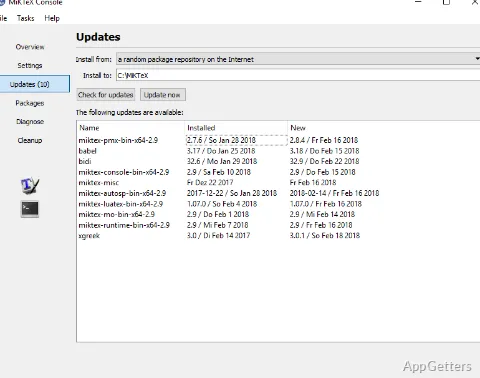
Auto-updates are a good example of how even the smallest details can be greatly beneficial to a user. MiKTeX takes pains to make sure that its files on your computer are the latest and greatest. This happens with very few requests for users’ time. This helps greatly in avoiding hitting issues. These issues are due to one’s very own development environment being out of sync with the projects. Nevertheless, at times, these updates possibly bring about slight changes in behavior. These changes were unexpected by users who have developed their documents while working with older versions of packages. So, those who are involved in long-term projects might update less frequently or more cautiously.

Strengths regarding accessibility, limits in control

MiKTeX’s strongest feature is, without a doubt, accessibility. It is a human-friendly LaTeX system for Windows because it takes care of many things ‘behind the scenes’ which normally have to be understood and configured by the user. This results in it being an ideal LaTeX solution for students, teachers, and casual users who simply want a good working system.

Still, the flip side of this friendliness might be that advanced users feel limited. If compared to TeX Live, MiKTeX gives you less visibility and decision power about the exact versions of your packages and how your system behaves. Yes, you still get the console for doing your package and setting management tasks. But when it comes to a power user trying to get the very same environment on various machines, one finds it much less trustworthy.

Performance characteristics

General performance is good; however, the very first run with a new document may be a bit slow because of packages that have to be downloaded and installed. From then on, normal operations usually continue without a hitch.

Where MiKTeX fits in actual use

MiKTeX is a very good pick as a reliable, simple-to-keep LaTeX distribution for a Windows crowd. This crowd mostly cares about the user friendliness factor and is willing to let go of the fine detailed control. A lot of academic work, domestic writing, and light professional documentation are contexts in which MiKTeX excels. Factors such as ease of installation and minimum user interruption for maintenance matter more than large-scale reproducibility.

Fresh LaTeX users will find here that the major hurdles that usually make LaTeX unattractive are removed to a large extent. As for knowledgeable users, it should be considered a very usable everyday tool. This is given that there is no need for guaranteed, identical builds across machines.

Software Details of MiKTeX 25.12

License
Free
Version
25.12
File Size
141.98 MB
Downloads
0
Languages
English English, Afrikaans, Amharic, Arabic, Armenian, Belarusian, Bulgarian, Catalan, Chinese, Croatian, Czech, Danish, Dutch, Estonian, Farsi, Finnish, French, German, Greek, Hebrew, Hindi, Hungarian, Icelandic, Indonesian, Italian, Japanese, Kazakh, Korean, Latvian, Lithuanian, Malay, Norwegian, Polish, Portuguese, Romanian, Russian, Serbian, Slovak, Slovenian, Spanish, Swahili, Swedish, Tagalog, Thai, Turkish, Ukrainian, Vietnamese, Zulu
Category
Op. System
Windows
Developer
Last Updated
January 2, 2026

Version History

2 versions
25.12
Latest
141.98 MB
January 2, 2026
24.1
138.07 MB
November 19, 2024

Leave a Comment

Your email address will not be published. Required fields are marked *

Software Icon
Security Report

Loading scan data...

Scroll to Top