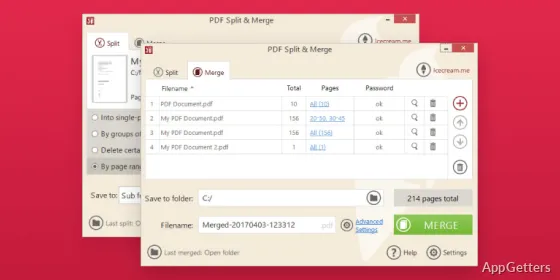
Need to pull a few pages out of a PDF or join several into one? Icecream PDF Split & Merge splits a document into single pages or page groups, removes pages, and has a merge mode for combining documents, with processing handled locally on the computer.
Split PDFs by page or remove selected pages
Choose whether to save every page as its own PDF, divide the document into groups of pages, or exclude pages that are not needed. A preview lets you inspect the PDF and select pages before starting the split.
The split and merge modes can be used in sequence: split a document into smaller files, then combine chosen PDFs into a new document.
Merge PDFs in a chosen sequence
Add multiple PDF files to Merge PDF and arrange them in the order they should appear in the combined document. Drag and drop can add files, and the preview provides a way to confirm the selected documents and pages.
- Set the destination to the original folder, a subfolder, or another folder.
- Apply password protection or set permissions in Merge PDF mode.
Process files on the computer
Icecream PDF Split & Merge works offline and processes documents on the local computer, without uploading them to a server. The preview is built into the program, so no separate PDF preview tool is needed.
- Password protection and permissions are also available in Split PDF mode.
- The program is available in more than 50 languages.
Pros
- Three split options: single pages, page groups, or page removal
- Preview pages before splitting or merging
- Choose an output folder for processed PDFs
- Set passwords or permissions in both modes
System requirements: Windows 11, Windows 10, Windows 8.1, Windows 8, Windows 7 · Processor: Intel, AMD, or compatible, 1.33 GHz · RAM: 512 MB minimum (1 GB recommended) · Display resolution: 1280×720 minimum · Disk space: 30–300 MB
What can Icecream PDF Split & Merge do?
It splits PDFs into single-page files or page groups, removes selected pages, and combines PDF files.
Can I choose which pages to split or remove?
Yes. Use the PDF preview to select specific pages, or choose a split mode for single pages or page groups.
Does the program upload PDFs to a server?
No. It processes files locally on the computer and works offline.