EXE
Home » Software » Windows » Photo Tools » DroidKit for Windows
DroidKit for Windows

DroidKit for Windows

  • By imobie
  • Free
  • Version: 1.0.2.1
  • 7.79 MB
  • Security Report:

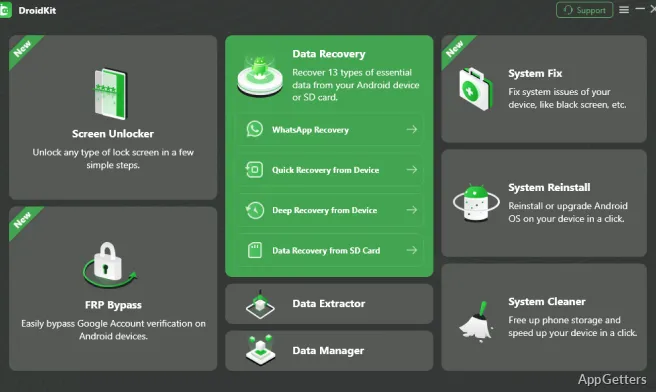
Today, smartphones are essentially our main storage for photos, messages, contacts, documents, and various other personal items. Accidental deletion of data, device inaccessibility, or some system errors making the device unusable are among the reasons that drive a lot of users to figure out recovery tools. These tools are both easy for them to handle and reliable. DroidKit is prepared to serve these needs. It provides a range of Android operating and recovery tools, all in one Windows application. Instead of concentrating entirely on data recovery, its goal is to assist users in resolving various frequent issues related to Android. It does so without necessarily requiring them to have expert-level technical knowledge.

Down-to-Earth Recovery of Android

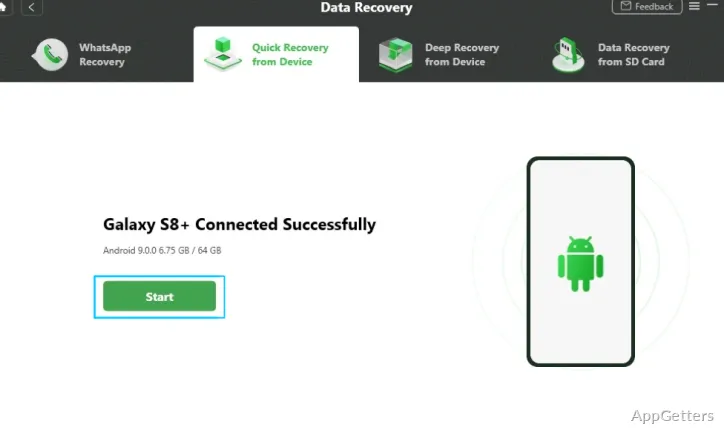
What makes DroidKit unique is, among other things, the fact that it offers detailed guided workflows. When working with the program, users are usually shown recovering and repairing assignments via detailed step-by-step methods. These methods will most likely not trouble even those who have had hardly any contact with Android troubleshooting. The result is that some of the doubts people usually have when it comes to recovery tools are dispelled.

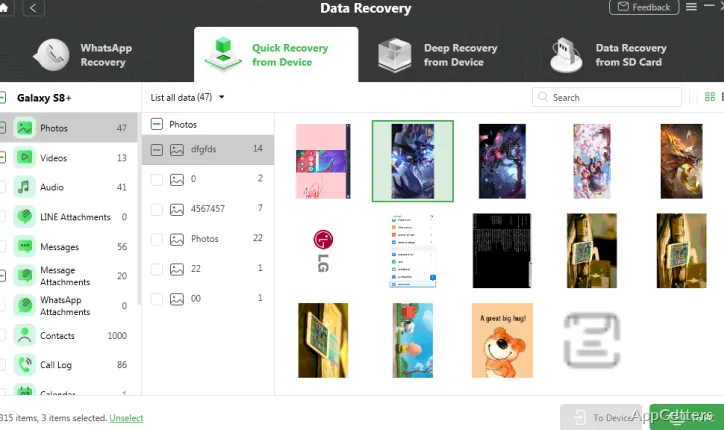
The software, first of all, tries to detect the presence of lost data. It only then guides recovery steps, which makes it more user-friendly without the requirement of complicated recovery knowledge. Even though components such as the type of recovery and the connection reliability of the device have an impact on the result, it would not considerably complicate the method. This way, consequently, DroidKit does not restrict itself only to technical users. It opens itself up to home users as well.

Device Management Plus Data Recovery

However, the part that recovering data is just one element of the functionality of the software may surprise many people. At times, in taking the device apart and doing the test, the user may quite inadvertently discover that there are quite a few typical Android problems. These problems prevent the user from getting back to normal in the first instance. They then need to be resolved as well. Opening the software and using it reveals that, at times, it actually provides multiple options for one problem scenario.

It is interesting to note that the software especially targets users who want a one-stop shop experience. Moreover, it can be assumed that those who have many Android devices sporadically at home, such as families, students, and casual users, will find the software helpful due to its wide-ranging features and capabilities. However, it is equally important to point out that not all of the functions/phases will be available for all models of Android. Some very advanced scenarios will have to turn to manufacturer-specific tools or additional technical intervention.

Workflow, Reliability, and User Experience

In terms of ease of use, DroidKit has dedicated an important proportion of its design to making the software more understandable and communicative to users. The user interface here does not confuse people with unnecessary specialist terminology. Instead, it is so designed that users can easily identify their problems and, based on that, locate the right tool quickly. This factor alone can be a major time-saver and help take some pressure off when one is dealing with data loss or device lockouts.

Like most programs, the speed of scans and recovery operations depends a lot on the device size, the retrieval source, and the connection reliability. The software is able to enhance and speed up many tasks. However, it is critical that users themselves not expect miracles or complete recovery all of the time. After all, there has not been a single recovery application so far that has guaranteed the 100% restoration of deleted data. On the other hand, DroidKit does offer a very well-organized and quite predictable way of working. It goes a long way towards managing user demands and signs them up for restoration attempts of the right magnitude.

Overall Android Problem Solving Tool

Usually, one can consider DroidKit as an Android all-in-one support application, which is not necessarily a specialized cryptography forensics tool. Helping non-expert users comprehend and perform simple maintenance and recovery operations is where the software spells its major strength. Integrating data recovery, device access facilitation, and system troubleshooting into a single Windows software greatly simplifies the procedures involved in Android repair workflows.

Being an amateur user, a student, or a random person dealing with a personal Android device, one can definitely consider adopting the software as a first solution to a problem. In fact, the software, being consumer-minded, faces a number of issues and constraints. These go hand in hand with most of the recovery tools sold on the market. However, a guided experience coupled with a wide range of features makes it a suitable alternative. It is suitable for those who want to use a simple tool to solve their day-to-day Android problems.

Software Details of DroidKit 1.0.2.1

License
Free
Version
1.0.2.1
File Size
7.79 MB
Downloads
4
Languages
English English, Afrikaans, Amharic, Arabic, Armenian, Belarusian, Bulgarian, Catalan, Chinese, Croatian, Czech, Danish, Dutch, Estonian, Farsi, Finnish, French, German, Greek, Hebrew, Hindi, Hungarian, Icelandic, Indonesian, Italian, Japanese, Kazakh, Korean, Latvian, Lithuanian, Malay, Norwegian, Polish, Portuguese, Romanian, Russian, Serbian, Slovak, Slovenian, Spanish, Swahili, Swedish, Tagalog, Thai, Turkish, Ukrainian, Vietnamese, Zulu
Category
Op. System
Windows
Developer
Last Updated
January 9, 2026

Version History

4 versions
1.0.2.1
Latest
7.79 MB
January 9, 2026
1.0.1.5
20.67 MB
December 5, 2025
2.3.3
19.58 MB
May 9, 2025
2.3.0
19.5 MB
April 18, 2024

Leave a Comment

Your email address will not be published. Required fields are marked *

Software Icon
Security Report

Loading scan data...

Scroll to Top