EXE
Home » Software » Windows » text-documents » AVS Document Converter for Windows
AVS Document Converter for Windows

AVS Document Converter for Windows

Document formats only become a problem for most Windows users when something just doesn’t open, upload, or share properly. For example, a PDF can’t be edited, and a DOCX doesn’t upload to a portal. It is sometimes necessary to turn an image-based file into searchable text. Such cases are minor but very common interruptions to the work process, especially for students, office workers, and anyone who deals with different types of files. AVS Document Converter presents itself as a simple solution to these everyday issues that people face. It mainly converts documents fast without touching deep technical stuff or requiring heavy software installations.

Practical Conversion for Daily Tasks

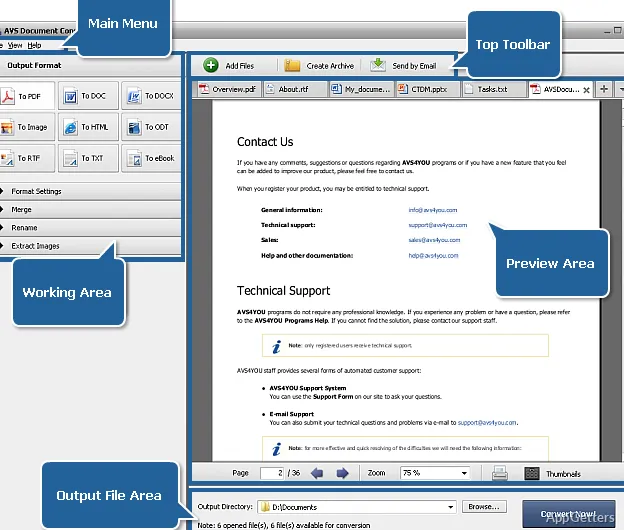
AVS Document Converter’s ability to keep primary productive days lies in focusing on the most common uses instead of all possible cases. Just a handful of mouse clicks is enough to turn PDFs into Word-editable documents. It can extract text from images. It can also get formats ready for submission with the use of drag and drop only. The interface has very few elements that can distract the user. This makes it easier for new users to pass without any problem, from selecting files to conversion.

Above all, batch conversions are well handled by this program. Instead of converting each file individually, they can be placed in a queue and left alone to be processed one after another. This is a time saver for scanned assignments, office paperwork that needs to be done, or file archives that undergo reformatting. So personalization of settings and beautification of documents are hardly on the agenda here. This is just a reliable getting-the-job-done promise.

Interface and Workflow Simplicity

Functionally, the interface is clearly made for the help and use of the least skillful group of users. Tab numbers are minimal and related to file types such as PDF, DOC, DOCX, RTF, TXT, and image formats. This results in no need for conversion jargon learning before getting going. Every action is supported visually. This makes users selecting changes at the output level less prone to errors they would make anyway.

The result for the tool is that its use gives rise to wrong choices only in the rarest of circumstances. The regular document-phase tool users will favor having thirty to forty configuration options to make various combinations of choices over having only a few. Those few hands who have more experienced skills may notice the absence of deeper control functions, like being able to keep formatting changes consistent better, or an advanced OCR (Optical Character Recognition) setting. The overall balance of the solution is on the simple, easy-to-use side at the expense of thorough precision editing.

Output Quality and Limitations

For the most part, the tool is able to create a close match to the source in the usual formats. It rarely makes mistakes or leaves out something important. Formatting aspects such as paragraphs, headings, and lists are also arranged well.

It means that, generally, a converted text corresponds to the source or is very close to it. These features really work quite well for clear and properly scanned documents and materials. However, it is nearly impossible to achieve the same level of accuracy in those with poor quality and very differently handwritten ones. Reformatting the others (primarily those with a lot of formatting, tables, and layered images) is a position where the program shows its shortcomings. At times, these can be quite significant.

This software will be able to deal with batch files of a certain moderate size. However, files that are very large, graphics-heavy, or high resolution may cause the program to slow down. For the majority of home and office users, the performance level will not change significantly.

Where It Fits in a Windows Workflow

One way to think of AVS Document Converter is as a tool that works as a bridge between different formats and simple editing requirements. Basic document conversion is carried out quickly and easily. The tool will be handy for purposes like students’ conversion of their assignments, small business users’ preparation of files for submission, and home users’ organization of digital documents.

The software integrates so well into everyday workflows. Its use hardly makes users think about the introduction of any complexities. This is quite often more desirable than features that are rarely used, if at all. Professionals, on the other hand, who are usually concerned with highly structured documents and/or demand very accurate control over the formatting, may be better off with more specialized software offerings. AVS Document Converter does not and, indeed, cannot work as the first line of defense in the battle against the complex. It serves rather to complement the existing solutions by undertaking the less glamorous work of routine conversion.

Software Details of AVS Document Converter 4.3.2.273

License
Trial
Version
4.3.2.273
File Size
30.07 MB
Downloads
1
Language
English
Category
Op. System
Windows
Last Updated
August 13, 2024

Version History

1 version
4.3.2.273
Latest
30.07 MB
August 13, 2024

Leave a Comment

Your email address will not be published. Required fields are marked *

Software Icon
Security Report

Loading scan data...

Scroll to Top