When a routine in Windows depends on the same sequence of clicks, keystrokes, or window actions, AutoIt lets you describe that sequence in a script. The BASIC-like language can also handle broader scripting tasks, including loops, functions, and expressions.
Mouse, keyboard, and window control
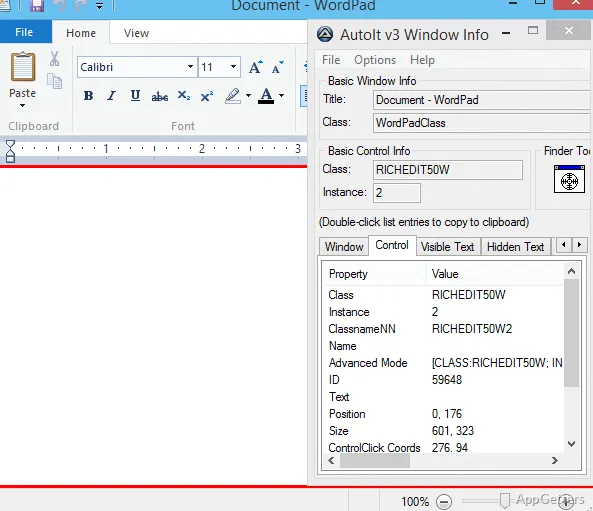
AutoIt scripts can send keystrokes, move the mouse, and interact with windows and their controls. A script can locate a window using details such as its title, displayed text, position, or class, then activate, resize, hide, show, or close it.
For interface tasks, AutoIt can work with controls such as buttons, check boxes, edit fields, list boxes, and combo boxes. It can also access controls in windows that are not active, which supports workflows where the target application is in the background.
Scripts, editor, and compiled tools
The language includes functions, loops, expression handling, string tools, and regular expressions. Scripts can also use COM objects or call Windows and third-party DLL functions, extending automation beyond simulated input.
AutoIt includes a customized SciTE-based editor for writing scripts. When a script needs to run as a standalone executable, Aut2Exe compiles it for distribution.
- Use scripts for repeated setup and configuration steps, application testing, or routine desktop actions.
- Build a GUI for an AutoIt script when a workflow needs its own controls.
Automation workflow
A typical script launches or targets an application, identifies the relevant window or control, and carries out a sequence of actions. That approach suits repeatable tasks such as responding to setup dialogs or exercising the same interface steps during testing.
AutoIt’s syntax is BASIC-like, while its language features support scripts with branching logic and reusable functions. The same environment can therefore handle simple input sequences as well as more structured automation.
Pros
- Simulates mouse actions and keystrokes with configurable behavior
- Targets windows and individual controls, including inactive windows
- Creates standalone executables with Aut2Exe
- Includes a SciTE-based script editor and supports COM
System requirements: Windows 7, Windows 8, Windows 8.1, Windows 10, Windows 11 · 32-bit and 64-bit
Can AutoIt scripts be shared with someone who does not have AutoIt installed?
Yes. Aut2Exe can compile a script into a standalone executable.
Can a script interact with a window that is in the background?
Yes. AutoIt can access controls in windows that are not active.
Can AutoIt call functions outside its own scripting language?
Yes. It supports COM and direct calls to Windows or third-party DLL functions.