Kids, students or guests using your PC and changing things they shouldn't? WinLock provides controls for restricting Windows features, applications, websites, and the amount of time someone can use the computer.
Which parts of Windows can WinLock restrict?
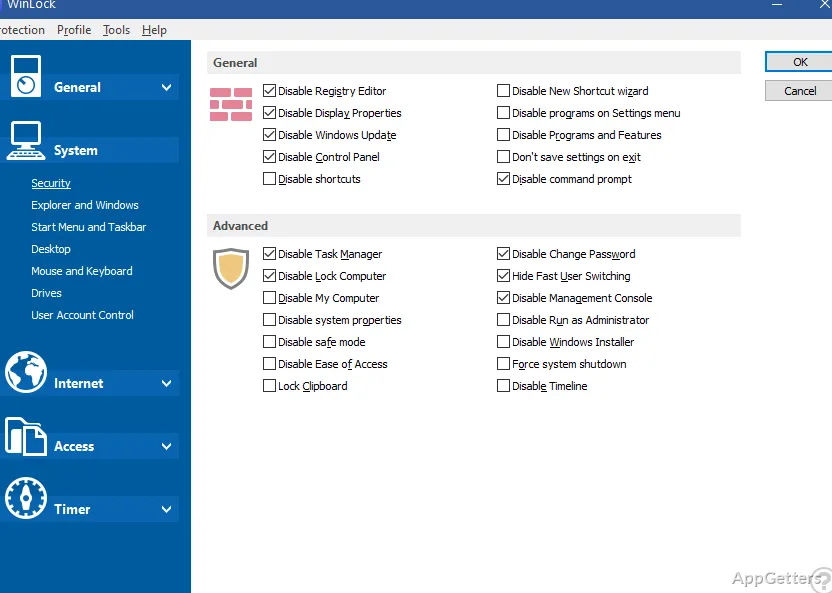
WinLock lets an administrator limit access to system areas such as the Control Panel, taskbar, desktop, clipboard, and Safe Mode. It can also hide chosen Start menu entries, switch off right-click menus, and disable specific keyboard shortcuts or mouse buttons. Desktop settings can also be locked, including wallpaper and icons.
Restrictions can extend to drives and programs. WinLock can hide system or network drives, block removable media, and prevent users from opening selected applications. The software filter can target categories such as games, messaging clients, downloaders, and CD-burning programs. Rules can also apply to individual windows, dialog boxes, or pop-up messages.
Passwords, schedules, and public-access setups
Protection is controlled with a password, and a chosen hotkey combination can switch it on or off. For households with children, time-limited access sets a computer-use allowance. Kiosk mode applies a more restricted setup to a public terminal or other shared workstation.
Website controls can allow access to trusted sites while blocking others. WinLock also offers controls for restricting installation of software and blocking selected programs.
- Use a scheduled time limit for access periods.
- Choose specific Start menu items, drives, apps, or Windows features to restrict.
- Set a hotkey for quickly toggling protection.
Activity logs and remote oversight
WinLock can record system changes in a log file, including changes involving files and folders. Reports sent by email can list which programs ran, which files were removed and which sites were stopped. This gives an administrator a record of activity alongside the access restrictions.
Remote administration supports managing WinLock settings on networked client computers. Profiles let administrators save different sets of access rules, while a one-button control applies a workstation lock setup. Those options suit environments where the same restrictions need to be applied across more than one PC.
Pros
- Password-protected restrictions cover system features and selected applications
- Website controls can allow trusted sites and block others
- Time limits, kiosk mode, and a quick protection toggle support different access setups
System requirements: Windows 7, Windows 8, Windows 8.1, Windows 10, Windows 11
Can WinLock block access to specific websites?
Yes. Website controls can allow trusted sites and block other sites.
Can it limit how long someone uses the computer?
Yes. WinLock includes time-limited access controls.
Does WinLock keep a record of activity?
Yes. It logs system changes and can email reports on programs started, files deleted and websites blocked.