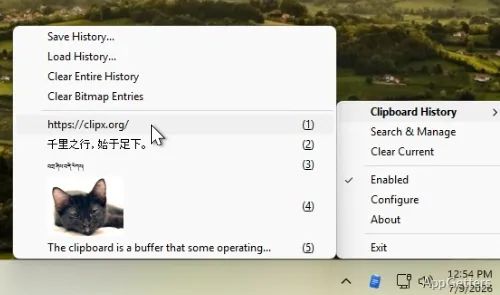
Copied something, copied again, and lost the first item? ClipX is a tiny free clipboard manager that keeps a history of copied text and images, so a hotkey brings back anything you copied earlier.
ClipX keeps text and bitmap clips in its history
ClipX records items copied to the Windows Clipboard, including text and bitmap images. When a newer copy replaces the current clipboard contents, older entries remain in the history for selection and pasting.
The system tray icon provides access to previous clips. A left-click shows recently copied items; a right-click opens a menu for accessing clips and changing settings.
Hotkeys open and search the clip list
Use a hotkey to bring up the stored clips, then choose an entry to paste into the current application. ClipX also has a search hotkey for finding a particular item in its manager, plus a shortcut that can search online for a selected clip.
- Choose how many clips the history retains.
- Set ClipX to ignore text or bitmap clips.
- Store a favorite set of clips and load it again next time.
Plugins add to ClipX’s clipboard workflow
ClipX supports plugins, which extend what the clipboard manager can do. ClipX has not been updated since version 1.0.3.9 in 2008, but it still runs on current Windows. Windows 10 and 11 also offer a built-in clipboard history with Win+V, though it keeps only 25 items and clears them on restart unless pinned.
Pros
- Keeps a history of both text and bitmap clips
- Hotkeys can open, search, and paste from clip history
- Saved clip sets can be reloaded across sessions
- Plugins extend the clipboard manager
Cons
- Not updated since 2008
- Copied text formatting is not kept
System requirements: Windows 7, Windows 8, Windows 10, Windows 11
How is ClipX different from Windows' Win+V clipboard?
ClipX can keep a longer history, save clip sets between sessions and search them; Win+V holds 25 items and clears unpinned ones on restart.
Does ClipX keep text formatting?
No. Text is stored as plain text; images are kept as bitmaps.
Is ClipX still developed?
No. The last release, 1.0.3.9, dates from 2008, though it still works on Windows 10 and 11.