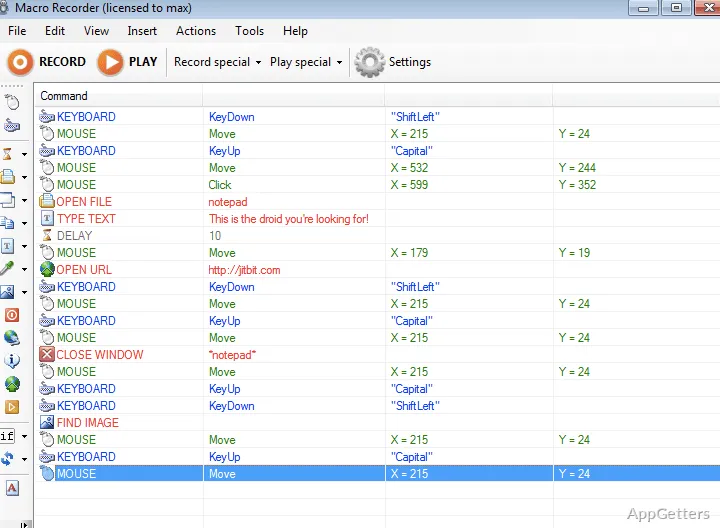
Keyboard-and-mouse recording captures the actions that make up a routine workflow. Macro Recorder turns those actions into a macro that can be edited and replayed, including mouse movement and clicks.
What does a recording capture?
Start a recording, perform the task, then stop to save the actions as a macro. The recording can include typed keys, mouse clicks, and cursor movement. Replaying it repeats the recorded workflow, which suits tasks that involve the same sequence of input in a Windows application.
For example, a repeated form-entry routine can be recorded once and replayed later. The macro follows the actions captured during recording, so the workflow should be performed in the order it needs to run.
How can a macro be edited?
A recording does not have to remain exactly as captured. Macro Recorder lets you edit macros and add keystrokes or parameters manually. This gives you a way to adjust a recording when the needed action was missed or when you want to change what the macro does.
- Record mouse actions and clicks.
- Include keyboard input in the workflow.
- Edit the macro and add keystrokes or parameters.
Can one macro open several programs?
Yes. A macro can automate a routine that opens several programs, then run that sequence with one click. The same record-and-replay approach applies to other repeated mouse and keyboard tasks, such as navigating through a familiar set of controls.
Pros
- Records mouse movements and clicks for replay
- Captures keyboard and mouse actions in a macro
- Allows keystrokes or parameters to be added manually
- Can run a sequence that opens several programs with one click
System requirements: Windows 7, Windows 8, Windows 8.1, Windows 10, Windows 11 · 32-bit and 64-bit · 256-MB RAM · 140kb hard disk space · Pentium 400Mhz or equivalent
What kinds of actions can Macro Recorder record?
It records keyboard input, mouse clicks, and mouse movements for playback as a macro.
Can I change a macro after recording it?
Yes. Macros can be edited, with keystrokes or parameters added manually.
Can a macro launch multiple programs?
Yes. It can run a sequence that opens several programs with one click.