EXE
Home » Software » Windows » Antispyware » Trojan Remover for Windows
Trojan Remover for Windows

Trojan Remover for Windows

It’s very unusual for a Windows system to stop working completely nowadays. However, infections that don’t show any damage are still very common. When systems are running slowly at startup, or when users see unexpected changes in network activity or security warnings, they will suspect that something is wrong. These warnings don’t really explain anything. Most probably, an antivirus will find a virus. But it might not be able to remove it totally. Or fix the damage that the virus did to the system. It is exactly these situations where a tool like Trojan Remover is very useful. It is not a complete antivirus program, but it is designed to help in finding and cleaning those pieces of malware. These very frequently remain after the first detection.

Focused Detection and Cleanup Behavior

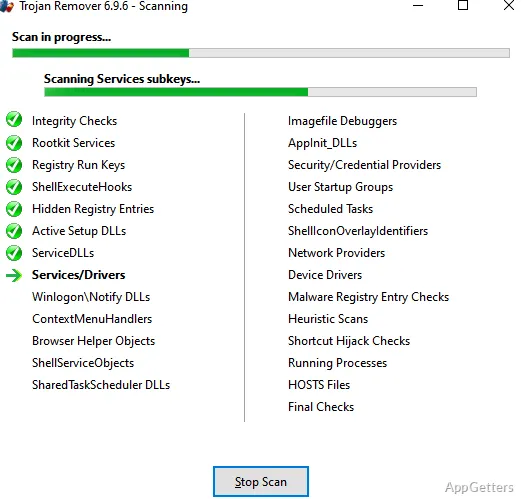
In fact, Trojan Remover is more like a tool for targeted treatment of a problem rather than an extensive security program. Trojan Remover is not an extensive security program. It checks those parts of the system which are very often changed by trojans: startup programs, registry keys, and system files. It detects anomalies instead of just looking for signature matches. Such a method can be very helpful. This is when the virus has disabled the antivirus program. Or changed the normal behavior of the system in such a subtle way. It is almost unrecognizable.

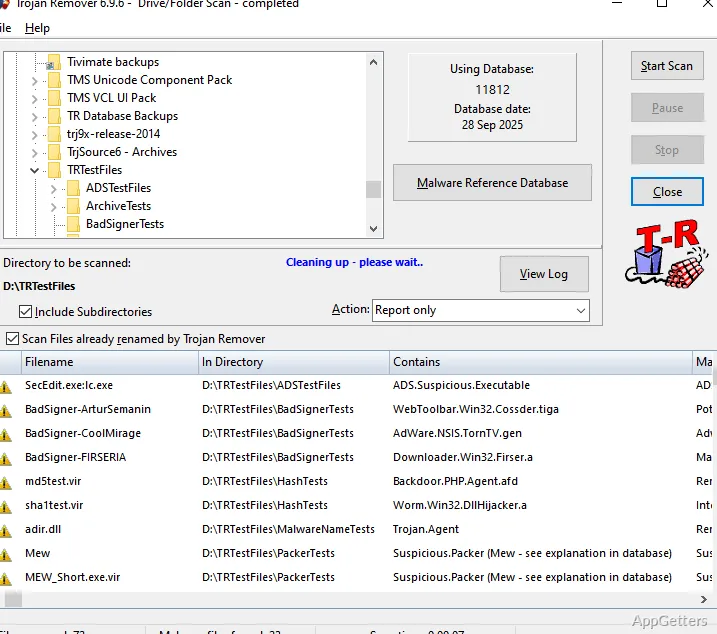
The scan doesn’t take much time. At the same time, it does not bombard the user with specialist terminology. Besides, when it finds the infected files, it shows what exactly has been changed and explains its impact on the system. Thus, it is not only clear what has been removed. But it is also understood why the system was misbehaving.

Real-World Performance on Infected Systems

In fact, Trojan Remover is capable of assisting a system that has been infected a while ago to recover. One of its features is that it can even get along well with the antivirus software that has already been installed. It does this not just by being there as its competitor. But also by being its tool partner. As an example, if the virus has hidden in the processes that run during the system startup, or if it has changed the security settings, the program will help the user restore the usual system operation. This is done in such a way that there is no need to reinstall the whole operating system.

Yet, Trojan Remover is not meant for around-the-clock protection. Those who expect it to always be running in the background and preventing infections without their involvement may be disappointed. It is reactive by nature. It is great when used to investigate what happened after one has noticed something suspicious. Hence, it is more of a tool for solving problems than a main line of defense.

Usability and Learning Curve

Trojan Remover really shines in terms of its ease of use. The tool has been developed in such a way that even a person who does not have much knowledge of computers can operate it easily. They can also see the results of scans very clearly. The recommended solutions after scanning are also so simple that they can be followed without fear, even if one is not a computer expert.

For students, people using computers at home, or individuals who have a personal PC to maintain, the aforementioned balance is really a blessing. This is because it makes them feel that they can get past their fear of using a malware removal tool. They can do this without actually giving up their control and insight into what is going on. Anyways, highly skilled computer users may miss the possibility of having a finer level of control and customization. This is offered by other, more advanced security suites.

Stability, Limitations, and Ongoing Use

Trojan Remover does not use system hardware quite heavily; therefore, it can be run quite comfortably even on a rather old computer or a device with a low-power processor. Also, it finishes the scanning faster than expected. This is considering the amount of work it has to do. Thus, the program is a good candidate for a tool that the user can call upon from time to time.

Unfortunately, there is no getting around the fact that it cannot cover all security needs. Replacing a complete antivirus with it would be a very wrong decision. On the contrary, the biggest strength of this product is that it can be paired with a regular antivirus very successfully. Users rarely need this kind of tool. But when nothing else can help, or the symptoms are quite clear that the system has been deeply compromised, then it is just the right tool to have.

Where Trojan Remover Fits in a Windows Security Setup

First of all, one needs to separate Trojan Remover from those tools that are intended to prevent malware infections. Instead, the best way to think about Trojan Remover is as a secondary option (after an antivirus program) when one’s computer is already infected. In this sense, it is consistent with a typical security regimen. This consists of an antivirus providing the main defense. While Trojan Remover is available for more thorough cleaning and repairs. This places Trojan Remover specifically as a very useful tool for users. These are users whose computer usage privileges occasionally expose them to potentially suspicious downloads, installation of conflicting software, or sudden system misbehavior.

From the perspective of a household, or a computer used by several people, or machines that are rarely under the supervision of any person, having a very dedicated tool makes very good sense for those hard-to-kill infections. Trojan Remover does not operate with the motive of replacing the existing layers of security, but rather strengthens them when they fall short.

Software Details of Trojan Remover 6.9.6 Build 2994

License
Trial
Version
6.9.6 Build 2994
File Size
22.62 MB
Downloads
6
Language
English
Category
Op. System
Windows
Last Updated
February 18, 2026

Version History

6 versions
6.9.6 Build 2994
Latest
22.62 MB
February 18, 2026
6.9.6 Build 2992
21.05 MB
September 17, 2025
6.9.6 Build 2990
21.21 MB
October 9, 2024
6.9.6 Build 2987
20.8 MB
June 12, 2024
6.9.6.2986
20.37 MB
April 12, 2024
6.9.6.2985
20.43 MB
December 15, 2023

Leave a Comment

Your email address will not be published. Required fields are marked *

Software Icon
Security Report

Loading scan data...

Scroll to Top