EXE
Home » Software » Windows » Antispyware » SuperAntiSpyware for Windows
SuperAntiSpyware for Windows

SuperAntiSpyware for Windows

What really irks Windows users the most is not usually a virus. It is the sneaky, small threats that manage to evade conventional antivirus software. The unwanted items include adware, tracking cookies, browser hijackers, and potentially unwanted programs (PUPs). They can slowly deteriorate the performance of the system. They result in browser clutter and put the user’s privacy at risk. These kinds of issues do not usually activate high-level alerts. Their accumulation can make the system unreliable and sluggish. Anti-spyware tools designed to clean up the mess certainly have their importance. This is especially true even when an antivirus has not solved the problem fully. SuperAntiSpyware, in that position, offers a completely new scanning method. It shines in those cases where the user’s system is already infected.

Detection of Classic Threats

SuperAntiSpyware can be used regularly as a cleaning tool, while prevention is left to other security software. Based on this, the security tool acts as a second-opinion scanner. It is great at identifying traces left behind without replacing a complete antivirus.

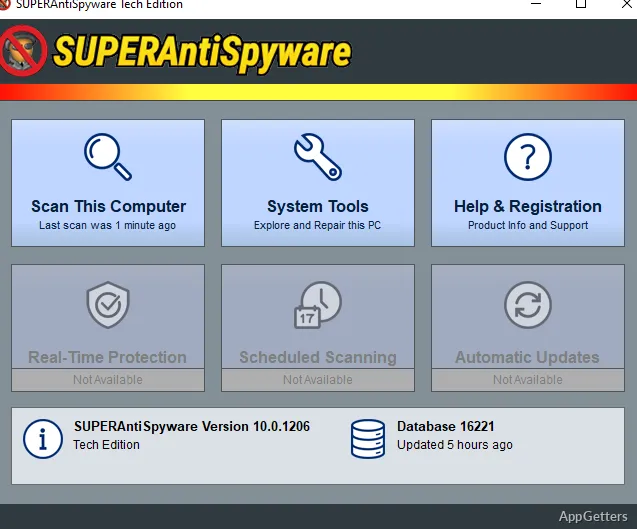
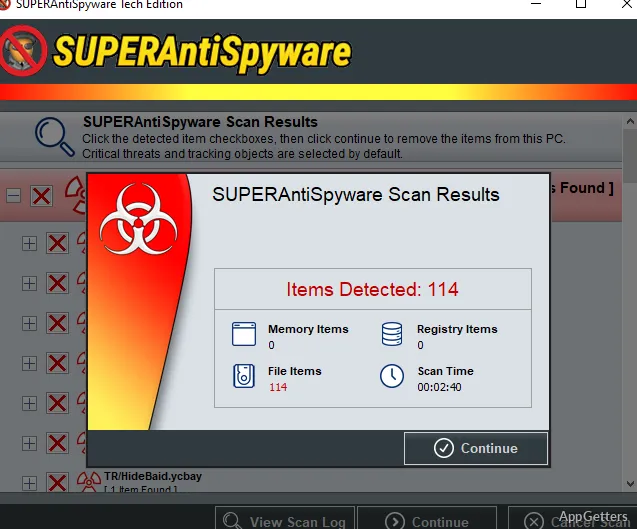
Starting a scan is so easy that anyone can do it. The tool is not there to drown the user with configuration settings, and default options usually work pretty well. Scanning time is acceptable. The tool actually takes a thorough look at those areas that are usually targeted by adware.

In fact, the tool’s main feature is the ability to detect the lowest-level infections. That’s why it’s a great support for times when the user has just uninstalled suspicious applications. It is also useful when the browser is still acting strangely despite having been reset.

Performance and Convenience

One of the most impressive things about SuperAntiSpyware is that it has a rather low impact on the system. It also offers powerful scanning features. On a lot of Windows PCs, it barely uses any processor or memory resources. So even a very old, entry-level laptop can run it without any problems.

While the UI is simple, it doesn’t take long to load. It does not complicate things when a user wishes to perform a scan. This simplicity makes it a good backup scanner, but the interface definitely looks old-fashioned and outdated when compared to other security software.

That said, there is not much reason to say that the free version of the tool possesses strong capabilities of real-time protection. Hence, these functionalities are limited. They force the user to think of the software simply as a tool for on-demand use.

Pros and Cons

Typically, the scenario for using SuperAntiSpyware is to clean the system. Like a symptom checker, if the system is behaving vaguely, such as showing unexpected pop-ups, homepage changes, or slow web browser responsiveness, the tool can help in finding the issue. It works best if used properly.

However, the tool itself is not able to protect the user against the most dangerous, latest malware types such as ransomware and rootkits. So, the user who depends only on this product for protection will be quite exposed. It is best when used along with a main antivirus solution to detect infections that the main antivirus has missed.

Definitions get updated regularly to include commonly encountered threats. The focus of the detection engine is still more on the most common adware and spyware than on the very recent exploits.

The Perfect Tool for Cleaning and Second Opinion Scanning

SuperAntiSpyware is really a take-it-or-leave-it kind of tool, and the user should not rely on it as a product that provides total security for the main system. It is also an excellent maintenance helper for the typical household user or student user who often installs freeware and wants a way to keep their system clean without much effort.

For systems that are less “infected” but reveal suspicious symptoms, this tool can be a very convenient and time-saving way to get a check on the user’s system for hidden problems. It could also come in handy as a second scanner in a situation where the first one does not detect the problem, yet there are symptoms.

In the normal course of a day, it is about the user walking to the edge of a cliff and looking down. Or even venturing a few steps when it comes to the extent of protection. So, in the context of the user’s expectations and capability, it is still a relevant tool and, more than that, let’s say a dependable one.

Software Details of SuperAntiSpyware 10.0.0.1286

License
Free
Version
10.0.0.1286
File Size
378.84 MB
Downloads
4
Languages
English English, French, German, Italian, Portuguese, Spanish
Category
Op. System
Windows
Last Updated
March 13, 2026

Version History

4 versions
10.0.0.1286
Latest
378.84 MB
March 13, 2026
10.0.0.1282
343.27 MB
December 19, 2025
10.0.1278
343.82 MB
December 18, 2025
10.0.0.1280
193.21 MB
October 3, 2025

Leave a Comment

Your email address will not be published. Required fields are marked *

Software Icon
Security Report

Loading scan data...

Scroll to Top