EXE
Home » Software » Windows » Antispyware » Ultra Adware Killer for Windows
Ultra Adware Killer for Windows

Ultra Adware Killer for Windows

  • By Carifred
  • Free
  • Version: 10.9.10.0
  • 18.29 MB
  • Security Report:

It is no longer common for malware to render modern Windows systems completely unusable overnight. Usually, these problems manifest themselves step by step. For example, a browser starts redirecting your searches. You find that even after removing the extensions, they come back, or you see ads in places where you’ve never noticed them. In many such scenarios, the root cause may be adware, browser hijackers, or potentially unwanted programs. Conventional antivirus software may not consider them a priority. Thus, programs like Ultra Adware Killer are usually the first to emerge on the scene.

Being primarily a cleanup tool rather than a protective one all the time, it aims at removing undesirable browser elements, aggressive apps, and dubious changes in configurations. It is a small program that seems to be targeted at those who would like to effortlessly refresh a Windows system. They can do this without long manual troubleshooting of the browser’s behavior. They can also avoid dealing with startup issues manually.

A Cleaning Assistant Specializing in Browsers

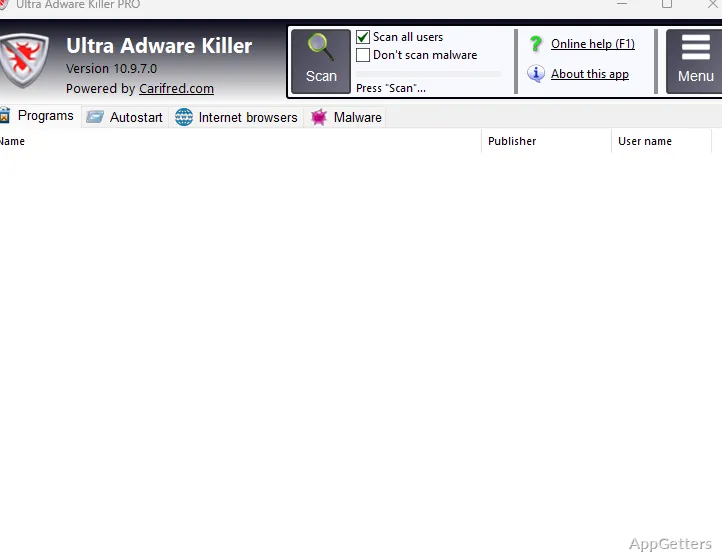
An important feature of Ultra Adware Killer centers on its focus on browser-related infections and modifications. In testing and servicing users, the program inspects installed browsers, extensions, scheduled tasks, startup entries, and registry locations. These are most commonly associated with adware. This is why it becomes necessary for users who are bombarded by pop-ups or redirected to other search engines. They may face situations where this kind of redirect has not been removed even after uninstalling attempts.

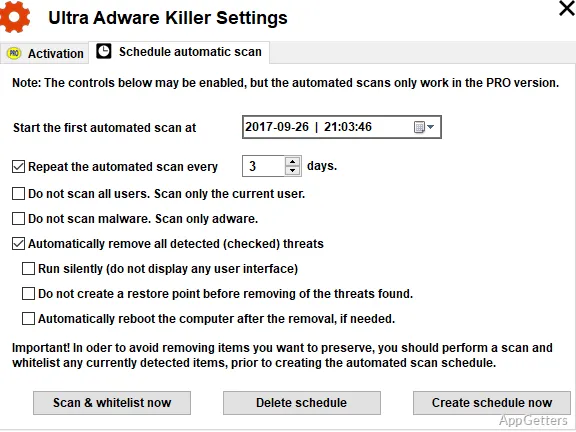
The GUI is quite limited, but it is user-friendly for those without much experience. The scan results are divided into simpler-to-understand categories. Users can relate to them more easily than to many traditional malware analysis tools. Instead of forcing users to understand technical expressions and explanations, it prefers to present potentially bad results in a more understandable way. On the other hand, experienced and skilled users are also given enough exposure to check the results before deleting them.

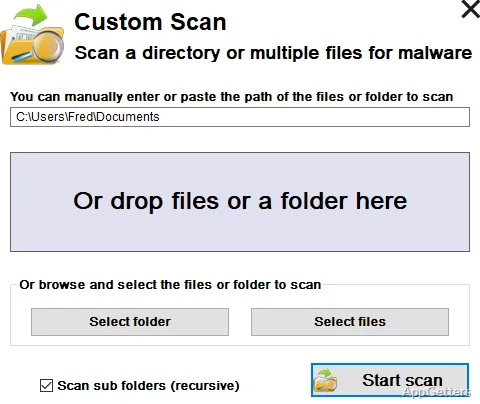
Since the program is meant to be a cleanup tool, a scan only takes a short amount of time. This should also be expected. It is not doing the job of a complete antivirus program. It is only a secondary tool that is used in situations when an unwanted element has had an opportunity to make system changes.

Being a Small Footprint Tool and a Convenient Recovery Helper

The great thing about this type of software is that, in most cases, it can be very effective. This remains true even when the system has been severely damaged or slowed down due to browser instability. Whilst running, Ultra Adware Killer still uses a not very intensive amount of the system’s resources. This may be important for an old laptop, a student PC, or a home system with limited resources. Such systems may already be having trouble due to heavy background security software.

Also, being a portable application is a great advantage. Some users always have such tools stored on their USB flash drives or download them only when there is a problem. In fact, that kind of flexibility is much more important than full automation. A person helping a relative to fix a problem with a browser, for example, simply prefers a simple scanner without any extra features. It also takes very little time to provide results.

In addition, the program has some repair-oriented features for browser settings and Windows policies. These have been modified by unwanted programs. These recovery tools may help restore the system without going through each browser component one by one. However, users are still expected to be deeply familiar with what they are deleting. This is especially important when it is about startup items or browser extensions.

Establishing Practical Goals and Dealing with Limitations Every Day

As is the case with many other tools intended for a specific cleaning purpose, Ultra Adware Killer is most effective when used as a provisional solution. It is not intended to function as a full security ecosystem. Although it will be able to get rid of most adware implementations and hijackings of browser activities, it should not be taken as the only and main security measure of a system.

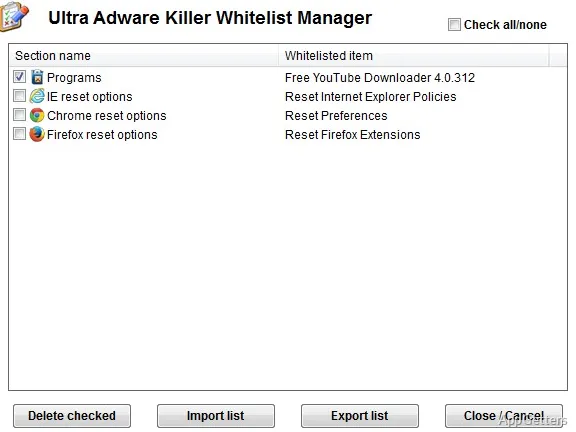
On the other hand, the implementation of the detection protocols in some situations may need a level of user interpretation. Some of the entries marked as suspicious may not really be the ones that need removing. Other than that, there could be extensions that are simply aggressive or bundled software, and not malware at all. Unfamiliar users may want to be very careful before deciding to delete all the objects marked during a scan.

The look and feel of the interface is functional rather than trendy. This may not be the cup of tea for users who have been accustomed to highly complicated and very visual security reports or dashboards. On the contrary, simplicity is probably also one of the reasons for the speed as well as accessibility of the software. Actually, in many instances, individuals who are struggling with browser problems prioritize returning to normal behavior. They prefer this over dealing with complicated security menu systems.

The Ideal User of Ultra Adware Killer

As far as Ultra Adware Killer is concerned, it is the kind of program a Windows user would want to have. This becomes more relevant when he or she is highly annoyed due to browser problems, suspicious changes to the homepage, aggressive behavior of ads over the network, or traces of bundled software that cannot be removed. Students, casual home users, freelancers, and even small repair technicians might find it easy to use as a secondary cleaning utility beside standard antivirus protection.

One of the most powerful aspects of this product has to be its recovery workflows. Besides, it is not continuously running as an active security layer. Rather, it functions as a specific maintenance tool that can restore the normal state of browsing after the infiltration of malicious software. For dedicated users who occasionally install freeware, test unfamiliar applications, or troubleshoot family computers, this approach can be really very helpful. At the same time, it is quite light on system resource usage.

Software Details of Ultra Adware Killer 10.9.10.0

License
Free
Version
10.9.10.0
File Size
18.29 MB
Downloads
7
Language
English
Category
Op. System
Windows
Developer
Last Updated
March 23, 2026

Version History

6 versions
10.9.10.0
Latest
18.29 MB
March 23, 2026
10.9.8.0
17.85 MB
August 4, 2025
10.9.7.0
17.82 MB
July 28, 2025
10.9.6.0
17.46 MB
February 24, 2025
10.9.5.0
17.37 MB
January 13, 2025
10.9.4.0
17.12 MB
September 17, 2024

Leave a Comment

Your email address will not be published. Required fields are marked *

Software Icon
Security Report

Loading scan data...

Scroll to Top