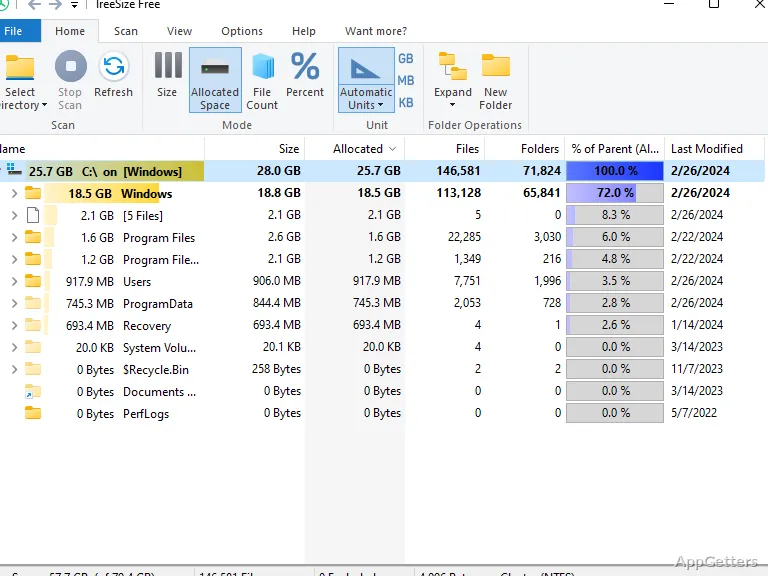
Where did all the space on your drive go? TreeSize Free Portable shows how much each drive and folder takes up, arranged in a folder tree you can expand. TreeSize Free scans in the background, so folder sizes appear while the scan is still running; the portable edition runs without installation from local or removable storage.
TreeSize Free lays out folder sizes in a navigable tree
Choose a drive or folder to scan and TreeSize Free reports its size along with the sizes of its subfolders. Expand entries in the tree to follow disk usage down through nested directories, then drill into the results to reach individual files.
The scan runs in a separate thread, so the tree can begin showing results before the full scan finishes. You can start exploring visible folder sizes while TreeSize Free continues reading the rest of the selected location.
NTFS details include compression rates and directory controls
For NTFS volumes, TreeSize Free can display the compression rate of files and folders. It can also apply NTFS compression to directory branches.
The portable edition runs from local or removable storage
TreeSize Free Portable can run from a local folder, removable drive, or cloud location without a conventional installation.
Pros
- Shows sizes for drives, folders, and nested subfolders
- Expand the folder tree and drill down to individual files
- Displays NTFS compression rates and can apply compression to directory branches
- Shows scan results while scanning continues
System requirements: Windows 8.1, Windows 10, Windows 11 · 64-bit only
What does TreeSize Free Portable show?
It shows the size of a selected drive or folder, including subfolders, and lets you drill down to individual files.
Can results appear before a scan is complete?
Yes. Scanning runs in a separate thread, so results can appear while the scan continues.
Can TreeSize Free Portable work with NTFS compression?
Yes. It can display NTFS compression rates and apply compression to directory branches.