People organizing photo folders, music collections, or other file batches can use Rename Master to apply consistent naming rules across many files. The program combines scripts, patterns, and customization options, with a preview of proposed name changes before they are applied.
What can its rename rules change?
Rename Master can modify a whole filename or just part of it across a selected group. Rules include adding a prefix, replacing text, and adding automatic numbering. Patterns and scripts provide additional ways to shape the names, and multiple operations can be combined for a batch.
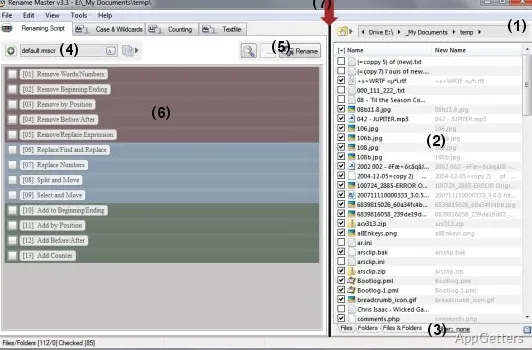
The program also includes commands for changing file extensions. Its main window shows file paths and the files in the batch, so the selected files and their proposed names can be viewed together.
How can you preview a batch?
As rules are adjusted, the displayed results reflect the proposed name changes. That preview lets you see how the full set of filenames will look before committing the rename, including the effect of combined rules. This is particularly relevant when a pattern or replacement affects many filenames at once.
- Add a prefix or replace a text string.
- Apply numbering to a group of files.
- Combine operations and inspect the resulting names.
Can Rename Master edit music and image tags?
For MP3 files, its ID3 tag commands can change the title, artist, year, and album. Image-tag editing is supported for JPEG, JFIF, and EXIF files. These metadata commands sit alongside the filename and extension tools, so the program covers both file labels and selected media tags.
Pros
- Batch renaming can combine multiple rules in one pass
- Supports MP3 ID3 tags, including title, artist, year, and album
- Can edit image tags in JPEG, JFIF, and EXIF files
System requirements: Windows 7, Windows 8, Windows 8.1, Windows 10 · No installation required
Which MP3 details can Rename Master change?
It can edit the ID3 title, artist, year, and album fields.
Which image formats have tag editing?
JPEG, JFIF, and EXIF files are supported.
Can it rename only part of a filename?
Yes. It can change either the entire name or a selected part across a batch.