EXE
Home » Disc Files » OpenDrive for Windows
OpenDrive for Windows

OpenDrive for Windows

  • By OpenDrive
  • Free
  • Version: 1.7.32.18
  • 22.61 MB
  • Security Report:

Nowadays, people usually have to manage files from different devices. But Windows still sees local storage and cloud storage as completely isolated from each other. That is why users end up having to do browser uploads, syncing folders here and there, and still not having access to their important files all the time. This is even more true when one changes work and personal systems. OpenDrive is on a mission to break up that separation by providing cloud storage, file syncing, and remote access. All within one environment that is a natural part of Windows users’ daily life.

A familiar approach to cloud storage

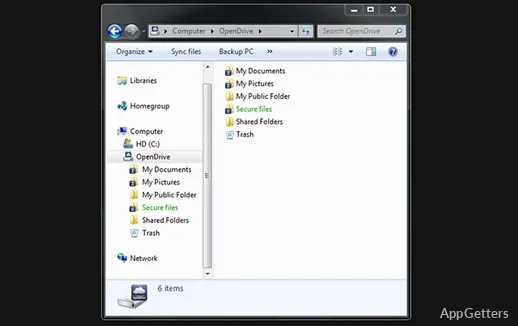
OpenDrive mimics other more popular cloud services and makes it very easy for the user to start using its cloud storage service. When the user completes the setup process, a specific sync folder is created automatically on the system. This resembles the sync folders of the other cloud services, where users can add, edit files, and upload automatically. In this way, the only time one will have to utilize a browser for file operations will be for more complicated tasks.

The execution is also plain and simple. If you put a file in the synchronization folder, it will automatically be uploaded to the cloud without any extra step required on your part. Any file modification done remotely will be synced with the local copy as well. A student, home user, or anyone working on locking their laptop and desktop up with a minimum of incompatibilities and interferences with the file accessibility is going to get a very nice and convenient level.

Remote access and backup in everyday use

Besides simple syncing, OpenDrive also allows one to remotely access their files in storage. This is quite handy when one’s situation is rather unusual with regard to their access to the files. The only option is to get hold of the file through the web interface or via the connected devices without having first synchronized them.

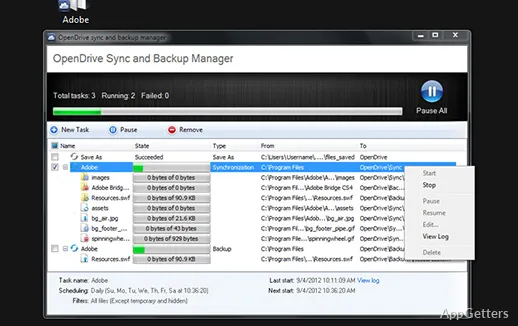
This results in a gradation of the power level from a mere simple synchronization to that of a full-fledged backup utility with inbuilt functions that a user does not even know about. In a day-to-day routine, one might find this aspect being used as a backup measure, especially in the case of those who have less-than-structural backup support. To a certain extent, the fall-back capacity obviates the need for top-notch backup strategies, but for the most part, it hardly substitutes for them. Not only does the convenience of having one’s file accessible from a plethora of locations significantly negate the irritations of a workflow wherein access, rather than the stringent organization, is the main concern. But also that very same workflow practically eliminates the need for workflow, i.e., for a very strict mode of operation.

Performance and usability considerations

OpenDrive works very well and without fail for regular everyday tasks. Nevertheless, the problem is that sometimes it seems to act according to your network connection, as well as file size, suddenly. You can file sync in no time with minuscule ones. However, you should expect to spend a good amount of your time in offline mode while large transfers, especially with the average broadband connections, are carried out. This is a very common scenario in the case of cloud-based tools. But one still needs to be reminded about it when the user frequently deals with media-heavy content.

Its user interface is not bad, but it is not exemplary either. The main thing on which it has been focused here is the accessibility of the essential features. The visual aspect is not perfected. Probably quite a few users will feel that the navigation is a little bit less intuitive. It is not as polished as the more advanced alternatives being offered on the market today. Nevertheless, once you are acquainted with the system, it remains the same. Hence, the time put into the learning process should be treated as an investment. Even though it might require you to adapt a little bit if you are new to cloud storage services.

Where OpenDrive fits in everyday workflows

OpenDrive is a good choice for those primarily concerned with a straightforward, all-in-one solution for cloud storage. It keeps their setup from being overcomplicated. It works well for students, freelancers, and home users. They need reliable, continuous access to their files on different devices. But are not really interested in advanced collaboration tools.

Practically, it is running in the background rather than being the focus area, so to speak. File synchronization happens seamlessly. There is no interruption when you need to gain access to the files. One can always predict how the system will behave. Apart from that, it is neither the most sophisticated interface in terms of the user experience. Nor does it provide the highest throughput speed every time. But it is a steady performer with regard to capabilities and user needs in the long run. If one is after a tool supporting a good balance of syncing, storage, and remote access all rolled into one, one would find it very handy. It is also extremely reliable.

Software Details of OpenDrive 1.7.32.18

License
Free
Version
1.7.32.18
File Size
22.61 MB
Downloads
0
Languages
English English, French, German, Italian, Spanish
Category
Op. System
Windows
Developer
Last Updated
June 5, 2024

Version History

3 versions
1.7.32.18
Latest
22.61 MB
June 5, 2024
1.7.30.5
18.42 MB
December 7, 2023
1.7.28.13
18.11 MB
October 12, 2023

Leave a Comment

Your email address will not be published. Required fields are marked *

Software Icon
Security Report

Loading scan data...

Scroll to Top