EXE
Home » Software » Windows » text-documents » Sumatra PDF for Windows
Sumatra PDF for Windows

Sumatra PDF for Windows

Most Windows users think opening a simple PDF file shouldn’t be a complicated task. Readers packed with features often start up slowly, occupy a large amount of memory, and bring in toolbars or prompts that distract from simple reading. It gets more annoying when you only want to look at your lecture notes, a manual, or a scanned document. That is the time when light alternatives are handy. They don’t accomplish more; instead, they simply don’t bother you. Sumatra PDF is created with this very aim: to be fast, simple, and mainly focused on reading rather than document manipulation.

Lightweight but fast

The speed with which Sumatra PDF launches is the first thing that users notice during their daily use. On even the oldest and slowest machines, it opens up within a second. Large PDFs are displayed quickly, without the lag commonly experienced when using heavy software. Such a level of responsiveness really matters in your daily routines. This is especially true if you get a lot of documents to look at during the day.

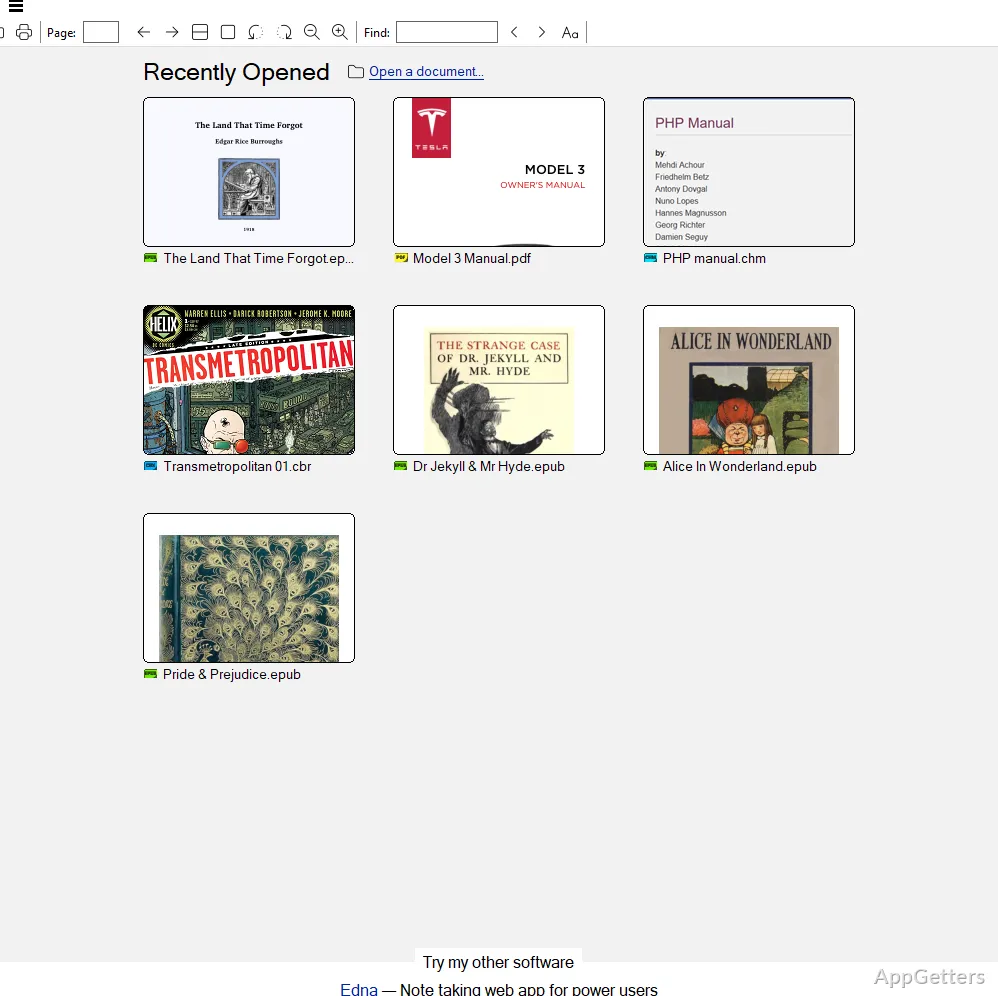
The same principle is also clearly visible in the program’s design. To start with, there are no fancy ribbons or multi-level menus; indeed, it is just the basics that have been left in the program’s layout. For those users who like to focus on a single task of reading, this level of simplicity seems quite purposeful and very far from feeling like a limitation. Very often, it is the more mundane or technical aspects of the paper that do the trick. This happens when you want to locate the ones or references that will help you the most. You gain most from a reader in that kind of scenario rather than a more feature-rich editor.

Mainly a reader

Sumatra PDF, at best, can only be seen as a viewer, rather than a multifunctional document tool. It is capable of opening multiple file types apart from PDF, such as ePub, MOBI, and DjVu. Students and other readers dealing with a variety of files will find it useful. At all times, opening the different file types is equally quick. The interface remains in line with the existing ones, with the same minimalism.

The drawback is that going through the workflow of annotating, filling in forms, and signing documents won’t even be remotely possible. For your information, many users use Sumatra PDF as their main reader and switch to the feature-heavy editor for specialized tasks. Splitting the use in such a way generally improves productivity rather than being a source of trouble.

Practical reliability and portability

Sumatra PDF’s reliability is one of the unassuming features that have enabled it to build a very loyal user base. It effectively opens a wide variety of documents, including big scans, which are usually a problem for other readers as well. Users hardly ever complain about program freezes or sudden closures. New versions are mainly released to improve performance and increase user-friendliness.

In addition to that, it has a portable edition, which is really convenient. This means you can use it straight from the flash drive without installation. This makes it perfect in a library, a lab, or an office where users are not allowed to do the installation. It will surely please those who carry files on one computer and then work on another. It will also please those who hesitate to add another piece of software.

Nevertheless, sometimes this bare-bones approach may not meet the minimum feature-level. For instance, the search facility is not very advanced. The ability to mark pages or other features that are usually accepted by the general public to a great extent is really limited. Whether you will consider these as disadvantages largely depends on what you use your PDFs for.

How it fits within daily Windows usage

Sumatra PDF is a good selection for users who mostly read documents and only edit documents from time to time. It is suitable if you are a student who goes through lecture slides, a professional double-checking reports, or a home user who just opens PDFs sometimes. You will appreciate the application for its quick and simple nature. The company targets its marketing mostly toward people who own aging computers or who are limited in their computer resources. For these users, performance is the main thing they care about.

Document heavy-weights who like adding comments or other annotations, collaborating on documents, or doing document conversion simply cannot live without, or will be unhappy with, their document handling solution if they choose Sumatra PDF. It could work out as a small part of such an integrated document management environment. It does this by saving the user time when he or she needs a quick lookup.

In reality, Sumatra PDF is one of the most straightforward solutions to the problem of a document reader that has no unnecessary features and hardly gets in the way of your work. It does not attempt to combine the functionality of all kinds of software, and that is very often what attracts most Windows users to it.

Software Details of Sumatra PDF 3.6.1

License
Free
Version
3.6.1
File Size
10.56 MB
Downloads
6
Languages
English English, French, Portuguese, Spanish
Category
Op. System
Windows
Last Updated
April 10, 2026

Version History

6 versions
3.6.1
Latest
10.56 MB
April 10, 2026
3.6
10.5 MB
March 20, 2026
3.6.17572
10.74 MB
February 27, 2026
3.6.17528
10.73 MB
February 20, 2026
3.6.17404
10.05 MB
February 13, 2026
3.5.2
7.86 MB
October 27, 2023

Leave a Comment

Your email address will not be published. Required fields are marked *

Software Icon
Security Report

Loading scan data...

Scroll to Top