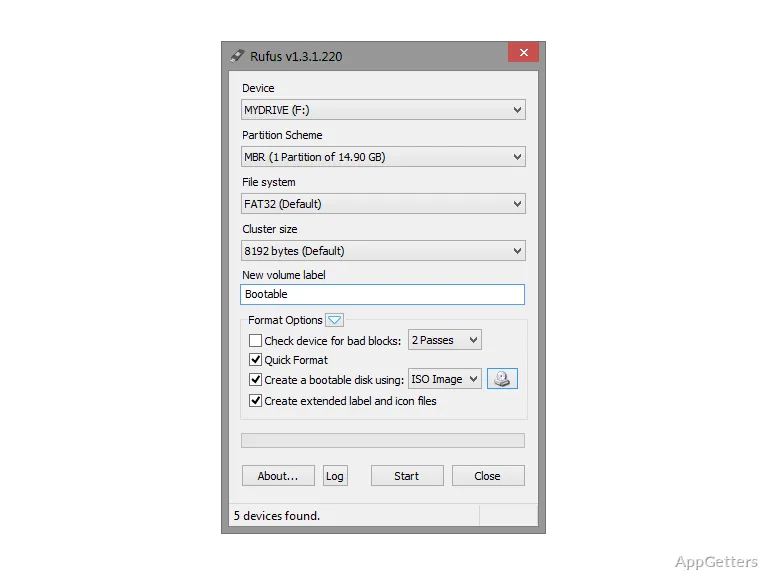
Need a USB installer for a Windows or Linux ISO, or a bootable drive for firmware work? Rufus Portable formats USB flash drives and writes bootable media, and its portable edition runs without a conventional installation.
How do you create a bootable USB drive?
Connect a USB flash drive, choose it in Rufus, and select an ISO as the boot image. Rufus then presents settings for preparing the drive, including the partition scheme and target system. Those choices determine how the media is laid out and which firmware configuration it is intended to boot on.
Starting the write process formats the selected drive, so any files already stored there will be removed. Rufus is designed for bootable ISO media such as Windows and Linux installation images.
What are the partition and target system settings for?
The partition scheme and target system options let you match the USB layout to the computer you plan to boot. Rufus supports common MBR and GPT partition schemes, which are used in different boot configurations. The appropriate combination depends on the target machine and image.
Can Rufus prepare DOS or firmware media?
Rufus can create DOS boot media for tasks such as flashing a BIOS or other firmware, and for running low-level utilities. The portable package can run from a removable drive without installing the program on each PC, which suits technicians moving between machines.
- Use an ISO to make installation or recovery media.
- Choose DOS media for compatible firmware and low-level tasks.
Pros
- Creates bootable USB media from Windows and Linux ISOs
- Supports DOS boot media for BIOS and firmware tasks
- Runs without installation from a removable drive
System requirements: Windows 8, Windows 10, Windows 11
Can Rufus Portable make a Windows or Linux installer?
Yes. Select a bootable Windows or Linux ISO and a USB flash drive to create installation media.
Does Rufus Portable erase the USB drive?
Yes. Rufus formats the selected drive during media creation, removing its existing contents.
What is DOS boot media used for in Rufus?
It can boot a computer for BIOS or other firmware flashing and low-level utility work.