Need to test a location-based app or show a different city on your iPhone without travelling? MockGo from Foneazy is a paid Windows tool that changes the GPS position reported by an iPhone or iPad, without a jailbreak, and can simulate movement along a route.
Choosing a location or route
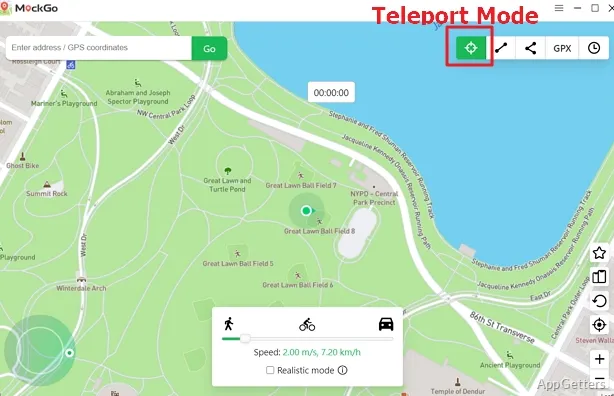
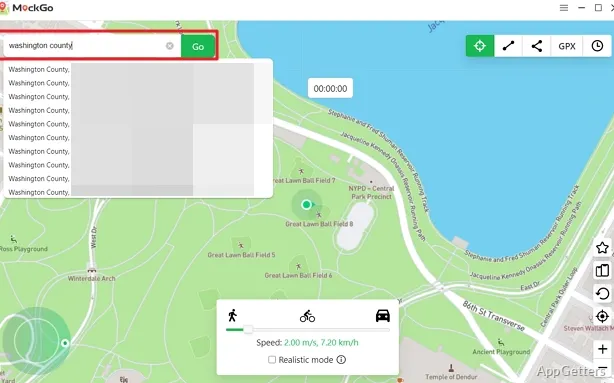
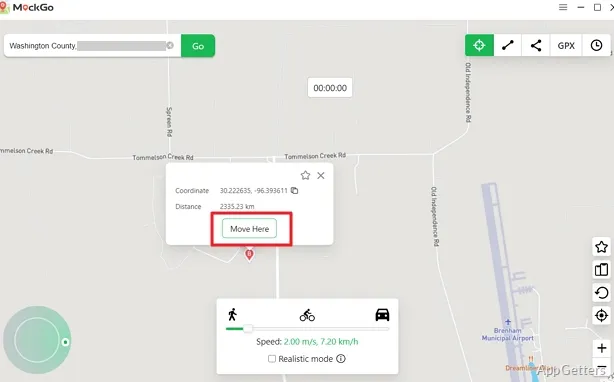
The map-based workflow starts with a destination or path. In Teleport Mode, search by address or coordinates, then set the selected point as the device’s reported location. Jump Teleport Mode moves between multiple chosen places, with a cooldown timer available for timed jumps.
For simulated travel, One-stop Mode connects a start point and destination along real roads. Multi-stop Mode follows several points selected on the map, while GPX import traces a route saved in a GPX file. Routes can be paused and resumed, and the movement speed can be set to walking, cycling, or driving.
What does movement control include?
A joystick and keyboard keys steer movement by hand, and speed can vary slightly for a more natural pattern.
Connecting devices and saving places
MockGo connects to iOS devices by USB cable or Wi-Fi. Location-based games such as Pokémon GO treat spoofing as cheating and can ban accounts, and faking location can break other services' terms, so it is best kept to app testing and privacy uses. The software supports changing the GPS location of up to five iOS devices at once.
- Favorites retain preferred locations, custom routes, and GPX routes for quick access.
- Historical records keep past locations available for later reference.
- Restarting the iPhone restores its actual GPS location.
Pros
- Teleport Mode accepts a place name or GPS coordinates
- One-stop, multi-stop, and imported GPX routes simulate movement
- Joystick movement supports keyboard controls and direction changes
- One session can change the location of up to five devices
Cons
- Location-based games can ban spoofed accounts
- Real location returns only after restarting the iPhone
System requirements: Windows 7, Windows 8, Windows 8.1, Windows 10, Windows 11 · Compatible iPhone, iPad, or iPod touch
Does MockGo require an iPhone jailbreak?
No. MockGo changes the iPhone’s GPS location without requiring a jailbreak.
Can MockGo simulate a route from a GPX file?
Yes. Import a GPX file to simulate movement along its saved track.
How can the iPhone’s real location be restored?
Restart the iPhone to restore its actual GPS location.