Double-clicked an .msix file and nothing happens, or the winget command isn't recognized? Microsoft's App Installer is the free component behind both: it installs MSIX and APPX app packages with a double-click, and it delivers winget, the Windows Package Manager.
App Installer displays package details
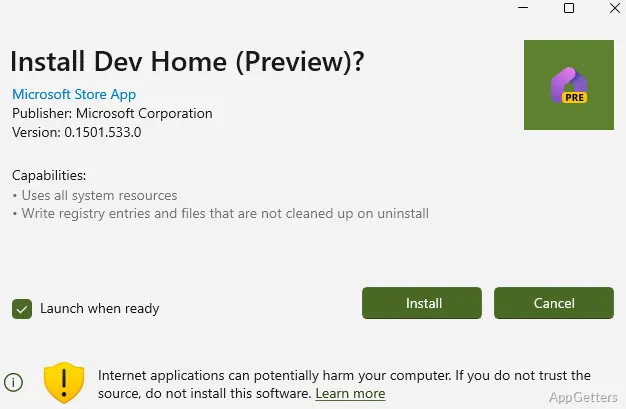
Opening an MSIX or APPX package brings up its information before installation. The screen shows the app name, developer, logo, version, and permissions it requests. These details let you identify the package and see what access it asks for before choosing an action.
Some packages contain multiple files, such as supporting libraries and builds for different processor types. This packaging can include the components needed to run the app on compatible systems.
Install, update, or reinstall from the package
Choose Install when the app is not present. If an earlier version is installed, App Installer offers Update; when the installed app is already current, it offers Reinstall. Reinstalling can address problems with an existing installation without changing the package format.
- Open an MSIX or APPX package to view its information.
- Select the action shown for the app’s current installation state.
MSIX and APPX define the package workflow
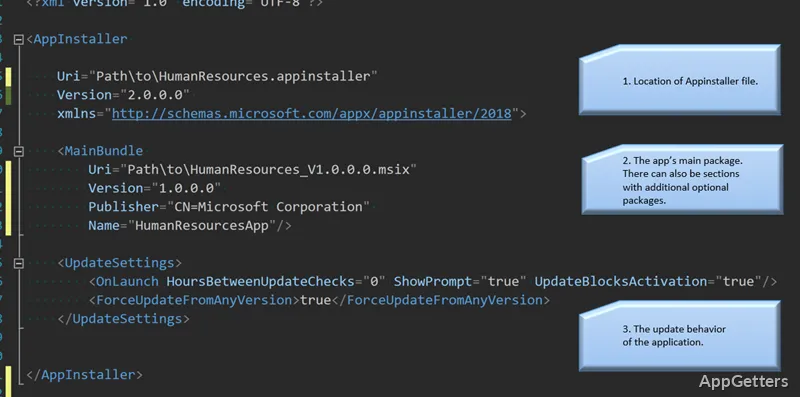
App Installer also ships winget, the command-line Windows Package Manager. Commands such as winget install, winget upgrade –all and winget search install and update thousands of regular desktop programs from a terminal. Packages published with an .appinstaller file can update themselves automatically.
Pros
- Installs both MSIX and APPX packages
- Shows the package name, developer, logo, and permissions
- Offers update or reinstall actions for installed apps
Cons
- Double-click install covers only MSIX and APPX packages
- Web links that install apps directly are disabled by default for security
System requirements: Windows 10, Windows 11
Is winget part of App Installer?
Yes. Installing or updating App Installer from the Microsoft Store provides the winget command.
Which package formats does App Installer handle?
MSIX and APPX packages and bundles, plus .appinstaller files that point to them.
Is App Installer already on my PC?
Usually yes. It comes with Windows 10 (version 1803 and later; winget needs 1809 or later) and Windows 11. Reinstall it from the Microsoft Store if winget is missing.