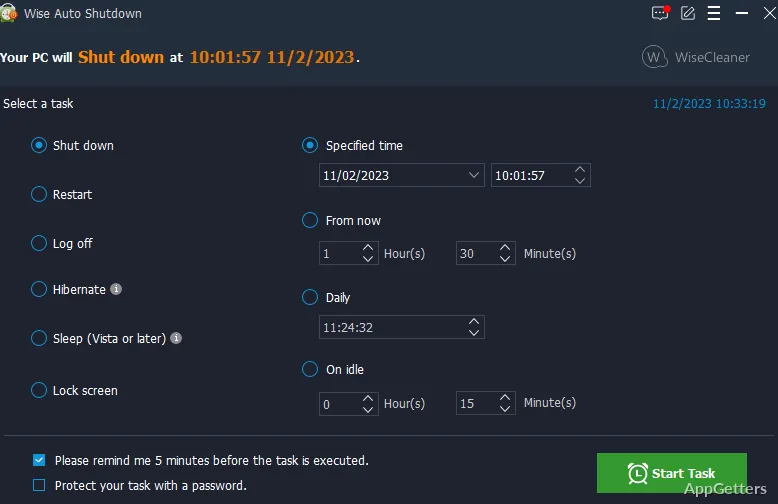
Leaving a big download running overnight and want the PC to turn itself off afterwards? The free Wise Auto Shutdown lets you arrange PC power tasks for a chosen time, date, or countdown, then keeps the scheduled task in the system tray.
Action and time panels
Choose a task in the left panel, then set its timing in the right panel. Available actions include shutting down, restarting, logging off, sleeping, hibernating, locking the screen, and powering off. The two-part layout keeps the selected action and its schedule together in the main window.
Set the task for a certain clock time, for a particular day, or for when a countdown runs out. Wise Auto Shutdown also supports daily schedules and tasks set to repeat. These options suit routines such as shutting down a PC after an overnight download or putting it to sleep at the end of the day.
Reminders and task delays
Enable a reminder to receive a notification five minutes before a scheduled action. If the PC needs to stay on longer, a delay option can postpone the task by 10 minutes or as long as four hours.
System-tray controls
After a task is set, the program can minimize to the system tray and continue running in the background. Right-clicking its tray icon gives quick access to shutdown and restart commands, alongside the scheduled task workflow.
Pros
- Schedules shutdown, restart, logoff, sleep, hibernation, lock, or power off
- Supports daily, date-specific, and countdown scheduling
- Offers a five-minute reminder and one-click delays
- Tray menu provides quick shutdown and restart commands
System requirements: Windows 7, Windows 8, Windows 8.1, Windows 10, Windows 11 · 32-bit and 64-bit
Which power actions can Wise Auto Shutdown schedule?
Shutdown, restart, sign-out, sleep, hibernation, screen lock and power off.
Can a task run every day or after a countdown?
Yes. Scheduling options include daily tasks, a chosen date or time, and a countdown.
What happens if I need to postpone a scheduled action?
Use the delay button in the reminder: anything from ten minutes to four hours.