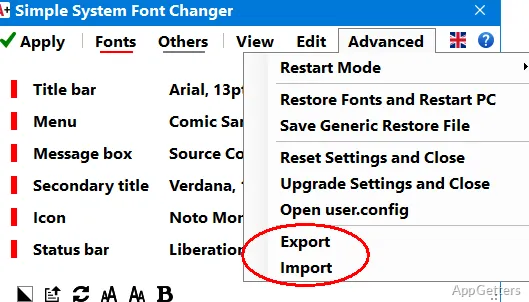
Simple System Font Changer adjusts the fonts used by Windows so on-screen text is easier to read without changing display scaling. It also saves a registry settings file that can be kept as a recovery copy.
What does Simple System Font Changer adjust?
The program changes the system fonts Windows uses to display text. Its focus is readability: font settings can be adjusted while leaving display scaling unchanged. This makes it relevant when text size is the concern but scaling the whole display is not the desired change.
After changing the settings, restart the computer for them to take effect. The new appearance does not apply immediately.
How can the original font settings be recovered?
On its first launch, Simple System Font Changer creates a file named WindowMetrics.reg in the startup folder. Copy that file somewhere safe, since it restores the original font display if needed.
- Keep the registry file outside the startup folder as a separate backup.
- Export current settings when you want to transfer them to another computer.
What happens when settings are moved to another computer?
The program can export settings for import on another computer. The export contains font names only, so the fonts named in the file need to be installed on the destination computer for the import to complete.
Pros
- Adjusts Windows system font settings without changing display scaling
- Creates a WindowMetrics.reg settings file on first launch
- Exports current settings for import on another computer
Cons
- A computer restart is required to apply font changes
- Imported settings require the corresponding fonts to be installed
System requirements: Windows 10, Windows 11
Does changing the font size change display scaling?
No. The program adjusts system font settings without changing display scaling.
When do font changes take effect?
Restart the computer to apply the settings.
Can settings be transferred to another computer?
Yes. Export and import the settings; the fonts named in the export must be installed on the destination computer.