EXE
Home » Software » Windows » Presentations » Microsoft Whiteboard for Windows
Microsoft Whiteboard for Windows

Microsoft Whiteboard for Windows

  • By Microsoft
  • Free
  • Version: 56.20201.588.0
  • 783.4 MB
  • Security Report:

There are lots of people who seek an easy method to put their ideas together, draw up plans, or even coordinate with each other. They can do so without the aid of such things as whiteboard paints. Be it the initial ideation phase of a school project, setting up a workflow, or exchanging ideas among the members of a remote work group, digital teamwork tools have definitely come to stay. They are now a common part of everyday collaboration. Microsoft Whiteboard is one such solution. It is a shared visual workspace that crosses over different Windows devices. Besides, it is very well incorporated into the wider Microsoft ecosystem.

A Virtual Canvas for Everyday Collaboration

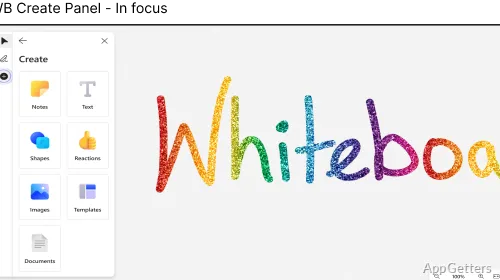
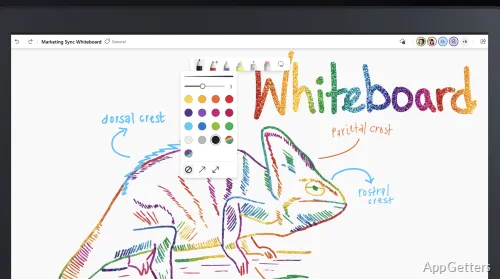
Microsoft Whiteboard responds to the fundamental notion of an infinite virtual canvas. On it, users unlock their creativity by visually representing their ideas. In fact, it does not resemble a word processor. But it is a very, very flexible workspace that may accommodate notes, sketches, diagrams, and may even demand planning sessions.

The software came to support touch, pen, mouse, and keyboard input. Quite a few Windows devices are therefore covered in this manner. Handwriting and drawing are the most natural forms of expression on a touchscreen, in particular. For those who type, sticky notes and text boxes make it easy to keep the content organized without being under the illusion of a designer. This is the beauty of the program as far as it is concerned.

How It Fits Within Daily Workflows

Microsoft Whiteboard is ideal for helping you organize your study or work concepts. A teacher can bring to life the ideas that s/he wants to show. The student, that is, the one who learns, can explore the ideas of the teacher. At the same time, remote teams can use it to gather opinions, come up with new ideas, and visualize their project plan during a meeting.

Being integrated into the Microsoft environment means that its power is noticeably improved. People who are used to doing their work via Microsoft Teams can cooperate so easily in the Whiteboarding area right after a meeting. Participants can put in their ideas at almost the same time. This is because the changes are saved and synchronized very quickly. These are only some of the collaboration benefits that this excellent piece of software offers!

Strengths and Aspects Where It Feels Limited

The first thing that a user notices about Microsoft Whiteboard is its universality for all types of users. Its easy-to-use interface does not scare even those who have minimal knowledge about visual collaboration software. Also, the canvas is highly responsive, and the application is stable, especially on the Windows OS.

On the other hand, it is, to some extent, comparable to a Swiss knife, which offers you lots of tools. Each of them is designed for a particular purpose only. It is very unlikely that people who require the preparation of detailed flowcharts will be content with the features provided. The same applies to those who need very advanced controls, such as in designing or complex management of projects. Besides, the management of the content in large boards may pose a major headache without thorough planning. Again, they will not consider these weaknesses as flaws. This is because they view Whiteboard as more of a tool for working out ideas and collaborating rather than for formal records, as well as designing.

Where Microsoft Whiteboard Makes the Most Sense

To put it in a nutshell, the strongest point of the Microsoft Whiteboard package is its shared space. Users come together to think and share ideas rather than being freighted with heavy applications. Most of the visual joint approach users will be students, teachers, home users, and small teams who will find the most advantages in the product. The software easily caters to brainstorming, discussions, and project planning, and can be described as an informal project organization.

The proliferation of the Microsoft ecosystem among Windows users has made this application a very good candidate for fitting into their predefined workflows. Normally, a new member joining a group finds Microsoft Whiteboard very easy to learn. Although users may still have their preferred diagramming or project-management tools, here lies Whiteboard with its own role as the trustworthy virtual canvas. On it, they can put and nurture their ideas. In a nutshell, advanced features are not what it is all about, but facilitating teamwork, taking notes, and visual thinking are also a very big part of its mission.

Software Details of Microsoft Whiteboard 56.20201.588.0

License
Free
Version
56.20201.588.0
File Size
783.4 MB
Downloads
0
Language
English
Category
Op. System
Windows
Developer
Last Updated
February 10, 2026

Version History

3 versions
56.20201.588.0
Latest
783.4 MB
February 10, 2026
55.20811.580.0
783.41 MB
August 19, 2025
55.20610.576.0
628.71 MB
June 17, 2025

Leave a Comment

Your email address will not be published. Required fields are marked *

Software Icon
Security Report

Loading scan data...

Scroll to Top