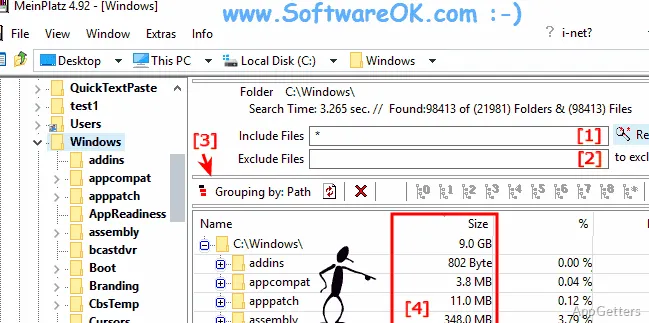
Disk nearly full and Explorer won't tell you which folder is to blame? The free MeinPlatz scans a selected drive or folder, including its subdirectories, then shows folder sizes, file counts and each folder's share of the disk in one tree list.
What appears in the scan results?
Choose a drive or folder to scan; MeinPlatz includes its subdirectories in the results. The tree-list layout presents folder and file information alongside the hierarchy, letting you move from the overall drive view into individual directories.
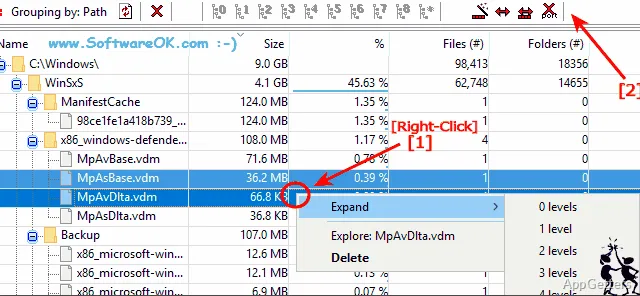
Use the size, item-count, and percentage figures to locate large folders and see how much space they account for on the scanned disk. Sorting the results brings prominent space consumers into view without opening each folder separately.
How can you group the scan data?
Grouping changes how the scanned contents are organized, which is handy when a folder-by-folder view does not answer the question you have.
- Group by file extension to see the space associated with file types.
- Group by modification time to organize items according to when they were changed.
- Group by size or by folder to examine large items or directory totals.
Can you compare scans or share a report?
Open another drive or folder in a separate tab to keep more than one scan available in the same window. A popup menu also provides a way to scan the workplace and select a folder.
Export results to XLS for spreadsheet work, or choose CSV, TXT, or HTML for other reporting needs. For paper output, the print preview offers adjustable scaling and page margins; its layout follows the columns and widths shown in the tree-list view.
Pros
- Shows folder sizes, item counts, and percentages in scan results
- Groups files by type, date changed, size or folder
- Exports reports as XLS, CSV, TXT, or HTML
- Supports multi-tab scans and configurable print previews
System requirements: Windows 7, Windows 8.1, Windows 10, Windows 11 · 32-bit and 64-bit
Can MeinPlatz scan a single folder as well as a whole drive?
Yes. Select a folder or a drive, and the scan includes the selected location's subdirectories.
Which file formats can I export?
Scan results can be exported as XLS, CSV, TXT, or HTML.
What grouping options are available?
Results can be grouped by folder, by size, by file type or by the date files were last changed.