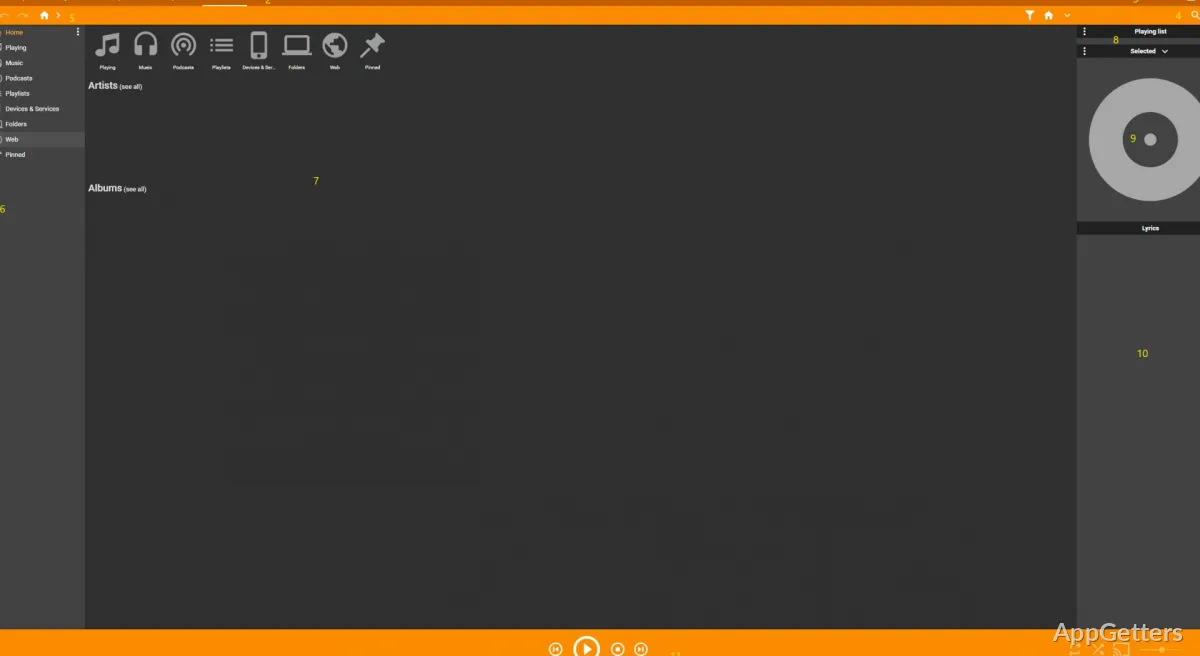
Handling a huge personal music collection on Windows can be a nightmare in no time. Music files can be lying around in different folders. The metadata tags may be a mess, and the process of syncing songs to other devices can be unreliable. Most standard media players focus mainly on the playback and offer very basic organizing tools for large music libraries. When the number of songs hits the thousands, these shortcomings are quite noticeable. MediaMonkey takes a whole different angle by concentrating on thorough library management. Rather than seeing music files as just media to be played and disposed of, it perceives them as a curated collection. To those who keep large local music libraries from ripped CDs, downloaded music, or archived recordings, MediaMonkey is a convenient tool for organizing, cleaning, and managing music files. It also helps retain the highest level of control over the music library itself.
Library Management Considerations for Very Large Collections
MediaMonkey is markedly different from many other players in its capability to process very large music libraries smoothly. Indeed, a lot of players become noticeably slow and laggy as the number of songs goes into thousands. MediaMonkey is cleverly engineered to work well with large-scale music collections. With the aid of efficient indexing and filtering tools, handling music libraries with tens of thousands of tracks becomes a possibility. It is still a manageable activity.
Besides, the program additionally permits users to classify their music according to the artist, album, genre, year, composer, or any other tag field that can be found. Also, it is possible to create various collections of audiobooks, podcasts, or classical music separate from normal music libraries.
Then again, the very real and concrete benefits of automatic folder organization should not be underestimated. They entail the automatic renaming and relocating of files based on metadata. This feature guarantees that the whole music folder will, over time, become both well-structured and predictable. This is a factor that is of utmost importance when one is sustaining collections for a long time.
Editing Metadata and Cleaning Up Your Library
It is almost guaranteed that you will have mismatched metadata if you got your music files from a variety of sources. The title of an album might be slightly different. The name of an artist might be written with a misspelling, and songs might be scattered among several albums. That is why MediaMonkey features a really good set of tools for editing metadata, particularly for this purpose.
Through batch tagging, the tag editor makes it much less of a headache to amend large groups of files. This avoids going through the pain of amending individual files one by one. Besides that, the tool is capable of pulling missing metadata and album covers from online databases.
So, on the one hand, this causes MediaMonkey to be viewed as a de-messifier alongside a media player. Meanwhile, users can carry out the standardization of filenames, metadata correction, or duplication detection. It is for sure that these features will come in handy for members of the community who have been collecting music at different stages. They are now doing the necessary work of putting their disorganized music library in order.
Routine Usage: Playback and Device Synchronization
Organization might constitute the number one reason for MediaMonkey standing out among the competitors. That is not to say that the software cannot work as a music player. On the whole, music playback seems to operate quite robustly. The player supports a majority of audio formats capable of producing sound, such as MP3, FLAC, AAC, WAV, etc. As regards the GUI, it still reminds one of the olden days. It raises a minimum of one point in the clarity department. It is always set to please.
Creating playlists is not only extremely easy. The player also offers the option of automatically updating playlists by defining parameters such as play count, rating, or date added. This way, users will be able to listen to something that they had forgotten about from their collection. They can do this without the necessity of manually organizing files.
Connecting to devices is also a very important operation. MediaMonkey is capable of carrying out two-way synchronization with Android devices and some older portable media players. It also converts files when necessary. For people who are averse to streaming music and prefer owning and listening to locally stored music, this will definitely be a feature of great value.
What Role Does MediaMonkey Play in a Contemporary Music Workflow?
The provision of local music files is the main condition for placing oneself within the target users of MediaMonkey. Students, collectors, DJs, and more experienced music fans can be expected to possess a large number of files. This means that these files will need to be well organized. Therefore, in these cases, MediaMonkey turns from a mere player into a music library management system.
The level of detail available in the MediaMonkey interface may seem to be more than what some lightweight players offer purely for quick playback. Also, the look of the interface is not the most modern one. On the other hand, the advantage of the organization facilities becomes very obvious when users are able to take back control over their music files.
Finally, MediaMonkey has also demonstrated time and again that it is one of the few programs that can, with great ease, manage really vast music archives running on Windows. Far from just outshining streaming services, it instead caters to those users who wish to organize, tidy up, and enjoy their personal music libraries in the long run. They can do this without them becoming impossible to manage.